Share
Sync lips naturally in 4K videos. Edit dialogue, clone voices, and translate content with professional results for filmmakers and creators.
What is sync?
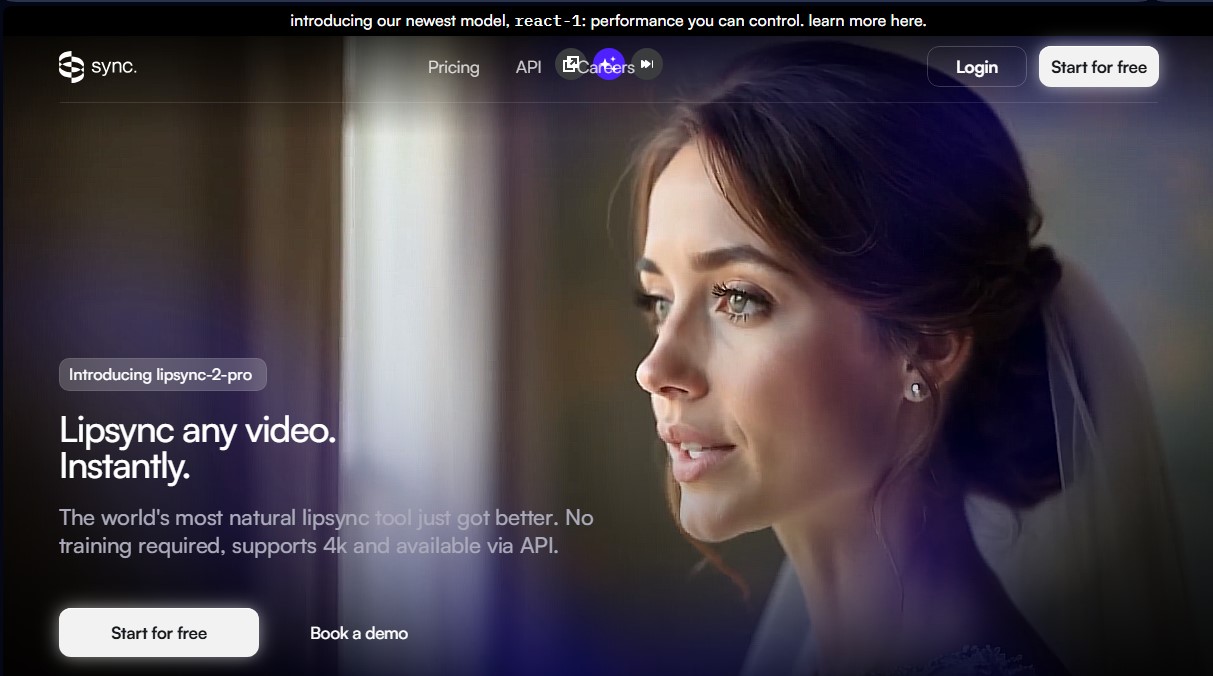
sync is an advanced AI lip-syncing tool designed to instantly reanimate the face of any video character. Its technology, centered on the lipsync-2-pro model, enables professional-grade visual dubbing without the need for prior model training. This application stands out for its ability to process files in 4K resolution, providing an effective solution for individual content creators, film production companies, and businesses looking to localize videos while maintaining the speaker's original expressiveness and emotion.
The functionality of sync is based on facial reanimation algorithms that precisely adjust mouth movements to the provided audio. Users can upload videos featuring live-action, animated, or AI-generated characters and modify the original speech in just a few clicks. The platform offers total flexibility for audio input: it allows for voice cloning from an existing file, generating voiceovers via text-to-speech, or recording the user's voice directly. Thanks to its scalable architecture and availability via API and SDK, these features can be integrated into automated workflows and third-party applications.
The primary capabilities of this AI lip-syncing tool include:
- Post-production dialogue editing: Modify what a speaker says after filming, eliminating the need for costly reshoots.
- Multilingual visual dubbing: Facilitate content translation into any language while ensuring perfect synchronization—ideal for global content localization.
- Active speaker detection: The system automatically identifies who is speaking in the frame to apply changes selectively and naturally.
- Format compatibility: Works on live-action video, animated characters, and synthetic avatars, maintaining visual consistency across all formats.
- High-definition processing: Native support for 4K exports, ensuring results suitable for film, television, and advertising.
From a functional standpoint, sync optimizes post-production timelines by allowing for seamless digital dialogue replacement. It is a key tool for creating personalized creative ads and for internationalizing corporate or educational videos. By eliminating visual discrepancies in dubbing, it enhances the viewer experience and reinforces the message's credibility. Furthermore, the voice cloning feature ensures the speaker's vocal identity remains intact, which is essential for audiovisual branding and consistency in long-term projects.
sync features and use cases
How to use sync
sync FAQ
Why does Sync charge a subscription fee in addition to usage fees?
The subscription unlocks platform features such as longer video durations and watermark removal, while usage fees cover the computing costs for each individual generation.
What is included in the Sync free trial?
Each free account receives three generations per month with a maximum duration of twenty seconds per video and ten text-to-speech generations, with no credit card required.
Why are there watermarks on my videos created with Sync?
Watermarks are only removed on Creator plans and above, so Hobbyist plan users and free account holders will see the logo on their content.
How is the platform's usage cost calculated?
The system takes the output video frames at twenty-five frames per second and multiplies that amount by the price per frame corresponding to the model used.
Does Sync allow voice cloning for dubbing projects?
You can upload an audio file or record your own voice to create a voice clone that naturally synchronizes with any character in the video.
What happens if I cancel my Sync subscription before the end of the month?
You will retain access to your tier's benefits until the end of the billing cycle, and any usage fees accumulated up to that point will be charged as usual.
What is the maximum video resolution supported by the tool?
The platform allows you to process and edit videos with a resolution of up to 4K to ensure professional image quality in all animations and dubs.
Can I use the Sync API on all available plans?
Access to the API and software development kits (SDKs) is available starting from the Hobbyist plan to facilitate integration into external workflows.
sync pricing and plans
Free Plan (Trial)
- 3 free generations per month on any model in the lipsync family.
- 10 text-to-speech generations.
- Maximum video length of 20 seconds per generation.
- Includes watermark on results.
- No credit card required.
Hobbyist Plan ($5/month)
- Video generation up to 1 minute in length.
- Process 1 job at a time.
- Up to 3 voice clones.
- API and SDK access.
- Access to Lipsync Studio and community support.
- Includes watermark.
- Note: The subscription only covers platform access; usage costs are billed separately based on generated frames.
Creator Plan ($19/month)
- Video generation up to 5 minutes in length.
- Up to 3 concurrent jobs.
- Up to 5 voice clones.
- Custom API key for text-to-speech (TTS) services.
- Active Speaker Detection feature.
- No watermark.
- Note: Usage costs are billed separately.
Growth Plan ($49/month)
- Video generation up to 10 minutes in length.
- Up to 6 concurrent jobs.
- Up to 15 voice clones.
- 5% discount on usage charges across all models.
- Team workspaces with 3 seats included.
- Additional seats available for $25/month each.
- Note: Usage costs are billed separately.
Scale Plan ($249/month)
- Video generation up to 30 minutes in length.
- Up to 15 concurrent jobs.
- Up to 50 voice clones.
- 20% discount on usage charges across all models.
- Team workspaces with 5 seats included.
- Dedicated support channel and early access to features.
- Batch API access for bulk processing.
- Note: Usage costs are billed separately.
sync Screenshots
sync alternatives
BurningBridgesAI.app
Turn a photo into Drake’s viral dance. AI automatically recreates the choreography and gestures so you can star in the trend without recording a thing.
DomoAI AI Drama Generator
Create AI vertical minidramas and short series. Use recurring characters and lip-synced dialogue to produce social media episodes in minutes.