Share
Generate ads, videos, and infographics using reusable AI workflows. Train models, leverage creative agents, and automate visual production at scale.
What is TheFluxTrain?
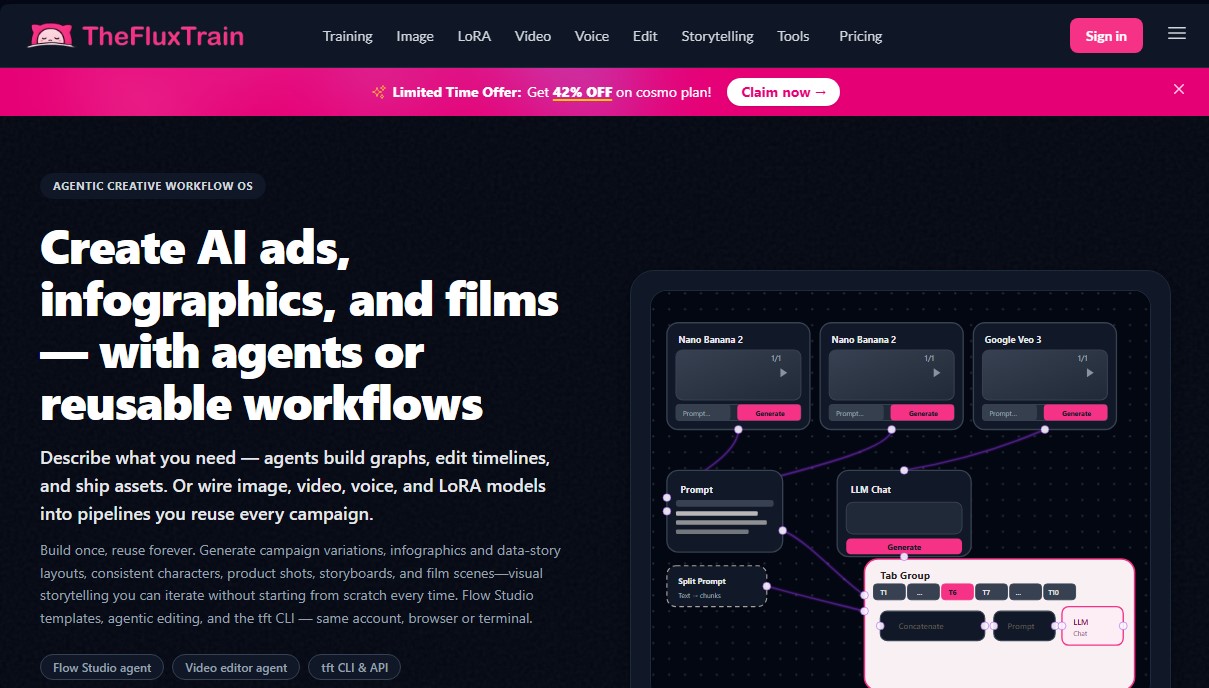
TheFluxTrain is an AI agent-based creative workflow operating system designed for professional visual and multimedia asset production. This platform enables the creation of AI ads, infographics, short films, and social media content through reusable workflows. Its core function is to centralize image, video, and voice generation within a scalable infrastructure, making it ideal for agencies, marketing teams, and creators who require visual consistency across their campaigns without rebuilding every process from scratch.
The tool operates through Flow Studio, a node-based editing environment that utilizes tab group node technology. This innovation allows users to organize identical sub-flows (such as different video scenes or ad variants) within a single interface, preventing visual clutter on the workspace canvas and facilitating focused editing. TheFluxTrain integrates advanced models such as Flux 1 and 2, Google Veo 3.1, Kling O3, and Nano Banana 2, allowing users to operate via their computer browser, a command-line interface (tft CLI), or an API.
Key capabilities and practical benefits include:
- LoRA Model Training: Facilitates the creation of custom models for faces, products, or specific styles with automatic captioning, ensuring that characters or products remain identical across all graphic assets.
- Video Generation and Editing: Includes text-to-video tools, motion transfer, talking avatars, and an AI video editor featuring a timeline and subtitle management for mobile formats.
- Template Automation: Offers preconfigured workflows for product poster generation, virtual influencer creation, and data infographic layout.
- Audio and Voice Suite: Features text-to-speech (TTS), dubbing, noise removal, and sound effect creation integrated directly into the workflow.
The unique value of TheFluxTrain lies in its iteration sinks, which automatically route each output as input for the next step in the process, optimizing the creation of mass variants. By allowing the use of shared prompts and locked reference nodes, the platform ensures that final results are consistent and ready for commercial use, eliminating the technical barriers of AI-driven creative automation.
TheFluxTrain features and use cases
How to use TheFluxTrain
TheFluxTrain FAQ
What exactly is TheFluxTrain, and what is it used for?
It is an agent-based creative operating system that lets you generate ads, infographics, and films using reusable workflows and AI tools.
Can I use TheFluxTrain for free?
No, platform access requires purchasing credits, either through a monthly or annual subscription or by buying one-time credit packs.
How many photos do I need to train a model on TheFluxTrain?
For best results when training a character or product model, uploading between three and nine high-quality images is usually enough.
What are the benefits of using the platform’s workflow templates?
Templates help you avoid the "blank canvas" problem by providing pre-connected structures to instantly generate posters, talking avatars, or social media clips.
Does TheFluxTrain support creating videos from images?
Yes, all plans include advanced features to transform text and images into video, along with tools for motion transfer and professional editing.
What is the "tab groups" feature in the node editor?
This tool allows you to organize complex workflows within a single node, making it easy to create multiple scene variations without cluttering your workspace.
How can I contact TheFluxTrain’s technical support?
If you need help or have questions about the service, you can email the support team directly at [email protected].
TheFluxTrain pricing and plans
Starter
Price: 11 $ per month (10 $/mo billed annually).
5,000 monthly credits (approx. 2-3 model trainings).
48-hour email support.
Access to Flow Studio and 20+ workflow templates (ads, infographics, cinema).
Image generation (Nano Banana, Flux 2 Pro, GPT Image 2, and more).
Custom training for faces, products, and influencers.
Video tools: text-to-video, image-to-video, talking avatars, and AI video editor.
Voice tools: TTS, dubbing, cloning, and sound effects.
CLI and API access.
Pro
Price: 19 $ per month (15 $/mo billed annually).
10,000 monthly credits (approx. 4-5 model trainings).
24-hour email support.
Includes all Starter plan features (Flow Studio, Story Studio, custom training).
Full access to image, video, and voice generation, and Action Studio.
Advanced
Price: 39 $ per month (31 $/mo billed annually).
25,000 monthly credits (approx. 10-11 model trainings).
24-hour priority support.
Includes all features from previous plans.
Access to all automation tools, folders, CLI, and API.
Cosmo
Price: 189 $ per month (100 $/mo billed annually).
125,000 monthly credits (50+ model trainings).
24-hour priority support.
Full access to all platform features, including advanced workflows and professional editing tools.
Credit Passes (One-time payment)
Price: From 15 $ to 200 $.
Starter Pass (15 $): 5,000 credits.
Pro Pass (20 $): 10,000 credits.
Advanced Pass (40 $): 23,000 credits.
Super Pass (125 $): 75,000 credits.
Cosmo Pass (200 $): 125,000 credits.
All passes are valid for 1 year and include access to all platform features and technical support.
TheFluxTrain Screenshots
TheFluxTrain alternatives

ColorCraft
Create Amazon KDP books. Generate coloring pages, stories, puzzles, and print-ready full covers, plus promotional mockups in a single workflow.


Tesla Wrap Generator
Tesla Wrap Generator uses AI to paint designs onto the official UV template of each Tesla model for Paint Shop, with a 3D preview before you download.