
Share
Create realistic images of models wearing your apparel from a product photo. Transform mannequin photos into professional studio sessions for your online store.
What is TinTin AI?
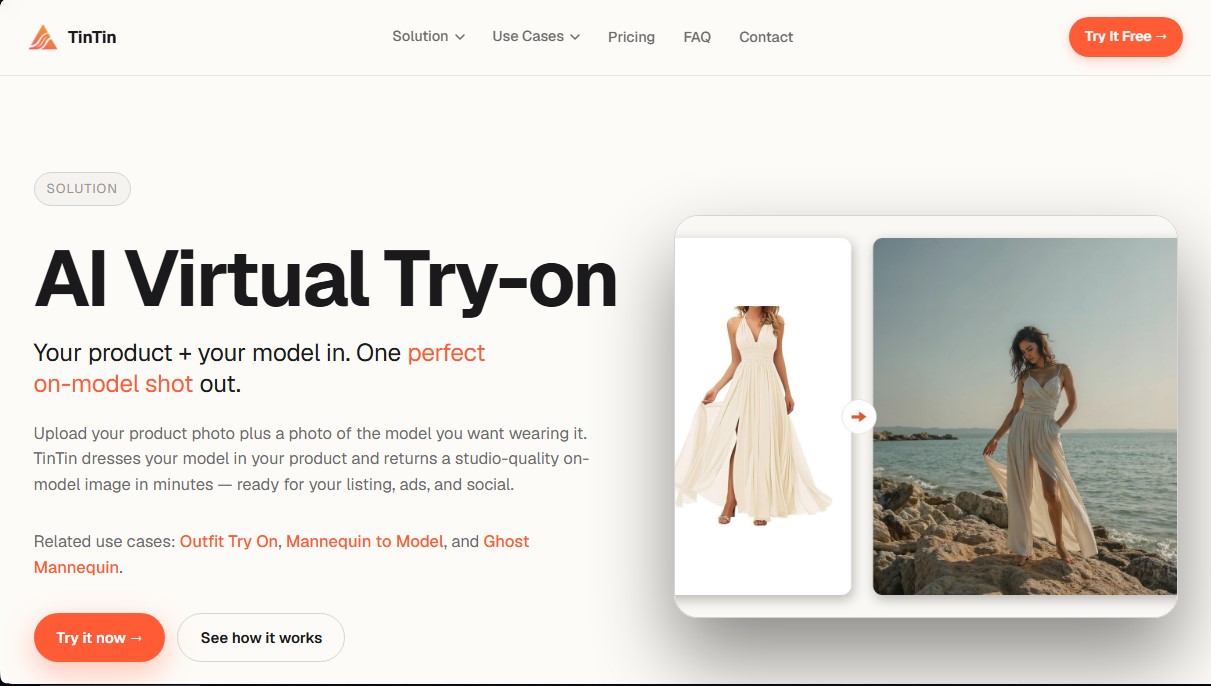
TinTin AI is an artificial intelligence platform specialized in the e-commerce sector that enables AI Virtual Try-ons. Its primary function is to transform static product photographs into professional images featuring real models in a matter of minutes. This tool is designed for fashion brands, marketing agencies, and sellers on marketplaces such as Amazon, Shopify, or Etsy looking to generate high-quality visual content without the costs associated with traditional photo shoots.
The TinTin AI workflow is structured into three steps. The user begins by uploading a product image, which can be a flat-lay photograph, an image with a mannequin (including the ghost mannequin effect), or even a simple shot taken with a smartphone. Next, the user selects or uploads a photo of the model who will wear the garment and defines parameters such as fit, product type, and aspect ratio. Finally, the system generates a high-resolution, photorealistic image ready for download.
The technology powering TinTin AI uses a garment-aware engine that intelligently identifies the characteristics of the piece. This approach ensures that prints remain aligned, seams follow their natural course, and the fabric drape—whether it is knit, silk, or elastic materials—is true to life. Unlike other generative tools, this software does not invent additional elements or modify the rest of the model's outfit, focusing exclusively on integrating the uploaded product with consistent lighting and shadows.
Key Capabilities and Functional Benefits:
- Mannequin to Model Transformation: Converts basic catalog photos into editorial-style images with human models.
- Specialization in Critical Categories: Includes optimized algorithms for swimwear, lingerie, and underwear, ensuring a precise and realistic fit against the skin.
- Nail Art Try-on: Enables the visualization of nail designs on models, expanding possibilities for the cosmetics sector.
- Visual Consistency: Facilitates the use of the same model across different products to maintain a uniform aesthetic throughout the online store.
- Video Generation: Capability to create video clips (Video Replicate) showing the movement of the garment, which is ideal for social media.
- Scalability: The system allows for item-by-item processing or using Bulk AI Try-on features to process entire catalogs en masse.
This AI solution for e-commerce eliminates the need to manage castings, photographers, or physical sample shipments. By providing high-resolution files suitable for commercial use, TinTin AI optimizes time-to-market, allowing a product to go from a simple inventory photo to a professional advertising image almost instantaneously.
TinTin AI features and use cases
How to use TinTin AI
TinTin AI FAQ
What kind of product photos do I need to use TinTin AI?
You can use any clear image of the garment, whether it's a flat lay, on a mannequin, or even a smartphone photo taken on a flat surface.
How long does it take TinTin AI to generate a publication-ready image?
The creation process is typically completed in under two minutes, delivering professional-quality results with realistic lighting and shadows.
Can I choose the model who will wear my products in TinTin AI?
Yes, you upload the photo of your preferred model, and the tool will place your garment on that person while maintaining their original pose and features.
Can I use the images generated with TinTin AI for commercial purposes?
Yes, images are downloaded in high resolution and without watermarks, so you can use them in your online store, social media, or advertising.
Will the tool modify the rest of the clothing the model is wearing?
No, the system only applies the garment you uploaded and keeps the rest of the model's outfit intact, without adding new elements or accessories.
Does TinTin AI work for specific items like swimwear or lingerie?
Yes, the platform features an engine optimized for intimate apparel and swimwear, ensuring a natural fit that remains true to the fabric's look on the body.
What happens to my credits if an image generation fails?
If the system detects a generation error, the credits are automatically returned to your balance without the need to contact technical support.
How does the garment adapt to different sizes or body shapes?
The technology recognizes the drape and flow of the fabric so that the garment fits photorealistically to the build of your chosen model.
Does TinTin AI offer options for processing large product catalogs?
Yes, in addition to individual generations, you can scale your production using the batch processing feature for your entire inventory.
TinTin AI pricing and plans
Free
$0 forever
- 5 credits (one-time).
- Access to all 4 platform apps.
- Full-resolution exports.
- Personal use only.
- Credits expire after 7 days.
Starter
$10/month (or $7.50/month with $90 annual billing)
- 20 credits per month (or 240 credits per year).
- Access to all 4 platform apps.
- Full-resolution exports.
- Commercial use license.
- Email support.
- Credits renew monthly.
- Credit usage: 1 credit per image (2 credits for 4K), 4 credits per garment video, and 20 credits per video replica.
Studio
$39/month (or $30/month with $360 annual billing)
- 90 credits per month (or 1,080 credits per year).
- Access to all 4 platform apps.
- Full-resolution exports.
- Commercial use license.
- Email support.
- Credits renew monthly.
- Credit usage: 1 credit per image (2 credits for 4K), 4 credits per garment video, and 20 credits per video replica.
Pro
$129/month (or $100/month with $1,200 annual billing)
- 320 credits per month (or 3,840 credits per year).
- Access to all 4 platform apps.
- Full-resolution exports.
- Commercial use license.
- Email support.
- Credits renew monthly.
- Credit usage: 1 credit per image (2 credits for 4K), 4 credits per garment video, and 20 credits per video replica.
TinTin AI Screenshots
TinTin AI user reviews
Write a review
Checking your session...
TinTin AI Reviews
Loading reviews...
TinTin AI alternatives



utilz Background Remover
Remove image backgrounds for free with total privacy in your browser. Create transparent or colored backgrounds without uploading files while maintaining original resolution.