

Share
AI tool to turn videos and live streams into short clips. Detects highlights, generates auto-captions, and allows manual editing for social media.
What is ViceForge?
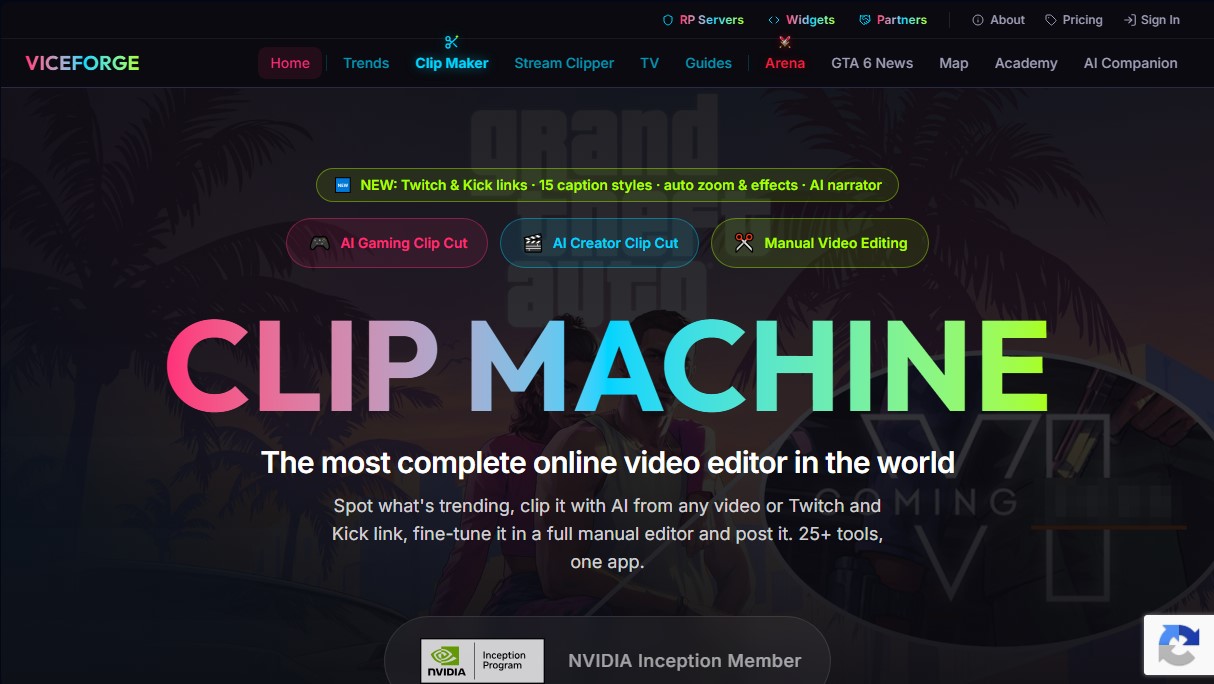
ViceForge is an advanced AI-powered video editing platform designed to automatically transform long-form content into short, viral clips. This tool specializes in the gaming sector as well as vlogs, podcasts, fitness, and educational content. Its primary goal is to simplify creators' workflows by identifying and extracting highlights for social media platforms like TikTok, Instagram Reels, and YouTube Shorts without requiring deep technical editing knowledge.
Part of the NVIDIA Inception program, ViceForge technology uses AI models to visually analyze gameplay, detect key sounds, and process facecam reactions. The system scans content to score specific events—such as clutch plays or explosions—assigning each clip a score from 0 to 100. Additionally, it utilizes natural language processing to transcribe and understand speech in any language, selecting the segments with the highest viewer retention potential.
Its core capabilities include:
- AI Gaming Clip Cut: Automatically locates epic moments using pre-configured profiles for over 100 different games.
- Trend Radar: Tracks trending topics in real-time to suggest content that is currently gaining market traction.
- AI Hook: Creates an impactful opening by showing the climax of the action first, optionally complemented by a "few moments later" storytelling card.
- Multi-channel Manual Editor: Allows for combining up to 20 segments on a single timeline, with tools to adjust trimming and duration with tenth-of-a-second precision.
- Auto Captions and Effects: Includes 15 animated caption styles, dynamic zoom that follows the creator's face, and visual effects based on AI-detected action.
The ViceForge ecosystem makes it easy to import content from local files or via direct links from Twitch, Kick, and YouTube. For live creators, the Stream Clipper feature allows for capturing snippets from YouTube Live while the broadcast is still active. The tool exports videos in vertical (9:16), horizontal (16:9), or standard (4:3) formats, offering resolutions up to 4K and preserving original audio to avoid copyright issues.
This solution is aimed at streamers, podcasters, and content managers looking to optimize their multi-channel production. ViceForge doesn't just cut video; it automatically generates optimized titles, descriptions, and hashtags, enabling direct publishing to video channels. Its practical approach eliminates the need to manually search through hours of footage, providing an efficient workspace on both desktop and mobile browsers.
ViceForge features and use cases
How to use ViceForge
ViceForge FAQ
What is ViceForge and who is its target audience?
ViceForge is an AI-powered editing platform that helps streamers and creators transform long-form videos into short clips optimized for social media.
Can I use ViceForge to edit non-gaming content?
Yes, the tool features specific functions for processing podcasts, vlogs, cooking tutorials, and any dialogue-based video or long-form presentation.
Does ViceForge allow for manual editing of the generated clips?
The app includes a manual editor that lets you combine up to twenty different segments on a timeline, add animated captions, and precisely adjust timing.
Is it possible to create clips in ViceForge using Twitch or Kick links?
Users on Creator Pro plans and above can import content directly by pasting Twitch or Kick video URLs without the need to download files.
What advantages does ViceForge’s Trend Radar offer content creators?
This feature tracks trending topics in the gaming world and allows you to generate clips on those specific subjects with a single click to improve your reach.
What video resolution do files exported with ViceForge support?
The platform offers high-definition quality across all plans and allows for 4K resolution exports for Creator Elite level subscribers.
Is there a free version of ViceForge to try out the tool?
ViceForge offers a free plan that allows you to process thirty minutes of video per month with a watermark so users can test the platform's basic features.
How does the automatic caption system in ViceForge work?
The tool generates captions synchronized word-for-word with fifteen different animated styles and allows you to add AI voices to narrate the on-screen text.
ViceForge pricing and plans
Free Plan
Price: Free.
- 30 minutes of video per month (1080p quality with watermark).
- File uploads up to 500 MB.
- Maximum video length of 30 minutes.
- Clips up to 15 seconds.
- 2 caption styles available.
- Manual editor limited to 2 segments (60-second max).
- 5 daily messages to the AI Companion assistant.
Gamer Pro Plan
Price: 7,99 € per month (or 79,90 € per year).
- 60 minutes of video per month (1080p quality, no watermark).
- File uploads up to 500 MB.
- Maximum video length of 1 hour.
- Clips up to 60 seconds.
- 15 animated caption styles.
- Manual editor for up to 5 segments (3-minute max).
- AI text suggestions for overlays and 100 AI Companion messages.
Creator Pro Plan
Price: 14,99 € per month (or 149,90 € per year).
- 300 minutes of video per month (1080p quality, no watermark).
- File uploads up to 2 GB.
- Maximum video length of 1 hour.
- Clips up to 90 seconds.
- AI speech recognition in any language and AI voiceovers (6 voices).
- Manual editor for up to 10 segments and the ability to re-edit finished clips.
- Direct publishing to YouTube (5-video monthly limit).
- Access to Twitch and Kick VOD links, trend history, and alerts.
Creator Elite Plan
Price: 29,99 € per month (or 299,90 € per year).
- 600 minutes of video per month (4K quality, no watermark).
- File uploads up to 5 GB.
- Maximum video length of 2 hours.
- Clips up to 2 minutes and 5 clips generated per video (instead of the usual 3).
- AI Hook feature (starts at the clip's peak moment) and hook editor.
- Stream Clipper tool for YouTube Live and YouTube URL imports (up to 1.5 GB per month).
- Manual editor for up to 20 segments and ZIP downloads for all clips.
- Unlimited YouTube publishing.
Lifetime Plan
Price: 770 $ (one-time payment).
- Lifetime access to all Creator Elite features.
- 600 minutes of 4K video processing per month.
- AI speech recognition limited to 150 minutes per month.
- Includes all advanced features: AI Hook, Stream Clipper, YouTube publishing, and ZIP downloads.
ViceForge Screenshots
ViceForge user reviews
Write a review
Checking your session...
ViceForge Reviews
Loading reviews...
ViceForge alternatives



CueTheScene
Create full YouTube videos in minutes. Automatically generate scripts, voiceovers, stock footage, subtitles, and thumbnails. Perfect for documentaries and faceless channels.


Rate My Clip
Analyze and score your YouTube Shorts with AI. Evaluate hooks, pacing, and visual quality to quickly optimize video performance.

Talking Avatar AI
Optimize videos with voice cloning, lip-sync, and multilingual translation. Easily adapt scripts, rewrite content, and create realistic avatars.