VidFlux Image to Video AI
Share
VidFlux Image to Video AI
Transform images into professional videos with the best AI models on a single platform. Easily create realistic animations and cinematic content.
General Information about VidFlux Image to Video AI
VidFlux Image to Video AI is a centralized platform designed for AI image-to-video generation using state-of-the-art artificial intelligence. Its primary function is to unify the industry's most advanced models into a single interface, eliminating the need to switch between different external tools. This AI video generator allows content creators, designers, and marketing professionals to efficiently and professionally transform static files into dynamic, cinematic-quality clips.
The architecture of VidFlux.ai stands out for integrating more than six sector-leading AI models. Available options include Google Veo 3.1, Kling 3, Sora 2, Wan 2.6, Seedance 1.5 Pro, Grok Imagine, and Runway. This technological variety allows users to choose the engine that best fits their specific needs, whether they are looking for extreme realism, fluid motion, or a specific artistic aesthetic. The tool utilizes deep learning algorithms to interpret the visual content of the original image and apply coherent motion based on text prompts.
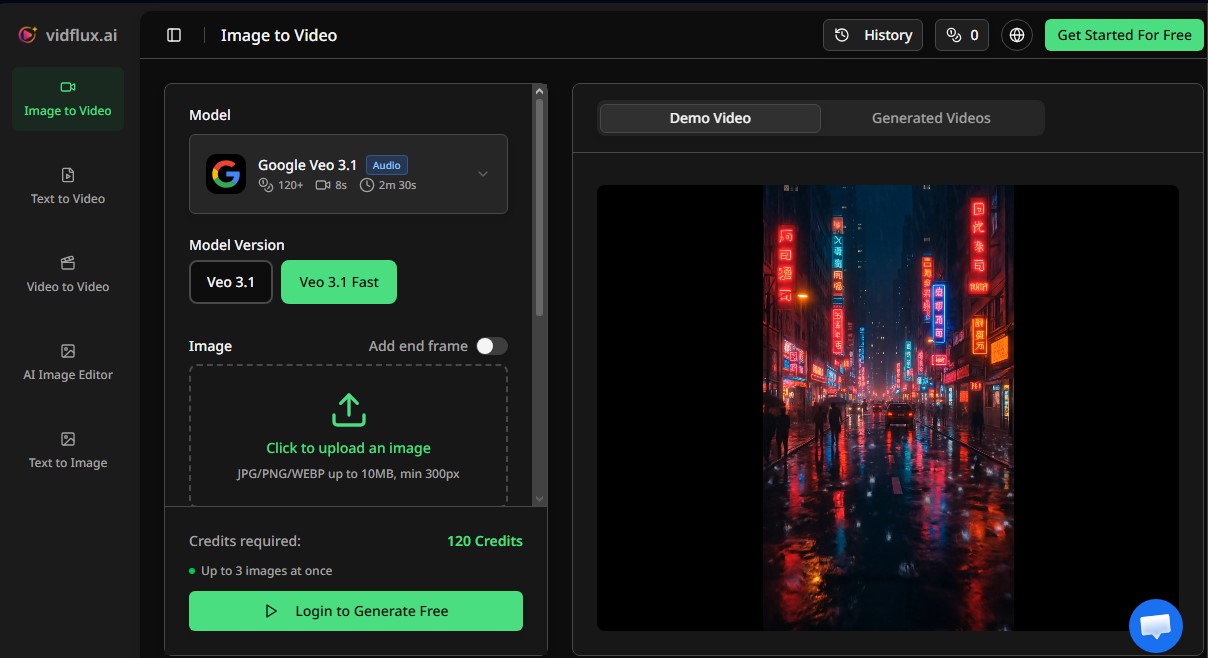
The creation process on VidFlux Image to Video AI is straightforward and requires no prior technical knowledge or invitation codes. The workflow is structured into three functional steps:
- File Upload: The user uploads an image in JPG, PNG, or WEBP format with a minimum resolution of 300px.
- Prompt Configuration: A text description is added, detailing the desired type of movement, character actions, or camera pans.
- Selection and Rendering: The user selects the AI model, aspect ratio (16:9 or 9:16), and duration before starting the process, which typically completes in about 60 seconds thanks to its dedicated GPU infrastructure.
The tool's capabilities cover various styles and practical applications:
- Portrait Animation: Generates natural facial gestures and subtle movements in photographs of people.
- Cinematic Motion: Incorporates zoom, pan, and depth-of-field effects to give still photos a professional film production look.
- Digital Art Animation: Allows for the animation of illustrations and paintings while maintaining the original visual style and details.
- Social Media Content: Optimized for creating vertical videos for TikTok or Instagram Reels and horizontal videos for YouTube or desktop presentations.
The value of VidFlux lies in its versatility to convert any photograph, product shot, or themed design into a compelling visual story. By offering commercial use rights and watermark-free results, it positions itself as a robust solution for producing ads, promotional content, and creative projects. Final files are exported in MP4 format, ensuring compatibility with any mobile device or digital platform, providing total control over AI image animation.
Features and Use Cases of VidFlux Image to Video AI
How VidFlux Image to Video AI Works
Frequently Asked Questions about VidFlux Image to Video AI
What is VidFlux Image to Video AI and what can I do with it?
It is an all-in-one platform that lets you transform any static image into a professional-grade video using the most advanced AI models on the market.
Which AI models are available on VidFlux?
The platform provides unified access to over six industry-leading models, including Veo 3, Sora 2, Kling AI, Runway, Seedance, and Wan AI.
How do I turn an image into a video on VidFlux?
Just upload your image in JPG or PNG format, type a description of the movement you want, select the AI model, and click generate.
Do purchased credits expire?
No, purchased credits never expire. They stay in your account until you decide to use them, with no monthly resets or hidden time limits.
Can I use VidFlux videos for my business or advertising?
Yes, all videos created under paid plans include full commercial use rights, so you can use them on social media, in ads, or for client work.
Will there be watermarks on my VidFlux creations?
No, all videos generated through the platform are watermark-free, so you can use them immediately for any professional project.
What video formats and sizes does the tool support?
Videos are exported in MP4 format. You can choose between a 16:9 aspect ratio for widescreen displays or 9:16 for vertical mobile content.
How long does it take VidFlux to generate a video from an image?
The generation process typically takes about 60 seconds, though the exact time depends on the complexity of the content and the current server load.
Do I need technical skills to use VidFlux?
No, the platform is designed with an intuitive interface that allows anyone to create cinematic videos without any prior technical knowledge.
What kind of images can I animate with VidFlux technology?
You can animate everything from portraits and landscapes to illustrations, digital artwork, or product photos, all while maintaining the original style and details.
VidFlux Image to Video AI Pricing
Free Version
Registered users receive free credits to generate videos and explore platform features upon signing up.
Basic Plan - $9/month ($7.50/month billed annually)
1,000 credits per month (allows for approximately 20 videos at 50 credits per video).
Access to all available video models.
No watermarks.
Commercial usage rights.
Pro Plan - $29/month ($24.17/month billed annually)
5,000 credits per month (allows for approximately 100 videos at 50 credits per video).
Access to all available video models.
No watermarks.
Commercial usage rights.
Priority support.
Studio Plan - $59/month ($49.17/month billed annually)
11,000 credits per month (allows for approximately 220 videos at 50 credits per video).
Access to all available video models.
No watermarks.
Commercial usage rights.
Dedicated support.
Priority processing queue.
Pay As You Go - Starting at $4.98 (one-time payment)
Purchase credit packs that never expire: 500 credits ($4.98), 2,200 credits ($18.80), 6,660 credits ($49.80), 13,300 credits ($79.80), 36,200 credits ($199), or 139,800 credits ($699).
Unused credits roll over and do not expire.
No recurring monthly fees.
VidFlux Image to Video AI Screenshots