

Share
Transform images into videos with realistic motion and cinematic style. Select from multiple AI models to professionally animate photos and designs.
What is Vidlux AI Image to video?
Vidlux AI Image to Video is an advanced platform designed to transform static images into video clips with natural, cinematic motion. This tool acts as a unified workspace that integrates multiple cutting-edge AI models, allowing users to choose the technology that best fits their creative needs. It is an ideal solution for marketing professionals, content creators, and designers looking to animate photos or illustrations without requiring technical knowledge of complex video editing.
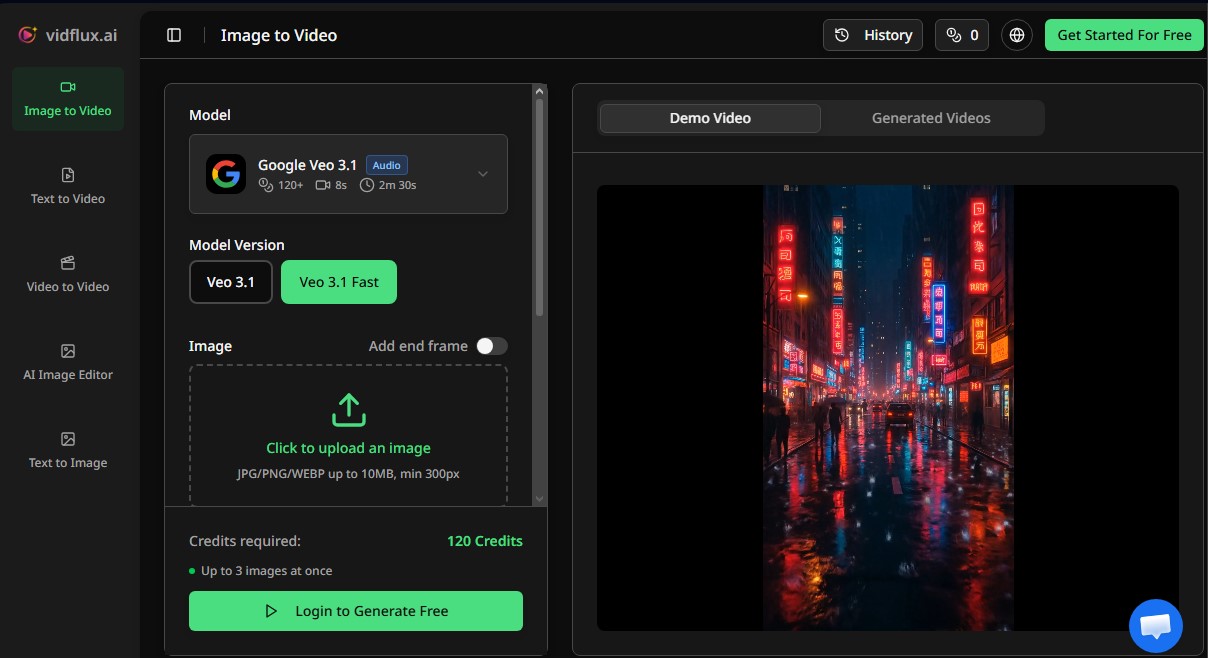
The operation of Vidlux AI Image to Video is based on processing an initial image through text instructions or prompts. The user uploads a file—whether it is a photograph, a product design, or a piece of concept art—and describes the desired movement, such as camera pans, character gestures, or lighting changes. The system uses AI video generation algorithms to interpret these commands and generate a fluid sequence that maintains the visual consistency of the original subject, preserving facial features and textures.
One of the greatest advantages of this application is access to a wide variety of rendering engines in a single location. Featured models include:
- Veo 3.1: Specialized in cinematic shots with a high level of detail and polished visual quality.
- Kling 3.0: Optimized for complex character animation and scenes requiring expressive movements and high stability.
- Seedance 2.0: Focused on offering consistent visual direction and movements with a natural, fluid rhythm.
- Wan 2.6: Versatile for generating dynamic results in both photorealistic styles and stylized creative directions.
The platform includes professional control features such as start and end frame control, which allows users to precisely define the starting point and conclusion of a scene, facilitating coherent visual transformations. Additionally, users can configure essential technical aspects from their computer, such as 4K resolution, aspect ratios adapted for different devices, and clip duration.
In practical terms, Vidlux AI Image to Video is extremely useful for the e-commerce sector, enabling the creation of dynamic ads for social media from still product photos. It is also a key tool for storyboarding and pre-visualization of audiovisual projects, allowing creatives to explore camera movements and transitions before starting actual production. Its ability to interpret motion prompts ensures that the generated content is unique and functional for any digital workflow.
Vidlux AI Image to video features and use cases
How to use Vidlux AI Image to video
Vidlux AI Image to video FAQ
What is Vidlux AI Image to Video and how does it work?
It is an advanced tool that transforms static images into videos with natural motion and cinematic camera effects using various AI model
How can I start creating a video in Vidlux AI?
Simply upload your image, describe how you want the scene to move in the text box, and select the AI model that best fits your needs.
Which AI models can I use on the platform?
Vidlux AI lets you choose from several powerful engines like Veo 3.1, Kling 3.0, Seedance 2.0, and Wan 2.6, each specialized in different motion styles and visual qualities.
Is it possible to control the start and end of the animation?
Yes, you can upload a starting frame and an ending frame to define exactly how your video begins and ends, ensuring a smooth and controlled transition between both images.
What resolutions can I use to generate my content with Vidlux AI?
The tool offers flexible configuration options that allow you to export your creations in 720p, 1080p, and even 4K quality.
Will my videos have a watermark when I download them?
Videos generated with the free plan include a watermark, but if you subscribe to any of the paid plans, you can export your projects completely watermark-free.
How many credits does each video generation use?
The cost depends on the selected model and the duration or resolution settings, but the system will show you the exact number of credits required before starting the process.
Can I use the videos created in Vidlux AI for commercial purposes?
Users with paid plans have commercial use rights for their creations, provided they comply with the terms of service and own the rights to the original images.
Are my personal images used to train the AI?
No, the images you upload to the platform are used exclusively to process your video request and are not used to train language or image models.
What does the technical support for paid plans include?
When you subscribe to a Vidlux AI plan, you gain access to standard email support to resolve any questions or technical issues related to the tool.
Vidlux AI Image to video pricing and plans
Free Plan
Includes a limited number of credits to test the tool.
Generations include watermarks.
Standard Plan: 29 $ per month (or 23 $ per month with 276 $ annual billing).
800 monthly credits.
Limit of up to 80 videos or 400 images per month.
Access to all image and video models.
4 concurrent tasks.
Fast generation speed.
Watermark-free results.
Privacy control and copy protection.
Standard support.
Pro Plan: 49 $ per month (or 34 $ per month with 408 $ annual billing).
2,200 monthly credits.
Limit of up to 220 videos or 1,100 images per month.
Access to all image and video models.
6 concurrent tasks.
Fast generation speed.
Watermark-free results.
Privacy control and copy protection.
Standard support.
Ultra Plan: 129 $ per month (or 77 $ per month with 924 $ annual billing).
6,000 monthly credits.
Limit of up to 600 videos or 3,000 images per month.
Access to all image and video models.
8 concurrent tasks.
Fast generation speed.
Watermark-free results.
Privacy control and copy protection.
Standard support.
Vidlux AI Image to video Screenshots
Vidlux AI Image to video alternatives


Osmo Studio
AI animation studio for professional motion graphics and videos. Control every detail, collaborate with teams, and export with transparent backgrounds.

Victoria Secret Runway
Create fashion show videos by integrating your face into real scenes. Just upload a photo to replace professional models and walk the runway.


BurningBridgesAI.app
Turn a photo into Drake’s viral dance. AI automatically recreates the choreography and gestures so you can star in the trend without recording a thing.

VideoWeb Video Generator
Generate professional AI videos from text or images. Features realistic avatars, automated scripts, and optimized formats for marketing and social media.