Vismuse Flyer Maker
Share
Generate professional posters and flyers in under a minute using text or references. Quickly design promotional materials for events and services.
What is Vismuse Flyer Maker?
Vismuse Flyer Maker is an advanced generative AI solution designed for the rapid creation of advertising and promotional materials. This tool functions as a flyer generator capable of producing complete designs in just one minute based on user instructions. Its goal is to democratize graphic design, allowing anyone—regardless of their technical skills—to generate striking visual pieces for their business or personal events right from their computer.
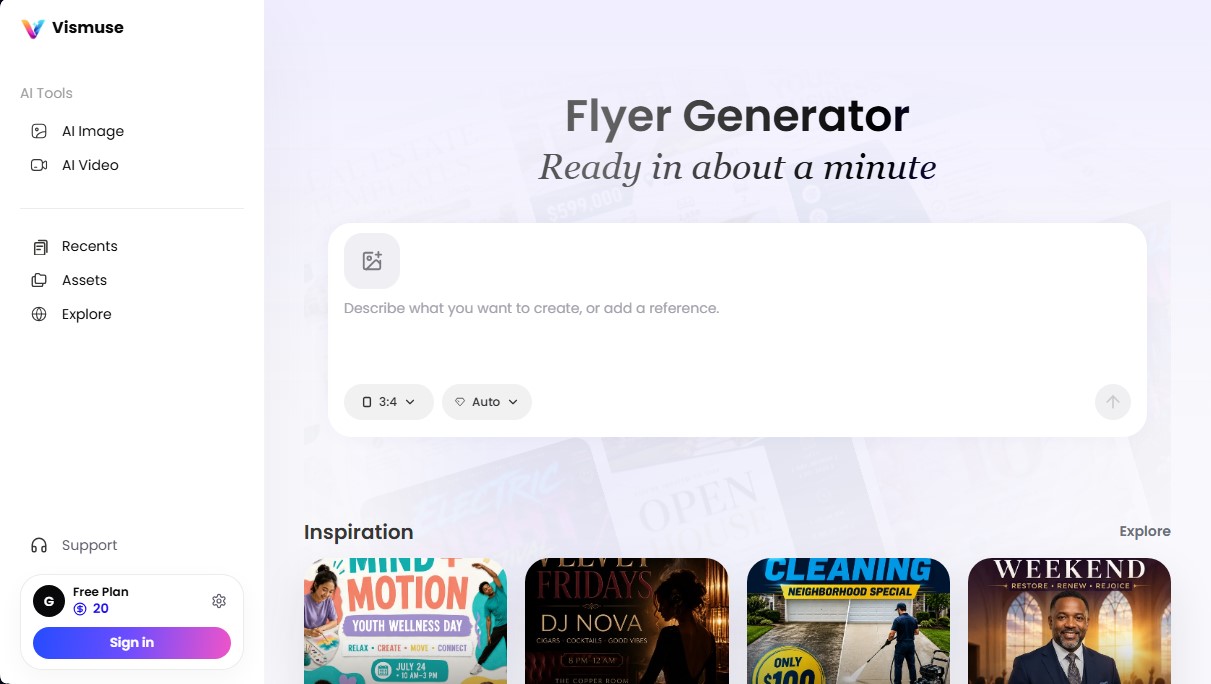
The operation of Vismuse Flyer Maker is based on natural language processing and visual reference analysis. Users can start the creation process in two ways: by providing a detailed description of what they want through a text prompt or, if preferred, by attaching a reference image so the AI can capture the desired style, color palette, and composition. By default, the system works with a 3:4 aspect ratio, a standard and versatile format for both physical printing and distribution across digital channels.
This AI design tool stands out for its versatility, covering a wide range of communication needs and sectors. Its primary capabilities and use cases include:
- Social event promotion: Creating posters for DJ sets, gala dinners, luxury parties, or birthday celebrations.
- Local service marketing: Designing flyers for professional cleaning services, food product sales, or local business promotions.
- Materials for organizations and communities: Generating flyers for school fundraisers, religious events, or family reunions and barbecues.
- Sports and health communication: Developing posters for soccer training sessions, wellness days, or fitness events.
The technology behind Vismuse Flyer Maker isn't limited to the initial generation; it facilitates a workflow geared toward visual refinement. Users can compare different generated proposals, adjust ideas, and evolve the creative concept until they achieve the desired aesthetic. For those requiring professional results, the platform allows for exporting in 2K and 4K resolutions, ensuring optimal sharpness for use on large-format physical media. Additionally, the system supports commercial use of the generated pieces, providing final images ready for distribution without watermarks.
In conclusion, Vismuse Flyer Maker positions itself as an essential tool for content creators, entrepreneurs, and marketing teams looking to optimize their production times. By automating graphic composition, it eliminates technical barriers and allows for the efficient and professional creation of high-definition visual material.
Vismuse Flyer Maker features and use cases
How to use Vismuse Flyer Maker
Vismuse Flyer Maker FAQ
What is Vismuse Flyer Maker and how does it work?
It’s a flyer generator that lets you create professional designs in about a minute using either a text description or a visual reference.
Can I use Vismuse Flyer Maker for free?
Yes, the tool offers a free plan that includes 50 credits, allowing you to generate your first images and test the workflow.
What resolution do the designs offer in the paid plans?
Subscribers on the Pro and Max plans can export their creations in high-resolution 2K and 4K without watermarks.
Is commercial use allowed for the generated flyers?
Commercial use is exclusively included in the Pro and Max subscription plans for all visual content you create.
How many images can I create with the Pro plan each month?
The Pro plan provides 2,000 credits per month, which is roughly equivalent to 200 high-definition images or 10 videos.
What happens if the system fails to generate my design?
If an image generation fails, the credits used are automatically refunded to your user account.
What aspect ratio do the flyers created with this tool use?
By default, the app uses a 3:4 aspect ratio, which is the optimal standard format for this type of promotional material.
Do I need design experience to use Vismuse Flyer Maker?
No experience is necessary. You just need to describe what you want to create or choose from the available inspiration templates to get a professional result.
Vismuse Flyer Maker pricing and plans
Free
0 $ forever. Ideal plan for testing the tool and making your first creations.
- 50 credits included.
- Image creation from prompts or references.
- Access to the Vismuse workflow preview.
- 1-month data storage.
- Sync chats, assets, and credits after registration.
Pro
19,99 $ a month (or 9,99 $/mo if billed annually at 119,88 $). Designed for growing creators who produce monthly content.
- 2,000 credits per month (equivalent to about 200 HD images or 10 videos).
- File exports in 2K and 4K resolution.
- Includes commercial use license.
- Automatic credit refunds for failed generations.
- Watermark removal.
Max
79,99 $ a month (or 39,99 $/mo if billed annually at 479,88 $). Designed for teams and power users requiring large-scale production.
- 20,000 credits per month (equivalent to about 2,000 HD images or 100 videos).
- File exports in 2K and 4K resolution.
- Includes commercial use license.
- High processing priority for faster generation.
- Watermark removal.
Vismuse Flyer Maker Screenshots
Vismuse Flyer Maker user reviews
Write a review
Checking your session...
Vismuse Flyer Maker Reviews
Loading reviews...
Vismuse Flyer Maker alternatives


InfographicAI
Instantly turn text, data, and PDFs into professional infographics. Customize designs with your brand identity and export high-quality results.
PosterMyWall
Create designs, videos, and social media content with AI. Features templates, email management, and tools to easily promote events.
CartoMind AI Infographic Generator
Automatically transform text and documents into professional infographics. AI analyzes content to apply the optimal design from over 500 templates.