

Share
What is Voice Remover?
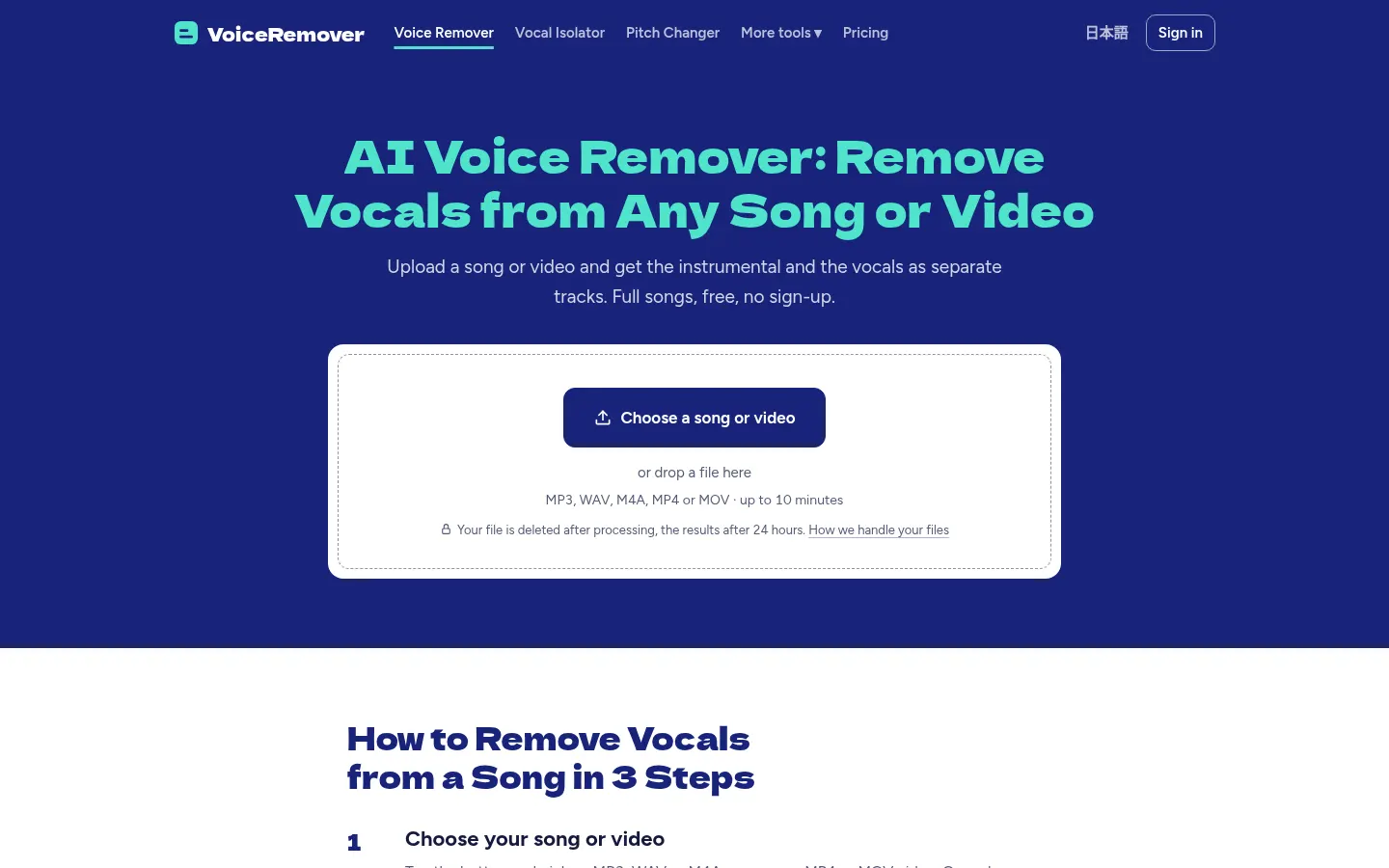
Voice Remover is an AI vocal isolator that takes a song or video and gives you the instrumental and the vocals as two separate tracks. It runs in the browser, including on a phone, and is built for anyone who wants a karaoke track, to study a vocal line or to reuse an accompaniment without installing anything.
How does Voice Remover work?
You upload an MP3, WAV, M4A, MP4 or MOV of up to 10 minutes (20 on paid tiers). A progress bar shows each step (upload, queue, separation) and most songs finish in about 30 seconds. You can then play the instrumental and the vocals on the page, compare them with the original and download them as MP3 (or WAV on paid tiers). The uploaded file is deleted once processed and the results after 24 hours.
How is it different from older methods?
Classic vocal removers cancelled whatever sat in the centre of a stereo mix, often taking the kick and other centre-panned parts with it and leaving a hollow sound. This tool uses an AI model that has learned what a singing voice sounds like and separates it from the rest, which also works on mono recordings. The same site offers a stem splitter (drums, bass, guitar, piano), a pitch changer, a BPM finder and a karaoke maker.
Who is Voice Remover for?
- Musicians who want to practice or sing over an instrumental.
- Anyone who needs to isolate the vocals to transcribe or study a performance.
- Creators who extract the audio from a video and split it into vocals and music.
Voice Remover pros and cons
Pros: you can use it without an account, there is no watermark and you get the full song. Cons: a live recording or a copy of a copy separates less cleanly than a studio track, and unsigned users are limited to one song a day.
Voice Remover features and use cases
How to use Voice Remover
Voice Remover FAQ
What is Voice Remover?
Voice Remover is an AI vocal isolator that, from a song or video, gives you the instrumental and the vocals as separate tracks.
Is Voice Remover free?
Yes, you can split one song a day (or two when signed in) without registering; for more use there is a subscription and a pack. See the pricing section.
How long does it take to split a song?
Most songs finish in about 30 seconds, and a progress bar shows each step.
Can I upload a video?
Yes. You upload an MP4 or MOV and get two audio files back: the music without the singing, and the vocals alone.
Do the files have a watermark?
No. Downloads are the full song, start to finish, with no watermark.
How long are my files kept?
The uploaded file is deleted once processed and the resulting tracks are removed after 24 hours.
Does Voice Remover have an API?
The official site does not mention a public API; it is used in the browser.
Does Voice Remover work in Spanish?
The site is in English and also in Japanese; you don’t have to type anything, so it can be used from any country.
What are the alternatives to Voice Remover?
On GptZone you can compare it with LALAL AI, Moises or Vocal Remover, which also split vocals and instrumentals with AI.
Voice Remover pricing and plans
Reference price: 4.99 USD / month. Source · Verified: November 16, 2026
Prices in US dollars (USD); taxes may be added at checkout. Checked on: 16/11/2026.
Free: 1 song a day (2 when signed in); standard separation, watermark-free MP3, files up to 10 minutes and 100 MB. No sign-up.
Pro: $4.99/month; higher-quality separation, up to 120 songs a month, files up to 20 minutes and 200 MB, WAV for tracks of 9 minutes or less, and a shorter queue.
One-time pack: $3.99; 15 high-quality songs that never expire.
Voice Remover Screenshots

Voice Remover user reviews
Write a review
Checking your session...
Voice Remover Reviews
Loading reviews...
Voice Remover alternatives


Songscription AI
Convert audio files and video links into sheet music, MIDI, and tabs. Transcribe multiple instruments at once and export to PDF, MusicXML, or Guitar Pro.
FineVoice Aunio
AI agent for end-to-end audio production. Generate professional voiceovers, music, and effects. Clone voices, edit sound, and create high-quality podcasts.

MP3 to MIDI
Convert audio files to editable MIDI with AI. Supports MP3, WAV, and FLAC, making it easy to extract notes and melodies for music production.
StemSplitterAI
Separate vocals and instruments from any song to create backing tracks. Isolate drums, bass, or vocals for practice, rehearsals, karaoke, and stems.