
Workshop AI
Share
Create websites, AI apps, and dashboards via chat. Design professional tools, connect databases, and launch projects quickly.
What is Workshop AI?
Workshop AI is an advanced platform designed to transform ideas into functional digital products through the use of conversational artificial intelligence. Its primary function is to allow users to create websites, AI applications, dashboards, and internal tools quickly and efficiently, eliminating traditional programming barriers. It is a versatile solution geared toward developers, product teams, and entrepreneurs who need to prototype MVPs or deploy operational solutions in record time from their computers.
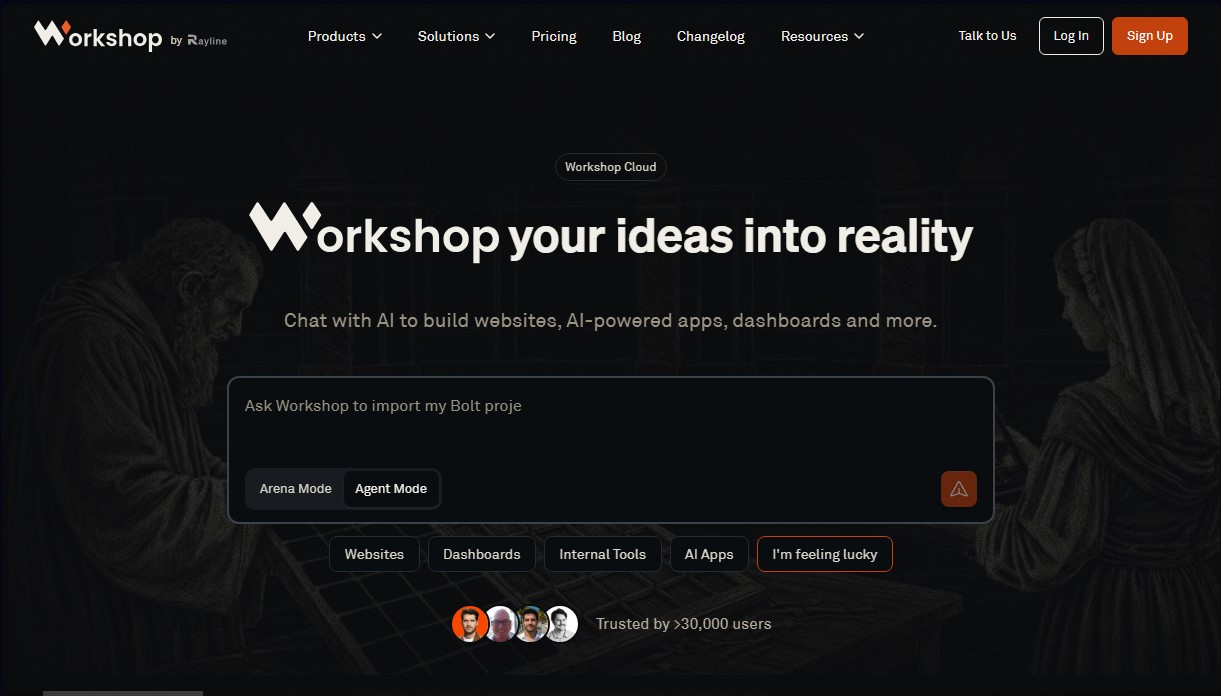
The tool operates under two complementary modes that optimize workflow: Arena Mode and Agent Mode. In Arena Mode, the user enters a single prompt, and the system generates four different versions of the project using various AI models simultaneously. This allows for a comparison of visual and functional results, making it easier to choose the best foundation for further development. Meanwhile, Agent Mode offers conversation-guided development, where an AI agent interacts with the user to refine, iterate, and finalize the project through direct instructions.
At a technological level, Workshop AI integrates with the most powerful language models on the market, including Anthropic Claude, OpenAI, and Google Gemini. Its technical capabilities extend to professional data connectivity, allowing applications to link with services and databases such as BigQuery, PostgreSQL, Supabase, Snowflake, MongoDB, MySQL, and Google Sheets. This interoperability ensures that the tools created are not just static prototypes, but dynamic applications capable of managing complex information and real-world workflows.
The platform's core capabilities include:
- Automatic code generation in multiple languages and the ability to reverse-engineer existing applications.
- Instant deployment via Workshop Cloud, which allows applications to be shared through a URL and accessed from any browser.
- Workshop Desktop, a native application available for Windows, Mac, and Linux that provides greater power and flexibility for local development.
- Connectivity with external ecosystems like GitHub and AWS S3 for seamless integration into production environments.
From creating financial data terminals to internal analysis tools or customer portals, Workshop AI stands out for its technical execution capabilities. The platform allows users to focus on business logic while the AI handles the structure and deployment, becoming a strategic ally for task automation and agile software development. Its practical approach ensures that any idea can be turned into a sharable and functional tool in a matter of minutes.
Workshop AI features and use cases
How to use Workshop AI
Workshop AI FAQ
What is Workshop AI, and what is this tool used for?
It is an AI platform designed to transform ideas into functional apps, websites, and dashboards using natural language.
What is Workshop AI’s Arena mode?
This mode allows you to generate four different versions of the same idea using various AI models, so you can compare the results and choose the one you like best.
How does Agent mode work for developing projects?
In this mode, you work directly with an AI agent through a conversational interface to create, refine, and publish your project iteratively.
Can I use Workshop AI for free?
Yes, there is a free plan that lets you try the tool with 250 AI credits without needing to provide a credit card.
What are the differences between the Cloud and Desktop versions?
The Cloud version allows you to access and share apps from any browser, while the Desktop version offers a full agent with maximum power and flexibility for Mac, Windows, and Linux systems.
Can I connect my apps to external databases?
The tool includes connectors for various services like Google Sheets, PostgreSQL, MongoDB, BigQuery, Snowflake, and Supabase to easily integrate your data.
Does Workshop AI allow the use of custom domains?
Yes, paid plans starting at the Build tier allow you to link your projects to your own domains and remove the platform branding from published apps.
What privacy measures are available for businesses on higher-tier plans?
Advanced plans include the option to opt out of having your data used for AI model training and offer team management features for greater control and security.
How many AI credits do I get with the Build plan?
This plan for individuals and small teams includes 1,500 AI credits per month, along with file storage and unlimited public apps.
Can I download the code for the apps I create with Workshop AI?
The platform allows you to download your projects so you have full control over the generated code and can run or host it wherever you prefer.
Workshop AI pricing and plans
Discover Plan
Free ($0 per month)
- 250 AI credits.
- App publishing.
- Access to Workshop Desktop and Workshop Cloud.
- 10-day data retention.
Build Plan
$20 per month
- 1,500 AI credits.
- 75 Cloud credits.
- 1 GB file storage.
- 1 private app (up to 5 viewers).
- Unlimited public apps.
- Custom domain.
- Remove Workshop badge.
- Ability to purchase additional credit packs.
Scale Plan
$50 per month
- 5,000 AI credits.
- 250 Cloud credits.
- 10 GB storage with no upload limits.
- Unlimited private apps and viewers.
- Custom domains.
- Team management.
- Data training opt-out.
- 10% discount on credit packs.
Max Plan
$200 per month
- 25,000 AI credits.
- 1,250 Cloud credits.
- Maximum discount on all credit packs.
- Includes all Scale plan features.
Enterprise Plan
Contact for pricing (contact Sales)
- Single Sign-On (SSO).
- Forward-deployed services.
- Enterprise-grade SLA.
- Volume seat discounts.
Workshop AI Screenshots
Workshop AI alternatives

StellarFirm
AI agents for founders to plan, build, and launch apps or websites. Automate technical and management tasks under your direct supervision and approval.


miniOrange MCP Server for WordPress
Securely connect AI agents to WordPress. Control permissions, protect sensitive data, monitor actions with audit logs, and manage human approvals.