Share
What is YoFont?
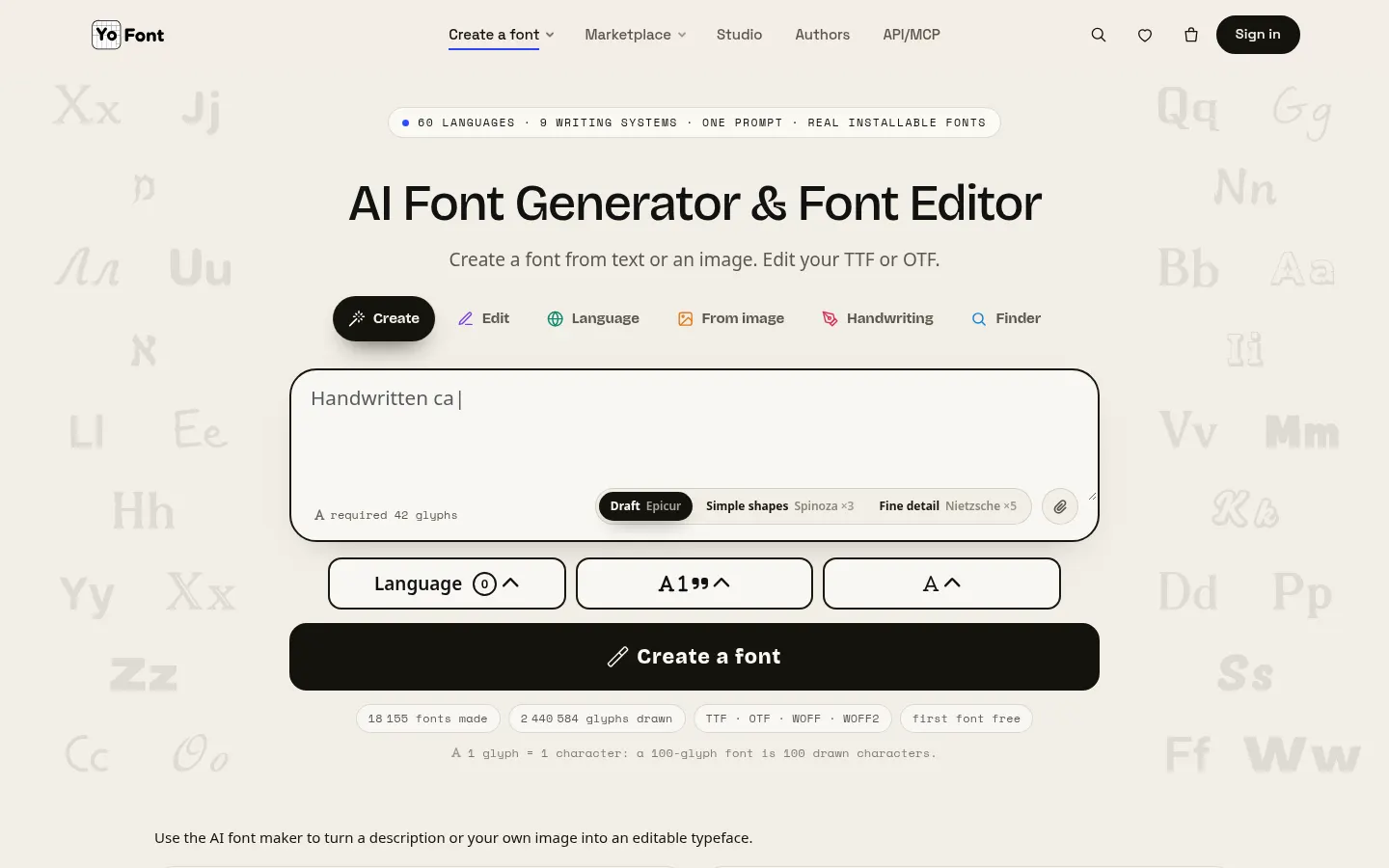
YoFont is an AI tool (by YoSpace LLC) that generates installable font files from a description, an image or a handwriting sample, built for designers, brands and creators who need a custom typeface without drawing every letter.
What is YoFont used for?
It gives you a real font file, not a picture of text or lookalike Unicode symbols to paste into a bio. Describe the mood, era or use, and the AI draws letters, digits and punctuation, then packages them as TTF, OTF, WOFF or WOFF2 with spacing and OpenType features. It supports 60 languages and 9 writing systems, including Cyrillic, Greek, Hebrew, Arabic, Chinese, Japanese and Korean, in Thin, Regular and Bold weights.
How does YoFont turn an image into a font?
Upload a logo, poster, shop sign or screenshot; words are detected on your device and you pick the lettering you like. From that crop it draws the full alphabet in the same hand, including characters the photo never showed. For handwriting, you fill in a template sheet, snap a photo and get your own font. You can also import a TTF or OTF to add languages or weights and fix any glyph in the editor.
Who is YoFont for?
- Designers and studios building a brand typeface from a wordmark.
- Brands that need to extend their font to Cyrillic, Greek or Asian scripts.
- Developers generating fonts from their own software via the REST API and MCP server.
YoFont pros and cons
On the plus side you get installable files, a glyph editor and a font marketplace where authors sell their work. On the downside, every glyph uses up your balance, the more detailed models (Spinoza and Nietzsche) use three to five times as many glyphs, commercial use and private fonts are limited to the upper tiers, and fonts made on the basic account are listed publicly in the catalog.
YoFont features and use cases
How to use YoFont
YoFont FAQ
What is YoFont?
YoFont is an AI font generator that creates installable typefaces from a text prompt, an image or a handwriting sample.
Is YoFont free?
Your first font with 100 glyphs is free, but downloading fonts and commercial use require a paid plan. See the pricing section.
Which font formats does YoFont export?
It exports TTF, OTF, WOFF and WOFF2 files that install like any other typeface on a computer or website.
Can I turn my handwriting into a font?
Yes. Fill in a template sheet by hand, take a photo and YoFont builds a font from your own writing.
Can I make a font from a logo?
Yes. Upload the image, select the lettering and the AI draws the rest of the alphabet in the same style.
Can I use the fonts commercially?
Commercial use of the fonts you create is included in the Pro and Studio plans, not the entry tiers.
Does YoFont have an API?
Yes. It offers a REST API and an MCP server for generating and downloading fonts from other apps, included in Pro and Studio.
Does YoFont work in Spanish?
Yes. The site is available in Spanish and fonts can include Spanish characters such as ñ and accented vowels.
What are the alternatives to YoFont?
On GptZone you can look at Fontjoy for pairing typefaces and WhatFontIs for identifying fonts from an image.
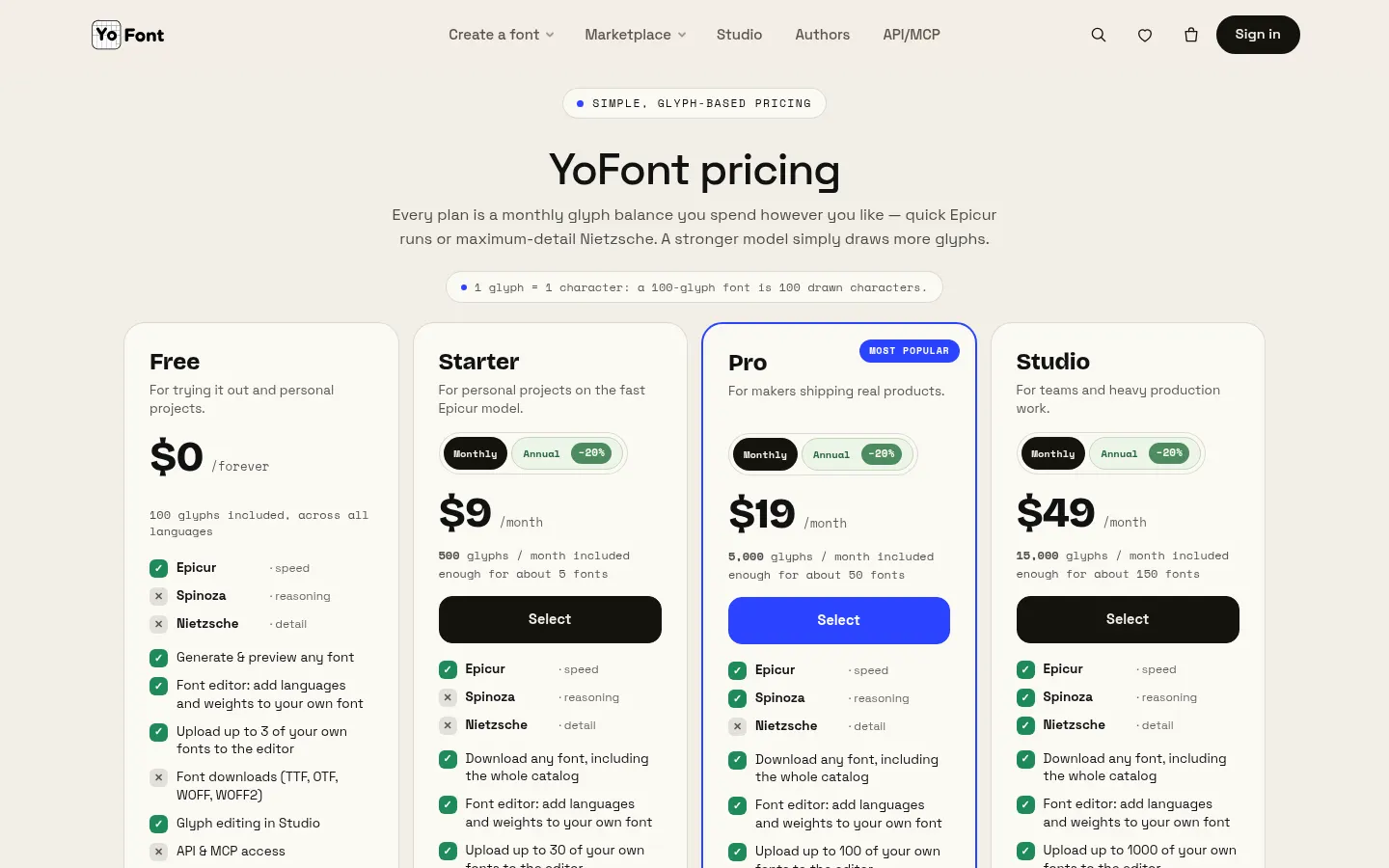
YoFont pricing and plans
Reference price: 9 USD / month. Source · Verified: November 15, 2026
Prices in US dollars (USD) as listed on the official site. Checked on: 15/11/2026. Annual billing saves 20%.
Free: $0. 100 glyphs, Epicur model, preview and editor; no font downloads or commercial license, and fonts are public.
Starter: $9/month. 500 glyphs/month (about 5 fonts), download any catalog font, up to 30 of your own fonts in the editor; top-ups at $0.015/glyph. No commercial use.
Pro: $19/month. 5,000 glyphs/month (about 50 fonts), Epicur and Spinoza models, API and MCP access, commercial use and private fonts; top-ups at $0.01/glyph.
Studio: $49/month. 15,000 glyphs/month (about 150 fonts), all three models, up to 1,000 fonts in the editor; top-ups at $0.008/glyph.
- 1 glyph = one character in one weight. Monthly glyphs reset each cycle; purchased glyphs never expire.
- Marketplace fonts are sold separately (around $9–10 each).
YoFont Screenshots
YoFont user reviews
Write a review
Checking your session...
YoFont Reviews
Loading reviews...
YoFont alternatives

AI Tattoo Studio
Design unique AI tattoos, edit details, and preview the result on your skin. Includes multiple styles and high-resolution downloads.