

Share
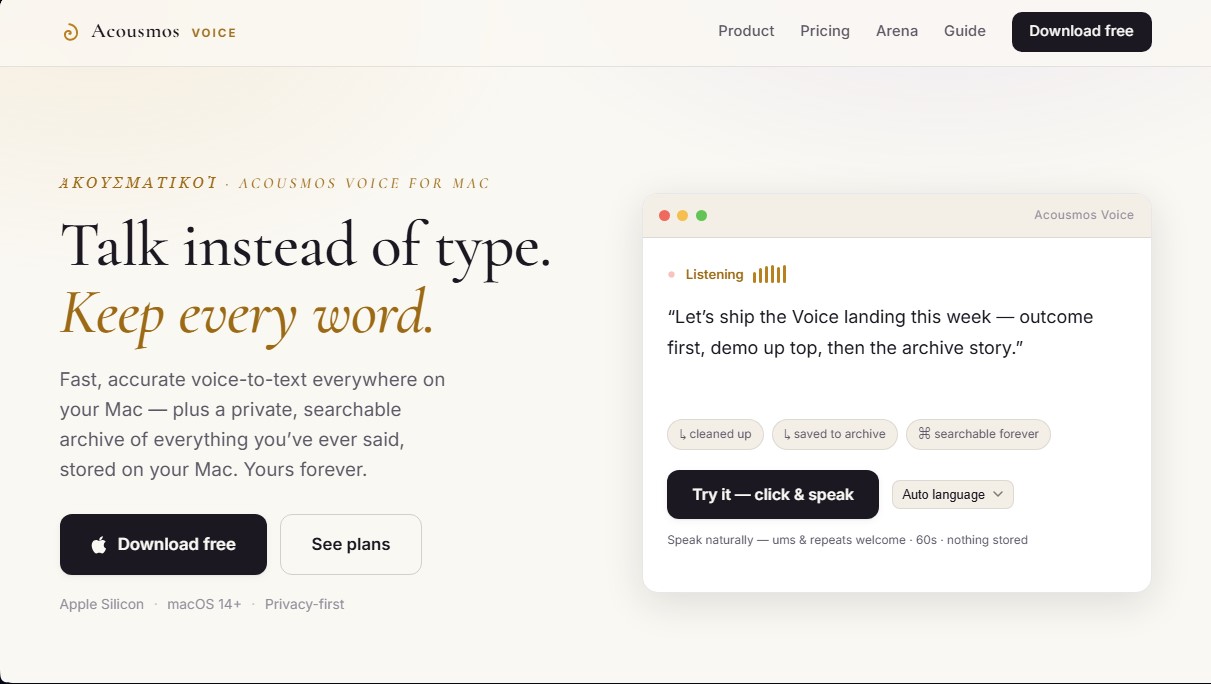
Convert speech to text in any Mac app via shortcut. Remove filler words, improve formatting, and create a private, searchable history of everything you say.
What is Acousmos?
Acousmos is an advanced voice dictation solution for macOS designed to transform speech into text instantly and accurately. This tool allows computer users to write using their voice in any application or text field without switching windows, optimizing workflow in professional environments. Its primary function is to capture ideas in real-time, facilitating faster and more natural communication on platforms like Slack, Gmail, Notion, or code editors.
The operation of Acousmos centers on a customizable hotkey. When activated, the software employs high-fidelity AI transcription models that process natural language, allowing the user to speak freely, including repetitions or filler words. The app's technology handles AI polishing, automatically removing unnecessary elements and correcting grammar so the resulting text is coherent and ready for immediate use.
The most notable functional capabilities of this tool include:
- Ubiquitous Dictation: Transcribed text appears directly at the cursor's location, eliminating the need to copy and paste from external interfaces.
- Private and Searchable Archive: It generates a historical log of all transcriptions saved locally on the Mac. This system acts as a digital second brain that allows users to locate any idea expressed verbally in the past through a simple search.
- Smart Formatting: The ability to restructure dictation on the fly, allowing spoken reflections to be converted into structured emails or organized notes.
- Custom Dictionary: Users can teach the AI proper names, technical terms, code symbols, or specific jargon to guarantee absolute precision.
- Data Privacy: It follows a privacy-first approach, storing information locally and offering options to run local AI models that function without an internet connection.
Acousmos is specifically geared toward professionals, developers, and writers looking to optimize their productivity by removing keyboard barriers. By combining automated transcription with a persistent storage system, the tool not only facilitates writing but also preserves the user's intellectual value in a format that remains accessible over the long term. It is compatible with Apple Silicon and requires macOS 14 or higher, ensuring fluid performance. Its architecture guarantees that users maintain full ownership of their data, with options to Bring Your Own Key (BYOK) and ensure that content is never used to train external models.
Acousmos features and use cases
How to use Acousmos
Acousmos FAQ
What exactly is Acousmos, and how does it work on my Mac?
Acousmos is a professional dictation tool that quickly and accurately converts your voice into text across any macOS application using a keyboard shortcut.
How can I try Acousmos for free?
You can download the app and start a one-month free trial of the Pro plan—no registration or payment information required.
Where are my Acousmos transcriptions saved?
All your transcriptions are stored in a private local file on your Mac, which you can search and export at any time.
Can I use Acousmos in apps like Slack or Gmail?
Yes, the tool works anywhere you can type, allowing you to insert dictated text directly into browsers, code editors, or messaging apps.
What are the advantages of the Acousmos Pro plan compared to the Plus plan?
The Pro plan allows you to use your own API keys or local models to work offline, ensuring your data never leaves your computer.
What are the technical requirements to install this tool?
You need a Mac with an Apple Silicon processor running macOS 14 or later.
What happens to my voice archive if I decide to cancel my subscription?
Your local archive is yours forever; it will remain accessible and searchable on your Mac even if you cancel your subscription.
Can I customize the vocabulary in Acousmos?
Yes, the app includes a custom dictionary where you can add proper names, technical jargon, or specific terms to ensure your transcriptions are always accurate.
Acousmos pricing and plans
Pro Trial (Free)
0 $ for the first month.
- Full access to all tool features.
- 20,000-word limit processed via managed cloud.
- Unlimited use when using your own API keys.
- No registration or credit card required.
Plus
12,99 $ per month or 99 $ per year (36% savings).
- Unlimited speech-to-text conversion.
- Permanent, searchable local archive.
- AI-powered text cleaning and formatting features.
- Custom dictionary and support for all languages.
- License valid for use on up to 2 Macs.
Pro
17,99 $ per month or 149 $ per year.
- Includes all features from the Plus plan.
- Option to use your own API keys (BYOK) for enhanced privacy and speed.
- Access to local models for offline work.
- Enhanced privacy: words do not pass through Acousmos servers when using local models or your own keys.
- License valid for use on up to 2 Macs.
Acousmos Screenshots
Acousmos alternatives

OpenWhispr
OpenWhispr is open-source voice dictation for Mac, Windows and Linux: transcribe locally or in the cloud, type into any app and take meeting notes without a bot.


Linden by Speechmatics
Low-latency speech-to-text for AI agents. Detects turns, identifies speakers, and captures names and numbers with high precision in over 55 languages.

SpeechTurbo
Convert audio and video to text with high accuracy and speed. Supports 98 languages, AI summaries, and translation. Pay-as-you-go with no monthly subscriptions.
TranscripTool
Extract text from TikTok, Facebook, and MP4 videos to verify content or create subtitles. Export to TXT and SRT to streamline AI-powered information analysis.