
Voktik
Share
Dictate and transcribe your voice in any Windows app. Remove filler words, add punctuation, and paste corrected text instantly without compromising your privacy.
What is Voktik?
Voktik is an advanced voice dictation tool designed specifically for the Windows operating system. Its primary function is to instantly transform natural speech into clean, punctuated, and professional text within any application or website. Unlike traditional dictation systems, this solution uses artificial intelligence to automatically eliminate filler words (such as "uh" or "um") and speech errors, delivering a polished final result directly to the user's cursor location.
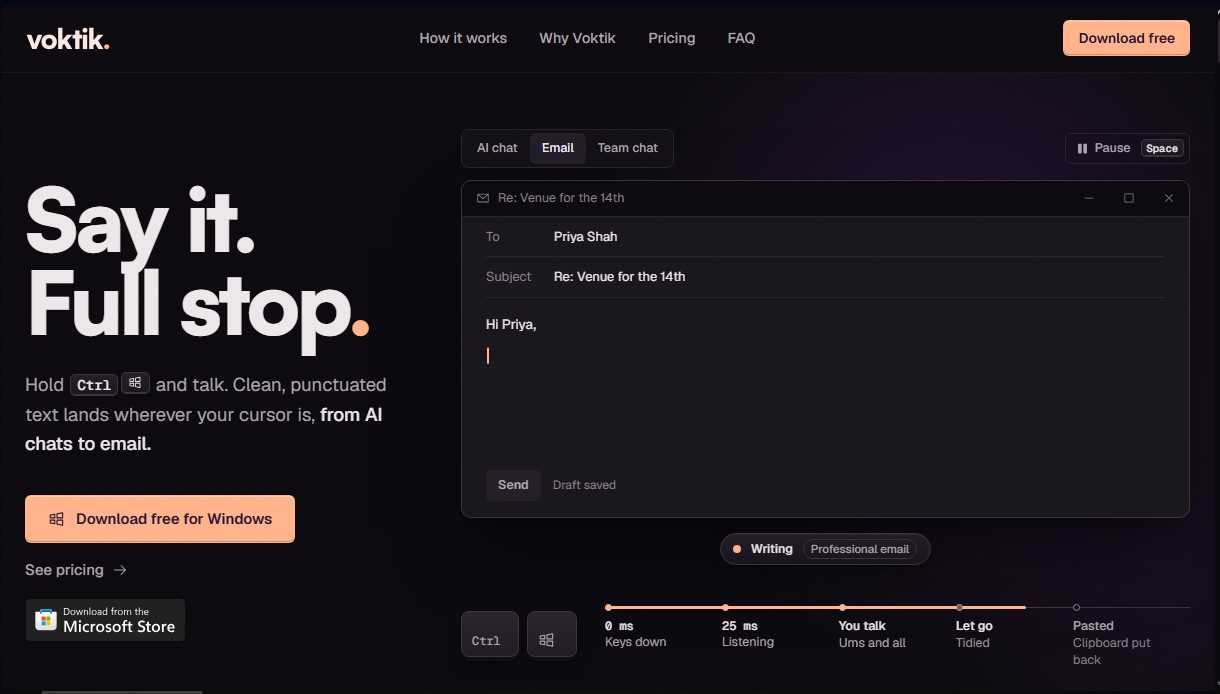
Operating Voktik is intuitive and integrates into your daily workflow through simple keyboard commands. Users simply hold down the Ctrl and Windows keys while speaking and release them when finished. At that point, the application processes the audio, applies styling rules, and pastes the resulting text into tools like ChatGPT, Microsoft Word, Slack, Outlook, or Notion. This technology enables communication up to three times faster than manual typing on a computer.
Among Voktik’s most notable technical capabilities are:
- Smart text cleaning: Identifies and removes repetitions and filler sounds, automatically adjusting punctuation and capitalization to generate ready-to-send text.
- Multilingual detection: Supports over 100 languages with auto-detection capabilities, allowing users to speak naturally in their preferred language at any time.
- Custom dictionary: Offers the ability to teach the AI proper nouns, brands, or specific technical terminology to ensure accurate transcription without spelling errors.
- Adaptive writing styles: Allows users to choose different formats based on context, including a mode optimized for AI prompts, which ensures that instructions for models like Claude or Gemini are transcribed with total clarity.
- Privacy and security: The application does not take screenshots or use voice recordings to train external AI models. Data is sent encrypted and deleted after processing, maintaining user confidentiality.
This tool is especially useful for professionals managing high email volumes, writers, programmers using Cursor, or users who frequently interact with AI tools. Voktik ensures workflow continuity even during Wi-Fi connection failures or unexpected system crashes, as it saves recordings locally on the device in an encrypted format. By eliminating the physical burden of typing, it stands as an essential productivity solution for optimizing time spent in front of the screen.
Voktik features and use cases
How to use Voktik
Voktik FAQ
How does Voktik work to transcribe my voice?
Just hold down the Control and Windows keys while you speak, and the text will appear clean and punctuated in your application once you release them.
What applications can Voktik be used with?
You can use it in any Windows program where you can type, such as web browsers, email clients, Slack, or AI tools.
What happens if I run out of words on the free version?
The two-thousand-word free limit resets automatically every Monday, although you can upgrade to the Pro version to remove this restriction.
Is my voice data handled securely in Voktik?
Your voice is sent encrypted for processing and is deleted immediately afterward; it is never used to train artificial intelligence systems.
Do I need to buy a special microphone for it to understand me?
No, your laptop's built-in microphone is usually enough for the system to recognize your voice clearly.
What languages can the tool recognize?
The system can automatically detect and transcribe more than one hundred different languages while you speak.
Is Voktik available for Mac?
No, the app is currently exclusive to Windows and requires an active internet connection to function properly.
What is included in the Voktik Pro subscription?
The Pro version removes the weekly word limit and allows you to use automatic writing styles, real-time translation, and custom dictionaries.
Voktik pricing and plans
Free
Price: £0
- 2,000-word weekly limit (resets every Monday).
- Automatic text cleanup: adds punctuation and capitalization, and removes filler words (ums, uhs).
- Custom dictionary with capacity for 3 snippets.
- 5 preset writing styles plus one custom style.
- Support for 100 languages with auto-detection.
- Full history saved locally on your PC.
- Includes a 7-day trial of Pro features.
Pro Annual
Price: £99.99 for the first year (early bird offer), then £129.99 per year (equivalent to £10.83/month).
- No weekly word limit.
- All Free plan features included.
- 7 additional writing styles that switch automatically based on the app (Gmail, Slack, ChatGPT, etc.).
- Real-time translation: speak in one language and the text is typed in another.
- Assign specific hotkeys for different languages or applications.
- Unlimited snippets.
- AI processing adjustment (prioritize speed or accuracy).
- Support for mouse buttons or foot pedals as trigger keys.
Pro Monthly
Price: £14.99 per month.
- No weekly word limit.
- Access to all Pro features (auto-styles, translation, unlimited snippets, etc.).
- Month-to-month billing with the ability to cancel anytime.
Voktik Screenshots
Voktik alternatives

OpenWhispr
OpenWhispr is open-source voice dictation for Mac, Windows and Linux: transcribe locally or in the cloud, type into any app and take meeting notes without a bot.

Linden by Speechmatics
Low-latency speech-to-text for AI agents. Detects turns, identifies speakers, and captures names and numbers with high precision in over 55 languages.

SpeechTurbo
Convert audio and video to text with high accuracy and speed. Supports 98 languages, AI summaries, and translation. Pay-as-you-go with no monthly subscriptions.



TranscripTool
Extract text from TikTok, Facebook, and MP4 videos to verify content or create subtitles. Export to TXT and SRT to streamline AI-powered information analysis.