

Share
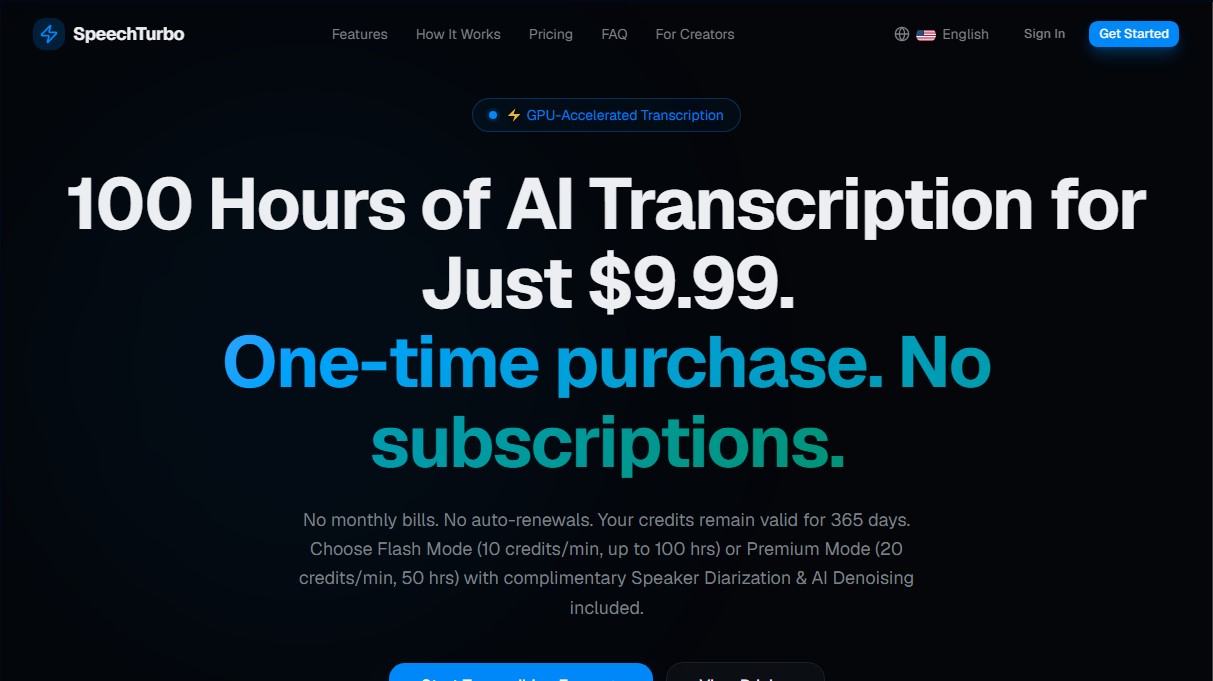
Convert audio and video to text with high accuracy and speed. Supports 98 languages, AI summaries, and translation. Pay-as-you-go with no monthly subscriptions.
What is SpeechTurbo?
SpeechTurbo is a high-performance AI-powered audio and video transcription platform that converts multimedia files into text with up to 99.8% accuracy. This tool is specifically designed for professionals who demand speed and precision, such as content creators, journalists, researchers, and project managers who need to efficiently document meetings or interviews from their computers.
The application's technological architecture is powered by GPU acceleration, enabling processing speeds up to 50 times faster than real-time. This means a one-hour file can be ready in less than 80 seconds. SpeechTurbo utilizes its own proprietary transcription engine (v3.0) for Automatic Speech Recognition (ASR), ensuring that core processing takes place on dedicated servers without relying on third-party APIs for the base conversion.
The system's workflow is intuitive and divided into three steps: file upload, AI processing, and result download. Users can import content by dragging local files or linking cloud services such as Google Drive and Dropbox. The tool supports a wide variety of formats, including MP3, MP4, WAV, MOV, AAC, and FLAC, with batch processing capabilities for up to 30 files simultaneously.
SpeechTurbo offers two operating modes based on the user's needs:
- Flash Mode: Focused on maximum speed for standard transcriptions.
- Premium Mode: Includes advanced features such as speaker diarization (identifying who is speaking) and AI noise cancellation (denoising) to improve clarity in recordings with poor audio quality.
In addition to transcription in over 98 languages, the tool enables AI translation into more than 70 languages and the generation of smart summaries. These summaries can be structured as meeting minutes, key point lists, or detailed outlines, making it easy to obtain actionable information without having to read the entire text.
Regarding export options, the system allows users to download results in versatile formats such as SRT and VTT for subtitling workflows, as well as PDF, DOCX, CSV, and TXT. Privacy is a critical aspect of SpeechTurbo's design; files are encrypted via HTTPS, and originals are automatically deleted from the servers after 24 hours. The platform does not use user data to train its artificial intelligence models, making it a secure choice for handling sensitive information.
SpeechTurbo features and use cases
How to use SpeechTurbo
SpeechTurbo FAQ
What is SpeechTurbo and how does the transcription system work?
SpeechTurbo is a GPU-accelerated transcription tool that converts audio and video files into text at fifty times the speed of real-time.
Do I need to pay for a monthly subscription to use SpeechTurbo?
No, the platform operates on a one-time credit payment system with no automatic renewals or recurring monthly fees.
How long are the credits purchased on the platform valid for?
Purchased credits remain active and available in your account for 365 days from the date of purchase.
What is the difference between SpeechTurbo's Flash and Premium modes?
Flash mode consumes 10 credits per minute of audio, while Premium mode consumes 20 credits and includes speaker identification and noise reduction.
What level of accuracy do the generated transcriptions provide?
The AI engine achieves up to 99.8% accuracy on recordings with clear audio.
How does SpeechTurbo guarantee the privacy of my personal files?
All files are encrypted via HTTPS, and original files are automatically deleted from the servers 24 hours after the transcription is completed.
In what formats can I export the transcribed text?
You can download your results in professional formats such as DOCX, PDF, SRT, VTT, CSV, and TXT to fit your workflow.
Can I translate my SpeechTurbo transcriptions into other languages?
Yes, users with VIP status can translate their text into more than 70 different languages and generate automatic AI-powered summaries.
SpeechTurbo pricing and plans
Free Version
3 transcriptions per day.
30-minute limit per file in Flash mode (15 minutes in Premium mode).
Max file size: 1 GB for anonymous users and 2 GB for registered users.
1 free use of AI features per month (summary or translation).
Starter Plan
Price: 9,99 $ (one-time payment, no subscriptions).
60,000 credits (equivalent to up to 100 hours in Flash mode).
Credits valid for 365 days.
Per-file limit of up to 8 hours or 4 GB.
Batch upload up to 30 files simultaneously.
Standard GPU processing queue.
Access to Flash mode (10 credits/min) and Premium mode with speaker diarization and noise reduction (20 credits/min).
VIP Benefits: Unlimited AI summaries and translations into over 70 languages at no additional credit cost.
Growth Plan
Price: 19,99 $ (one-time payment, no subscriptions).
138,000 credits (equivalent to up to 230 hours in Flash mode).
Credits valid for 365 days.
Per-file limit of up to 8 hours or 4 GB.
Batch upload up to 30 files simultaneously.
Dedicated priority GPU processing queue.
Access to Flash mode (10 credits/min) and Premium mode with speaker diarization and noise reduction (20 credits/min).
VIP Benefits: Unlimited AI summaries and translations into over 70 languages at no additional credit cost.
Pro Plan
Price: 39,99 $ (one-time payment, no subscriptions).
300,000 credits (equivalent to up to 500 hours in Flash mode).
Credits valid for 365 days.
Per-file limit of up to 8 hours or 4 GB.
Batch upload up to 30 files simultaneously.
Exclusive "Turbo" GPU processing queue.
Access to Flash mode (10 credits/min) and Premium mode with speaker diarization and noise reduction (20 credits/min).
VIP Benefits: Unlimited AI summaries and translations into over 70 languages at no additional credit cost.
SpeechTurbo Screenshots
SpeechTurbo alternatives

OpenWhispr
OpenWhispr is open-source voice dictation for Mac, Windows and Linux: transcribe locally or in the cloud, type into any app and take meeting notes without a bot.


Linden by Speechmatics
Low-latency speech-to-text for AI agents. Detects turns, identifies speakers, and captures names and numbers with high precision in over 55 languages.


TranscripTool
Extract text from TikTok, Facebook, and MP4 videos to verify content or create subtitles. Export to TXT and SRT to streamline AI-powered information analysis.