
AI Photo Edit
Share
What is AI Photo Edit?
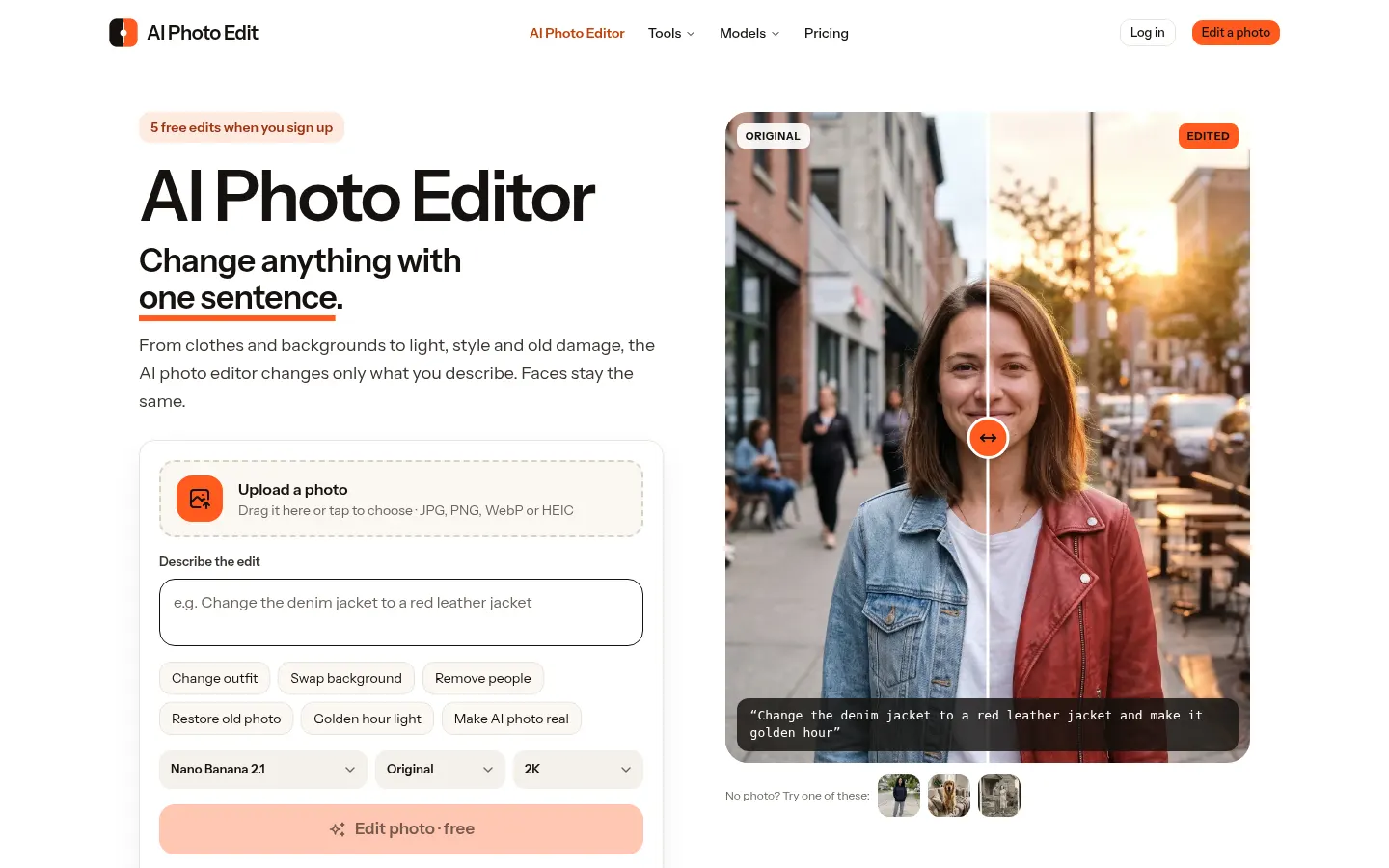
AI Photo Edit is an AI tool by ONETU LTD that edits photos from a written instruction for anyone who wants to retouch pictures without layers, masks or selection tools: everyday users, online sellers, creators and small shops.
How do you edit a photo with AI in AI Photo Edit?
You upload a JPG, PNG, WebP or HEIC image, type the change in one sentence (say, “change the denim jacket to a red leather jacket and make it golden hour”) and the model redraws only that part. Anything you don't mention stays as it is and faces remain recognizable. A slider lets you compare with the original, then you download the result in 2K or 4K with no watermark or keep editing with a new sentence.
Which AI models does it use?
It runs on Google's Nano Banana and several versions of OpenAI's GPT Image, and you pick the model, aspect ratio (1:1, 4:5, 3:4, 9:16 or 16:9) and resolution for each edit. Each combination uses a different number of credits, shown on the button before you start, and failed edits are refunded.
What can you change in a photo?
- Clothes, hairstyle and hair color.
- Backgrounds, sky, lighting and season.
- Unwanted people, text or power lines.
- Old photo restoration with natural color.
- Combining elements from two photos.
AI Photo Edit pros and cons
Pros: it is very easy to use, runs in a phone or desktop browser and keeps people's identity well. Cons: results depend on the model and on how clear the instruction is, heavy 4K use burns through credits quickly, the site is English-only, and you should only edit photos you own or have permission to edit.
AI Photo Edit features and use cases
How to use AI Photo Edit
AI Photo Edit FAQ
What is AI Photo Edit?
It is an online AI photo editor that applies the change you describe in one sentence and leaves the rest of the picture untouched.
Is AI Photo Edit free?
You get 5 free edits on sign-up; after that there are subscriptions or credit packs, as covered in the pricing section.
Does it keep people's faces?
Yes, preserving facial features while changing clothes, background or lighting is one of its strengths.
Which AI models can I use?
Google's Nano Banana and several versions of OpenAI's GPT Image, selectable for each edit.
Does it add a watermark?
No, results download without a watermark in 2K or 4K.
Can it restore old photos?
Yes, it removes scratches, stains and torn corners, sharpens faces and adds natural color.
Can I write instructions in Spanish?
The site asks for plain English instructions; it does not promise the same results with Spanish prompts.
Does it have an API?
The official website does not offer a public API; it is used in the browser.
What if an edit fails?
Credits for a failed edit go back to your account automatically.
What are AI Photo Edit alternatives?
Our directory lists Photoroom, geared toward product photos, plus Clipdrop and Fotor.
AI Photo Edit pricing and plans
Reference price: 7.5 USD / month. Source · Verified: November 20, 2026
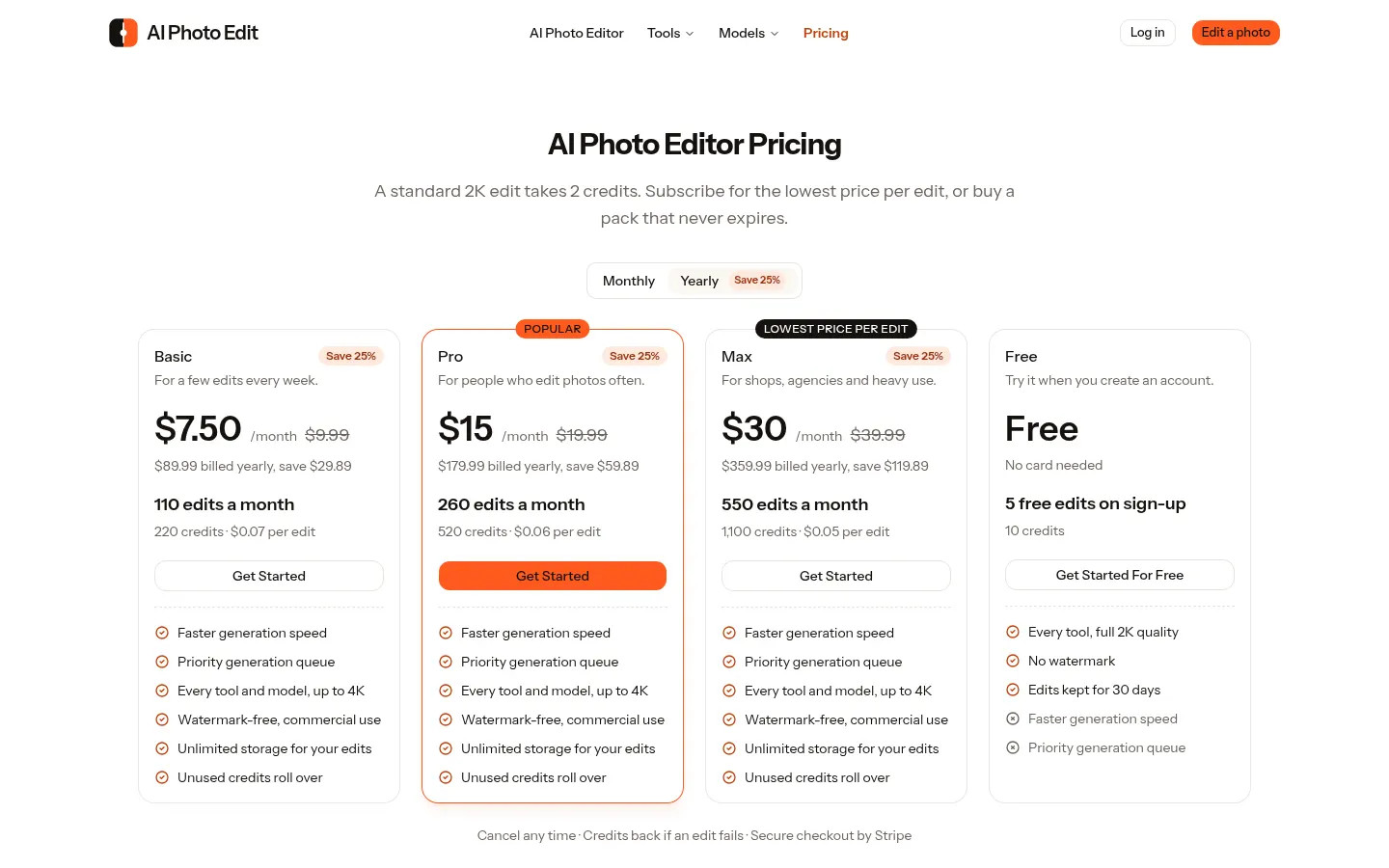
Prices in US dollars (USD) from the official website. Checked on: 20/11/2026. A standard 2K edit takes 2 credits; 4K and other models take more.
Free: 5 edits (10 credits) on sign-up, no card, 2K and no watermark.
Basic: $7.50/month billed yearly ($89.99/year) or $9.99 month-to-month. 110 edits a month (220 credits).
Pro: $15/month billed yearly ($179.99/year) or $19.99 month-to-month. 260 edits a month.
Max: $30/month billed yearly ($359.99/year) or $39.99 month-to-month. 550 edits a month.
Non-expiring packs: Starter $4.99 (30 edits), Creator $24.99 (210) and Business $99.99 (1,000), among others.
AI Photo Edit Screenshots
AI Photo Edit user reviews
Write a review
Checking your session...
AI Photo Edit Reviews
Loading reviews...
AI Photo Edit alternatives
EZ Image to Image
EZ Image to Image is an AI photo editor: upload a picture, describe the edit and pick a model such as GPT Image, Nano Banana, FLUX.2 or Seedream.
Virtual Staging AI Studio
Virtual Staging AI Studio is an AI tool that furnishes and styles empty property photos for listings, with one free image a day and watermark-free downloads.
Animate Image AI
Animate Image AI is an AI photo animator: upload an image, describe the motion and get a 2- to 15-second video you can download as an MP4.