

AI Photo Editor.io
Share
Edit and enhance photos with text prompts. Change backgrounds, remove objects, retouch portraits, and apply artistic styles with AI quickly, easily, and professionally.
What is AI Photo Editor.io?
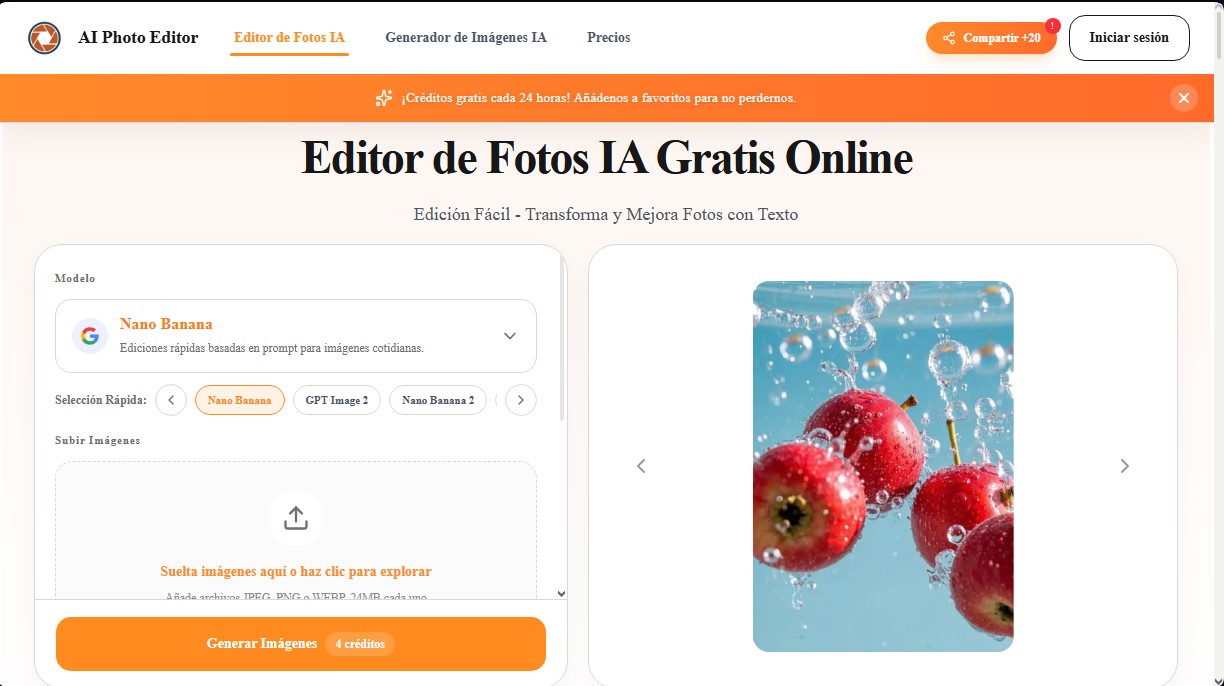
AI Photo Editor.io is an advanced AI photo editing platform designed to transform and enhance images using simple text instructions. This tool stands out for its practical approach, allowing users to make complex changes without needing to master technical design software. Its primary function is to serve as a free AI image editor that simplifies workflows for both individual users and professional marketing and e-commerce environments.
The technology behind AI Photo Editor.io is supported by various image processing and natural language models, such as Nano Banana (in its Standard, Pro, and 2 versions), GPT Image 2, Seedream 5.0, and Qwen 2. These models allow the system to understand complex scenes and execute precise edits based on prompts. Users can upload JPEG, PNG, or WEBP files up to 24MB and apply immediate transformations directly from their computer.
Among its most relevant functional capabilities are:
- Photo background changer: Allows for replacing common backgrounds with clean or brand-aligned environments while maintaining natural-looking edges.
- Prompt-based editing: It is possible to remove unwanted objects, change colors, or add elements by describing the desired change in natural language.
- Portrait and product enhancement: Optimizes lighting, refines skin textures, and increases detail sharpness—ideal for product listings and professional profile photos.
- Creative stylization: Transforms original images into specific aesthetics such as Ghibli style, cinematic, vintage, or illustration.
- Multiple reference usage: Facilitates visual consistency by pulling composition or style ideas from several source images.
The workflow is straightforward: upload an image, write a short prompt, and generate the result. This AI image generator is especially useful for marketing managers, small business owners, and content creators who require high-quality visual assets on a recurring basis. By removing the technical barrier of manual layers and masks, any user can achieve professional results for social media or brand presentations.
In addition to speed, AI Photo Editor.io offers a minimal learning curve. No prior knowledge of photo retouching is required, as the artificial intelligence interprets instructions to execute tasks automatically. This makes it an efficient solution for optimizing professional portraits, cleaning up travel photos, or quickly iterating on creative concepts within a single accessible and functional web interface. By allowing the commercial use of the resulting images, it positions itself as a key tool for modern visual productivity.
AI Photo Editor.io features and use cases
How to use AI Photo Editor.io
AI Photo Editor.io FAQ
Can I use AI Photo Editor.io for free?
Yes, you can claim 20 free silver coins every 24 hours to edit for free by adding the website to your favorites.
Is it mandatory to log in to use AI Photo Editor?
Yes, you must sign in with a Google account to edit images, authorize access, and manage your credits.
How do I make changes to images with this AI photo editor?
The process is very simple: just upload your photo and write a prompt or short description of the modifications you want to apply.
What file formats can I upload to AI Photo Editor.io?
The tool supports JPEG, PNG, and WEBP formats with a maximum file size of 24 MB per upload.
Can I use results from AI Photo Editor for my online store or commercial use?
Yes, edited images are suitable for commercial use in e-commerce, marketing campaigns, social media, and professional presentations.
Which AI models are available on the platform?
You can choose from different models based on your needs, such as Nano Banana for quick edits, GPT Image 2 for natural language, or Nano Banana Pro for premium projects.
Does AI Photo Editor.io allow for removing objects or people from a photo?
Yes, simply describe the object or distraction you want to remove, and the AI will automatically and cleanly reconstruct the background.
What happens if I run out of daily free credits?
If you need to make more edits or access advanced features, you can purchase various premium credit packages that do not expire.
Is it hard to learn how to use AI Photo Editor.io if I'm not a designer?
No, the tool is designed to be intuitive and doesn't require any knowledge of layers or masks, as everything is controlled through simple text instructions.
AI Photo Editor.io pricing and plans
Free Plan
Price: 0 $
- 20 free silver coins every 24 hours (manual claim required).
- Google account login required.
- Access to image generation and editing models.
Starter Pack - Newbie
Price: 5,90 $ (One-time payment)
- 100 credits.
- Credits never expire.
- Full commercial use.
- Priority generations.
Starter
Price: 16,90 $ (One-time payment)
- 500 credits.
- Credits never expire.
- Full commercial use.
- Priority generations.
Popular (Hot)
Price: 29,90 $ (One-time payment)
- 1,200 credits.
- Credits never expire.
- Full commercial use.
- Priority generations.
Pro
Price: 64,90 $ (One-time payment)
- 3,000 credits.
- Credits never expire.
- Full commercial use.
- Priority generations.
Expert
Price: 114,90 $ (One-time payment)
- 6,000 credits.
- Credits never expire.
- Full commercial use.
- Priority generations.
Ultimate
Price: 189,90 $ (One-time payment)
- 11,000 credits.
- Credits never expire.
- Full commercial use.
- Priority generations.
AI Photo Editor.io Screenshots
AI Photo Editor.io user reviews
Write a review
Checking your session...
AI Photo Editor.io Reviews
Loading reviews...
AI Photo Editor.io alternatives

utilz Background Remover
Remove image backgrounds for free with total privacy in your browser. Create transparent or colored backgrounds without uploading files while maintaining original resolution.

ColorCraft
Create Amazon KDP books. Generate coloring pages, stories, puzzles, and print-ready full covers, plus promotional mockups in a single workflow.



