

Share
Upscale images up to 4x with AI. Enhance sharpness, restore old photos, and optimize files for print or social media.
What is AI Upscaler.org?
AI Upscaler.org is an online platform specializing in enhancing and processing visual files through artificial intelligence. Its primary function is to allow users to increase photo resolution up to 4x its original size without losing sharpness. Unlike traditional scaling methods that simply stretch pixels—causing blurriness—this tool uses advanced neural networks to analyze content and reconstruct missing details, achieving professional results even with images that are initially low quality.
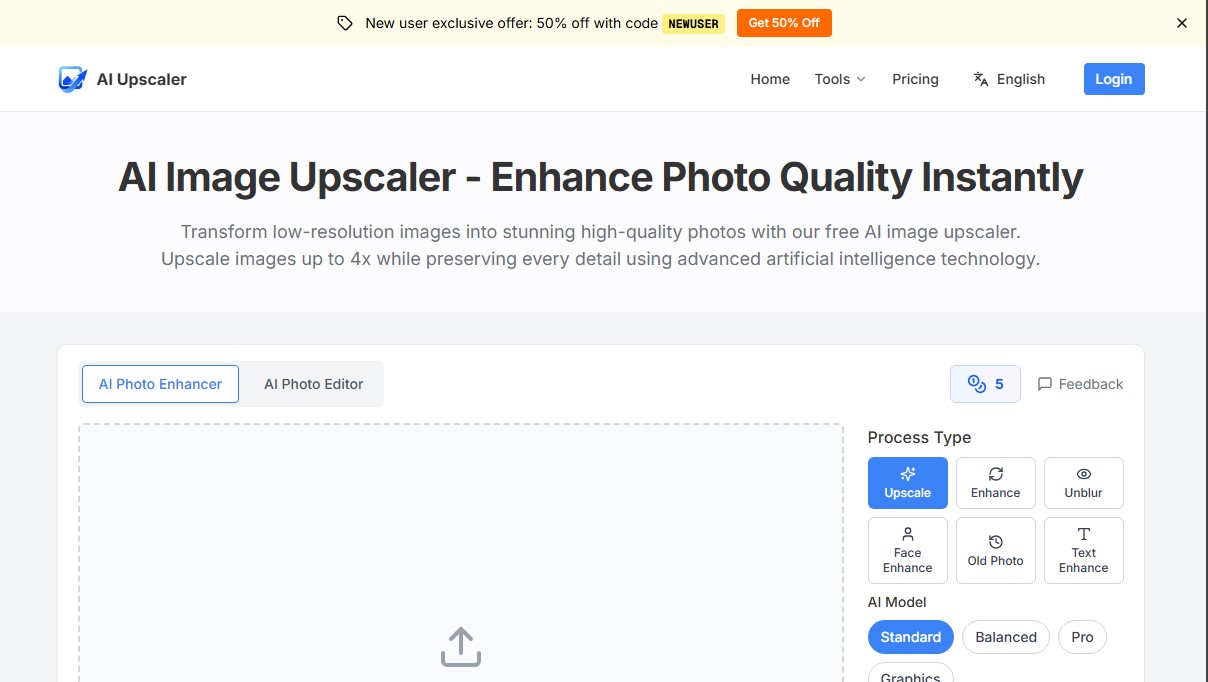
The operation of this AI image upscaler is based on deep learning models trained on millions of photographs. The process is intuitive and takes place entirely within your desktop or mobile browser: the user uploads a file (compatible with JPG, PNG, and WebP formats up to 10MB), selects the scale factor (2x or 4x), and chooses the appropriate processing model. The platform offers options such as Standard, Balanced, or Pro, along with specific configurations for graphics, ensuring that edges remain sharp and textures look natural.
Beyond simple resizing, AI Upscaler.org integrates functional editing capabilities for various scenarios:
- Face Enhance: Specifically optimizes facial features in portraits and selfies, correcting skin textures.
- Old Photo Restoration: Recovers clarity and detail in vintage images or worn-out family photographs.
- Unblur and Text Enhance: Tools designed to correct motion blur and improve text readability in screenshots or digitized documents.
- Object and Background Removal: Allows for cleaning up compositions by automatically erasing unwanted elements.
This solution is highly useful for e-commerce professionals who need to improve product photos for their catalogs, as well as for social media content creators looking to maintain sharpness across different devices. It is also a key tool for the real estate and digital design sectors, facilitating the preparation of files for large-format printing where high pixel density is required.
Regarding security and privacy, AI Upscaler.org processes data via HTTPS encryption and complies with GDPR regulations. Uploaded files are automatically deleted from the servers after 60 minutes, and the platform guarantees that user images are not used to train its AI models, ensuring a private and reliable workspace.
AI Upscaler.org features and use cases
How to use AI Upscaler.org
AI Upscaler.org FAQ
What is AI Upscaler.org, and how does it work?
AI Upscaler.org is an artificial intelligence platform that increases your image resolution by up to four times its original size. It analyzes content to intelligently fill in pixels and enhance sharpness.
Can I use AI Upscaler for free?
Yes, you can try the tool completely free of charge. Use your daily credits to enhance and download high-quality photos without needing to register first.
Which image formats and file sizes are supported?
The tool supports JPG, PNG, and WebP files, provided they do not exceed the maximum file size of 10 MB per image.
Are my data and photos secure on AI Upscaler.org?
Your privacy is our top priority. All images are automatically deleted from our servers after 60 minutes and are never used to train artificial intelligence models.
How do I get the new user welcome discount?
You can get a 50% discount on your credit purchase by using the promo code NEWUSER during the checkout process on our website.
Do I need a monthly subscription to use AI Upscaler?
No recurring fees are required. Our system works on a pay-as-you-go basis with credit packs that never expire, allowing you to use them at your own pace.
Can I use images processed with AI Upscaler.org for commercial purposes?
Yes. You retain full rights to your enhanced images and can freely use them for online stores, social media, print materials, or any other professional project.
How long does it take for the AI to enhance a photo?
The process is extremely fast, typically taking between 10 and 30 seconds depending on the original image size and the selected upscaling level.
What other types of enhancements does AI Upscaler offer besides upscaling?
In addition to increasing resolution, the tool can restore old photos, fix blur, enhance facial details, edit text, and automatically remove objects or backgrounds.
Can I download the results directly to my mobile device?
Our platform is fully responsive and works perfectly on smartphones and tablets. You can upload photos from your gallery and download the final result directly to your device.
AI Upscaler.org pricing and plans
Free Plan
Price: Free.
- Daily free credits to test the tool.
- No registration or credit card required.
- Image upscaling up to 4x.
- Download high-quality enhanced images.
- Results expire and are deleted after 1 hour.
Starter
Price: $5.99 ($2.99 with code NEWUSER).
- 300 credits.
- One-time payment, no recurring subscription.
- Credits never expire.
- 10 MB file size limit (PNG, JPG, WebP).
Pro (Most Popular)
Price: $19.99.
- 1,500 credits.
- One-time payment, no recurring subscription.
- Instant processing and high-resolution downloads.
- Priority support.
- Credits never expire.
Business (Best Value)
Price: $49.99.
- 5,000 credits.
- One-time payment, no recurring subscription.
- Instant processing and high-resolution downloads.
- Priority support.
- Credits never expire.
Credit Usage Information:
- Upscaling: 1-2 credits.
- Face Enhancement: 2 credits.
- Background Removal: 1 credit.
- Deblur, Text Enhancement, Old Photo Restoration, or Object Eraser: 3 credits per action.
AI Upscaler.org Screenshots
AI Upscaler.org user reviews
Write a review
Checking your session...
AI Upscaler.org Reviews
Loading reviews...
AI Upscaler.org alternatives

Topaz Labs
Topaz Labs makes AI apps that upscale, sharpen, denoise and restore photos and videos, available on desktop, web, mobile and through an API.



AlreadyRan
AlreadyRan brings dozens of AI image, video and audio models into one web studio with a single credit balance and the cost shown before every generation.

Album Art Creator
Generate professional album covers with AI. Create editable designs tailored to your music's genre and style, optimized for Spotify, Apple Music, and other streaming platforms.

Unpixelate
Enhance blurry or pixelated images with AI. Upscale resolution and restore details in faces and old photos for free.