

Album Art Creator
Share
Generate professional album covers with AI. Create editable designs tailored to your music's genre and style, optimized for Spotify, Apple Music, and other streaming platforms.
What is Album Art Creator?
Album Art Creator is an artificial intelligence tool specializing in the creation of album covers and singles, optimized for direct publication on streaming platforms like Spotify, Apple Music, and Amazon Music. Its primary function is to transform musical metadata—such as the song title, genre, and lyrics—into visual pieces that meet professional recording industry standards without the need for complex design software.
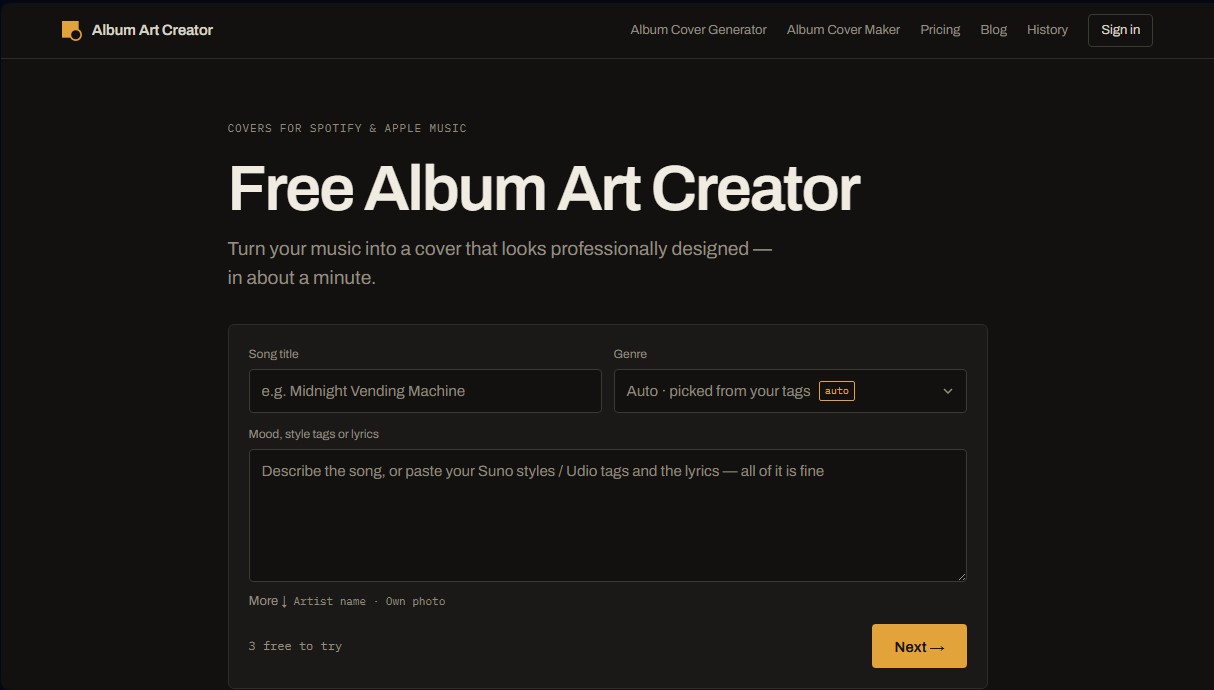
The workflow of this AI for musicians is structured into a three-step process. First, the user inputs the track's context; the system can process style tags from platforms like Suno or Udio, extracting concepts, objects, and locations mentioned in the lyrics to generate a coherent visual foundation. Next, the tool proposes four creative directions: Abstract, Scene, Portrait, and Typography, each with a color palette and composition specifically tailored to the described sound.
One of Album Art Creator’s most standout capabilities is its deep understanding of the visual codes of every genre. The system handles 31 different styles, applying specific materials, lighting, and aesthetics. For instance, a techno cover will prioritize concrete and steel textures, while country music designs will feature elements like weathered wood and dust. Additionally, each genre includes its own font package to ensure the lettering remains faithful to the sonic identity.
Unlike other image generators that permanently embed text into the pixels, this app uses editable layers for the title and artist name. This allows you to modify the typography, size, color, and text placement at any time directly from your computer's browser. Key features and practical benefits include:
- Pre-flight check: A technical review panel that validates the design against the strict rules of distributors like DistroKid, TuneCore, and CD Baby, detecting common errors such as the inclusion of URLs or prices.
- High-resolution export: Allows for the generation of files up to 4096 x 4096 pixels, meeting the most demanding quality requirements.
- Professional formats: Download files in JPG or PNG, while also providing a version of the artwork without text.
- Personal photo styling: An option to upload your own images for the AI to apply a professional artistic treatment.
Album Art Creator is an efficient solution for independent artists who need AI cover art design with immediate results. By automating the creation of album art, the tool ensures the final file is ready for digital distribution, respecting all the technical specifications for format, size, and composition required by today’s music market.
Album Art Creator features and use cases
How to use Album Art Creator
Album Art Creator FAQ
What is the resolution of the covers created with Album Art Creator?
Free downloads are 2048 pixels, while paid plans allow you to export at 3000 and 4096 pixels in JPG or PNG format.
Can I upload my design to platforms like Spotify or Apple Music?
Yes, the tool includes a technical review that ensures the file meets the size and format requirements of Spotify, Apple Music, and distributors like DistroKid or TuneCore.
Is it possible to edit the text after generating the image in Album Art Creator?
Yes, the artist name and title are independent layers that allow you to change the font, size, color, and position without spending additional credits for each edit.
Do I have permission to use the covers for commercial purposes?
Personal use is free, but any credit purchase or Pro subscription activates a permanent commercial license for all images generated on your account.
Does Album Art Creator work with songs created on platforms like Suno or Udio?
Yes, you can paste style tags and lyrics from your songs so the tool can design a cover consistent with the genre and theme of your music.
Can I use my own photo to create the cover art?
Yes, Pro plan users have the option to upload their own photos to apply artistic styles and transform them into professionally designed covers.
What sets Album Art Creator apart from other generic image generators?
This tool understands the visual codes of each musical genre and offers specific font packs so that the image and typography fit the sound perfectly.
How many images can I generate for free?
You can start without registering with three trial credits, and after creating a free account, you will receive three new credits every week for your designs.
What happens if an image generation fails?
The system detects if a generation was not completed successfully and automatically returns the used credits to your account.
How does the technical review feature help before downloading?
This panel checks that the design doesn't contain text prohibited by digital stores and verifies that the contrast and size are correct to avoid rejections from distributors.
Album Art Creator pricing and plans
Free
$0
3 starter credits to try it out—no registration required.
3 weekly credits when you create a free account.
Full editor access and technical pre-flight check panel.
JPG downloads at 2048x2048 resolution.
Limited to personal use only.
Pro
$19/mo (or $14.99/mo billed annually)
100 monthly credits.
Generate up to 4 creative directions per run.
High-resolution exports (3000 and 4096 pixels) in JPG and PNG formats.
Includes a text-free version of the cover art with every download.
Upload and style your own photos.
Full access to all 22 available fonts.
Permanent creation history.
Commercial use license.
Credits (One-time purchase)
Starting at $4.99
Available packages: 8 credits ($4.99), 24 credits ($12.99), or 80 credits ($34.99).
Credits never expire and can be used at any time.
Includes the same export features and commercial license as the Pro plan.
Top-up option for Pro users: 50 additional credits for $4.99.
Album Art Creator Screenshots
Album Art Creator alternatives



NeotypeLab
NeotypeLab uses AI to plan paint schemes for Gunpla, mecha girls and Zoids, with real hobby paint codes, a spraying sequence, a shopping list and an HD preview.

AlreadyRan
AlreadyRan brings dozens of AI image, video and audio models into one web studio with a single credit balance and the cost shown before every generation.


Vidverse AI
Vidverse AI brings several AI video, image and voice models into one web and mobile app, so you can turn text or photos into clips, images and voiceovers.