AI Watercolor Generator
Share
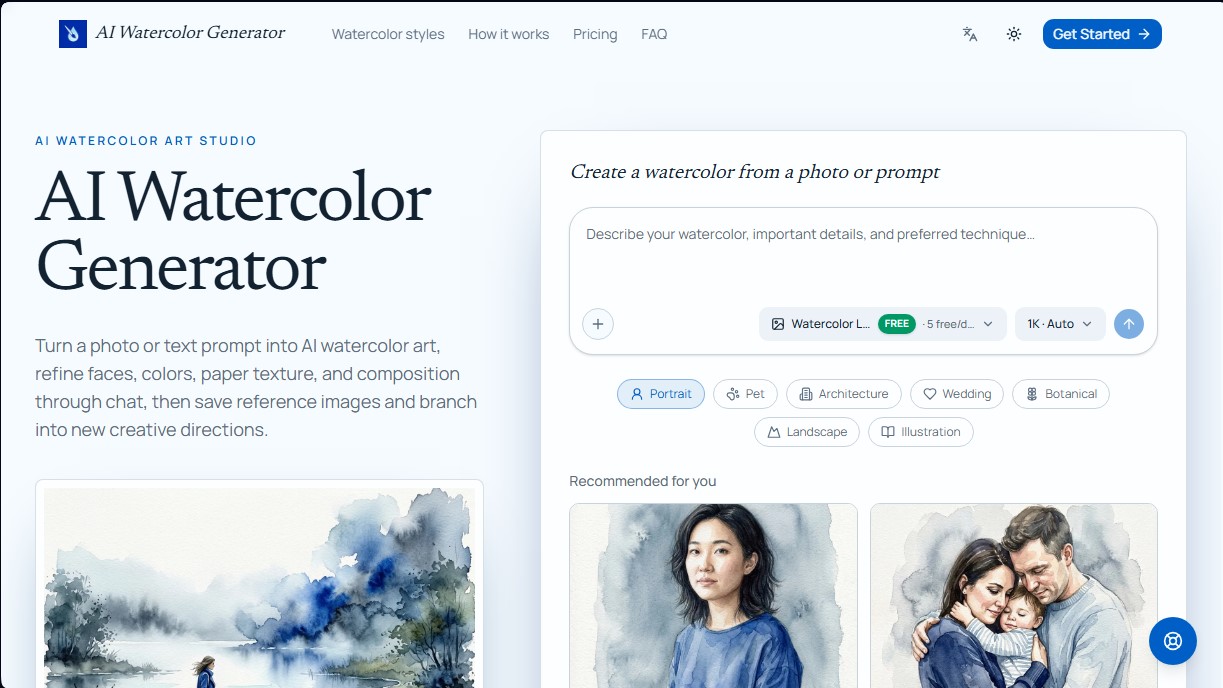
Transform photos or text into watercolor art. Use chat to retouch textures, colors, and faces for a fully personalized artistic finish.
What is AI Watercolor Generator?
AI Watercolor Generator is an advanced AI-assisted design tool specializing in the creation of watercolor-style art. This software allows you to transform both text descriptions and real photographs into digital illustrations that mimic traditional painting techniques, such as color washes, soft edges, and grainy paper textures. Its primary function is to provide comprehensive creative control, allowing users to quickly generate personalized artistic pieces for professional projects or personal keepsakes from their computer.
The platform’s functionality is based on the integration of various image generation models, most notably Watercolor Lite, GPT Image 2, and versions of Nano Banana Pro. Unlike conventional automatic filters, the AI Watercolor Generator utilizes a chat-based editing system. This means users can refine the results by conversing with the AI to request specific adjustments, such as increased pigment transparency, more diffused edges, more vibrant colors, or the correction of specific elements within the composition.
One of its most powerful capabilities is the photo-to-watercolor converter. This feature is ideal for transforming family portraits, pets, or buildings into works of art while maintaining the fidelity of the original subject. The system allows you to specify which architectural details or distinctive marks should remain recognizable, ensuring a balance between artistic abstraction and precision. It is a practical solution for creating custom wedding stationery, commemorative portraits, or botanical illustrations with a professional finish.
Key technical and functional features include:
- Multi-model generation: Selection of different AI engines based on the quality, style, and complexity required for each project.
- Targeted editing: Allows you to highlight a specific area of the generated image and describe concrete changes using natural language, keeping the rest of the artwork intact.
- Professional resolution: Supports exports in 1K, 2K, and 4K, making it easy for both digital use and high-quality physical printing.
- Reusable asset library: The ability to save reference images and visual elements that can be retrieved in future chats to maintain stylistic consistency.
- Creative branching: The option to explore new visual directions from a previous result without losing original progress.
This AI art studio is particularly useful for graphic designers, illustrators, and users looking to create watercolor clipart, book covers, or branding assets with an organic aesthetic. Thanks to its editable prompt recipes, it provides access to complex illustration techniques for any user, enabling high-level aesthetic results through an intuitive and functional process.
AI Watercolor Generator features and use cases
How to use AI Watercolor Generator
AI Watercolor Generator FAQ
What is AI Watercolor Generator, and what does it do?
It’s a creative tool that transforms text prompts or uploaded photos into watercolor-style artwork, which you can then refine through a chat interface.
Can I turn my own photos into paintings with AI Watercolor Generator?
Yes, you can upload portraits, pet photos, or pictures of buildings, and the tool will transform them while keeping key features recognizable based on your instructions.
Can I make changes to the image after it has been generated?
Yes, you can continue the conversation to request specific adjustments, such as softer edges or more vibrant colors, or even fix details by highlighting specific areas.
Am I allowed to use the artwork created with AI Watercolor Generator for commercial purposes?
Paid plans include a commercial license for downloaded results, provided you respect the rights of the original source material.
Which AI models does the platform offer?
You can choose between Watercolor Lite, which is the free daily option, or advanced models like GPT Image 2 and Nano Banana Pro for higher quality.
Do I need to create an account to use the generator?
An account is required to upload images, generate results, save your conversations, and manage your personal asset library.
How can I ensure that faces stay accurate in the watercolor painting?
You should mention this in your initial prompt or highlight the specific area of the generated image to request a targeted revision that preserves important details.
What image resolutions are available for download?
Depending on your credits and chosen plan, you can generate and download your artwork in 1K, 2K, or 4K resolution.
AI Watercolor Generator pricing and plans
Free Plan (0 $)
5 daily image generations with the Watercolor Lite model at 1K resolution.
Store up to 3 assets in the library.
Starter Plan ($8.25 per month - $99 billed annually)
3,600 credits valid for 1 year.
Store up to 50 assets.
Text-to-image and image-to-image features.
Access to all image models (Watercolor Lite, GPT Image 2, Nano Banana Pro, and Nano Banana 2).
Free downloads and commercial use license.
Pro Plan ($16.58 per month - $199 billed annually)
12,000 credits valid for 1 year.
Store up to 200 assets.
Text-to-image and image-to-image features.
Access to all image models on the platform.
Free downloads and commercial use license.
Ultra Plan ($33.25 per month - $399 billed annually)
31,900 credits valid for 1 year.
Store up to 500 assets.
Text-to-image and image-to-image features.
Access to all image models on the platform.
Free downloads and commercial use license.
AI Watercolor Generator Screenshots
AI Watercolor Generator alternatives
Triverse AI
Triverse AI generates 3D models from an image or a text prompt, adds AI PBR textures and produces assets ready for games, 3D printing and XR.

NeotypeLab
NeotypeLab uses AI to plan paint schemes for Gunpla, mecha girls and Zoids, with real hobby paint codes, a spraying sequence, a shopping list and an HD preview.

Image to 3D
Convert 2D images and sketches into textured 3D models using AI. Export in GLB, STL, or USDZ for video games, 3D printing, and augmented reality.