Share
Transfer video motion to any character or image using AI. Create realistic social media clips in minutes without actors or film crews.
What is AIMotionTransfer.org?
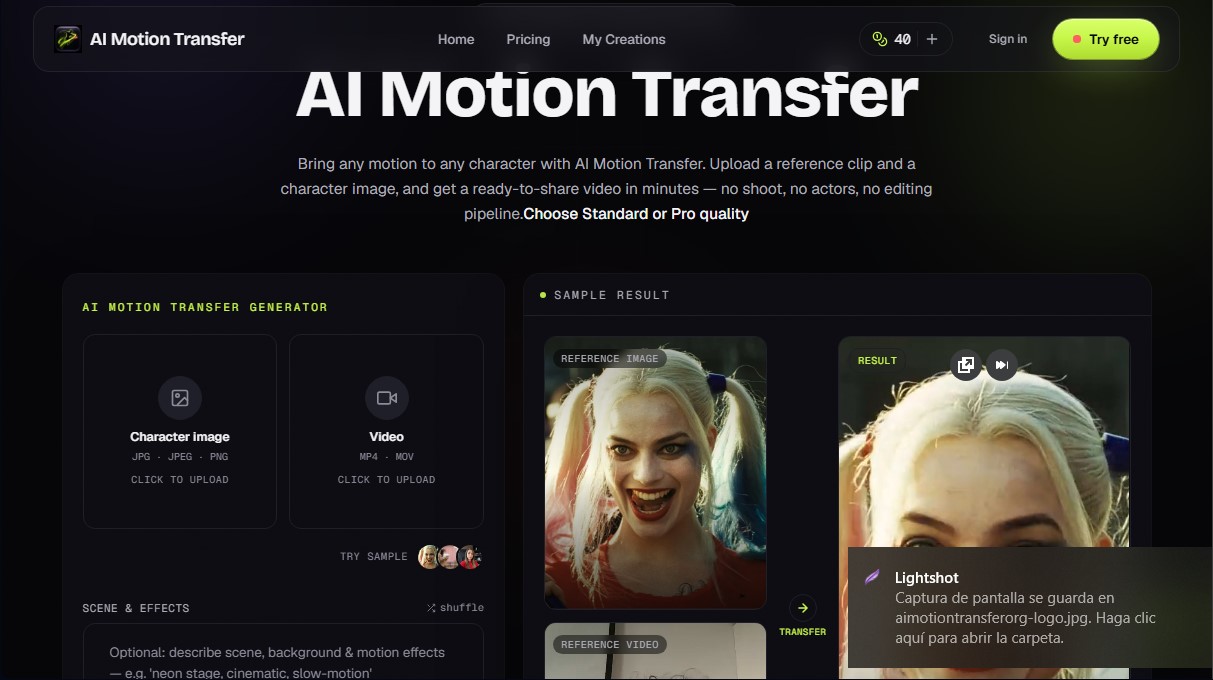
AIMotionTransfer.org is a specialized AI video generation tool that allows you to apply motion from a reference clip to any character, whether starting from a static image or another video. Its primary function is to simplify audiovisual production by removing complex technical barriers such as rigging, motion capture (mocap), or the need for physical shoots with professional actors and studios.
The system operates through a highly efficient motion mapping process. The user provides a source video featuring the action they wish to replicate and the file of the character they want to animate. AIMotionTransfer.org’s technology analyzes the frames, captures the essence of the choreography or facial gestures, and transfers them to the new subject within 3 to 10 minutes. This approach produces share-ready videos without the need for a traditional editing or post-production workflow on a computer.
The technical and functional capabilities of this AI tool include:
- Expression and Action Transfer: Capable of replicating everything from subtle facial expressions in close-ups to complex athletic routines, maintaining frame-by-frame motion consistency.
- Format Flexibility: Supports JPG, JPEG, and PNG formats for static characters, and MP4 or MOV files for video references up to 30 seconds long.
- Quality Adjustments: Offers rendering options in Standard (720p), optimized for speed, and Pro (1080p) for projects requiring maximum clarity.
- Scene Customization: Allows for optional text descriptions to modify the background and lighting or add additional effects (such as cinematic style or slow motion).
- Commercial Rights: Results generated under a subscription include commercial use rights, making it easy to integrate them into professional campaigns.
This platform is an ideal solution for social media managers, marketing agencies, and creators looking to produce scalable content for TikTok, Instagram Reels, YouTube Shorts, or Meta Ads. The ability to generate multiple variations of the same movement across different characters makes AIMotionTransfer.org a key resource for creating dynamic ads and viral content, optimizing both workflow and production costs compared to conventional animation or filming methods. Users have full control over resource consumption, as the platform displays the credit cost and estimated time before starting any AI motion transfer.
AIMotionTransfer.org features and use cases
How to use AIMotionTransfer.org
AIMotionTransfer.org FAQ
What exactly is AIMotionTransfer.org?
It’s a video generation tool that lets you apply the motion from a reference clip to any character image or video you provide.
How long does it take to process a video on AI Motion Transfer?
Most creations are completed within three to ten minutes, depending on the clip's length and the selected quality.
Can I use my own image and video files?
Yes, you can upload any image in JPG or PNG format and videos in MP4 or MOV, provided you have the necessary permissions to use them.
Does AI Motion Transfer offer a free trial?
You receive forty free credits valid for seven days to run your first tests without needing to enter a credit card.
Do I have commercial rights to the results?
Videos generated through any paid subscription plan include commercial use rights for your advertising campaigns and social media.
What is the difference between Standard and Pro quality?
Standard quality generates files at 720p for fast results, while Pro offers 1080p for high-definition finishes.
How does the platform's credit system work?
The credit cost is calculated based on the length of the reference clip and the chosen quality mode, and the exact price is always displayed before you confirm the generation.
Can I cancel my AIMotionTransfer.org subscription at any time?
You can cancel your plan whenever you like through your account settings, and you will retain access to paid features until the end of your billing period.
Which platforms can I post the generated videos on?
Files are downloaded in standard MP4 format, making them fully compatible with TikTok, Instagram Reels, YouTube Shorts, and Meta ads.
AIMotionTransfer.org pricing and plans
Free Trial: 0 $
40 free credits valid for 7 days.
No credit card required.
Limited to 2 successful motion transfer videos.
Results include a light watermark.
Starter: 19 $ per month
400 credits every month.
Approximately equivalent to 11 standard clips (5s) or 3 Pro pieces (10s).
Fast generation.
30-day cloud storage.
Standard (720p) and Pro (1080p) quality modes.
No watermark.
Private generations and saved history.
Creator: 49 $ per month
1,100 credits every month.
Approximately equivalent to 31 standard clips (5s) or 9 Pro pieces (10s).
Priority generation speed.
180-day cloud storage.
Commercial use rights.
Includes all Starter plan features.
Agency: 99 $ per month
2,300 credits every month.
Approximately equivalent to 65 standard clips (5s) or 19 Pro pieces (10s).
Top priority generation queue.
360-day cloud storage.
API access.
Commercial use rights.
Extra credits (one-time purchase):
200 credits: 25 $ (never expire).
600 credits: 35 $ (never expire).
2,000 credits: 100 $ (never expire).
AIMotionTransfer.org Screenshots
AIMotionTransfer.org user reviews
Write a review
Checking your session...
AIMotionTransfer.org Reviews
Loading reviews...
AIMotionTransfer.org alternatives

LyricEdits
AI lyric video generator: upload a song and create lyric videos, karaoke, visualizers and music videos with automatically synced lyrics.