Share
Professional AI-powered video, music, and design editing suite to automate creative tasks and streamline workflows.
What is Apple Creator Studio?
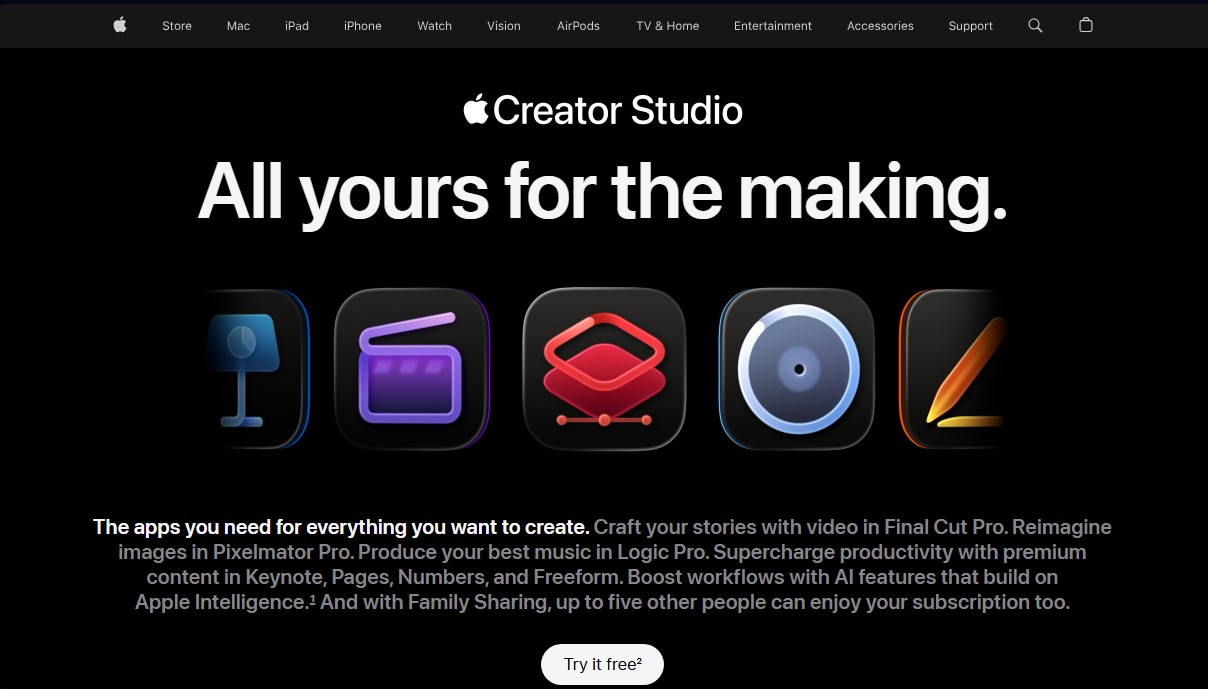
Apple Creator Studio is a comprehensive subscription-based solution designed to centralize the most powerful creative tools in the Apple ecosystem into a single workflow. This bundle is aimed at video editors, musicians, graphic designers, and productivity professionals looking for high-performance tools on their Mac, iPad, or iPhone. The platform combines industry-standard apps like Final Cut Pro, Logic Pro, and Pixelmator Pro, integrating advanced artificial intelligence features to automate technical tasks and boost creativity.
In the realm of video editing, the tool uses Apple Intelligence algorithms to streamline the editing process. Key features include Visual Search and Transcript Search, which allow users to locate specific clips or audio fragments using keywords, eliminating the need to manually review hours of footage. The ecosystem is complemented by Final Cut Camera, which facilitates professional capture from a mobile device and immediate synchronization with the editing environment.
For music production, Logic Pro incorporates AI Session Players, which act as a virtual band (bass, drums, keyboards) capable of adapting in real-time to the user's style. Other key technological capabilities include:
- Stem Splitter: Technology to separate mixed audio tracks into individual elements like vocals, drums, or bass.
- Mastering Assistant: Intelligent processing for the final polish of mixes.
- Beat Detection: Automatic synchronization of video clips with the music's rhythm.
Graphic design and image editing are handled through Pixelmator Pro, which uses AI for automatic background removal, image repair, and detail enhancement via Super Resolution, a feature that allows files to be upscaled while maintaining sharpness. Additionally, the subscription adds exclusive capabilities to productivity tools like Keynote, Pages, and Numbers:
- Automatic presentation generation from text outlines.
- Creation of smart presenter notes based on slide content.
- Magic Fill in Numbers to complete cells by recognizing data patterns.
- Access to the Content Hub with premium resources and professional templates.
The performance of Apple Creator Studio is optimized for Apple Silicon hardware, leveraging local processing power for machine learning tasks. While many of its features are available on iPad and iPhone, the full experience requires the latest versions of macOS and iPadOS. The system supports Family Sharing, making it easy for up to five people to share access to the apps and high-quality creative content included in the platform.
Apple Creator Studio features and use cases
How to use Apple Creator Studio
Apple Creator Studio FAQ
What apps are included in Apple Creator Studio?
The subscription includes Final Cut Pro, Pixelmator Pro, Logic Pro, Motion, Compressor, and MainStage, as well as advanced intelligence features in Keynote, Pages, Numbers, and Freeform.
How can I get a free trial of Apple Creator Studio?
New users can enjoy a one-month free trial, while the purchase of a new Mac or iPad includes a three-month subscription at no additional cost.
Can I share my Apple Creator Studio subscription with other users?
Yes, using Family Sharing, you can share the standard plan with up to five other people, though the student and educator plan is for individual use only.
What happens to my projects if I cancel my Apple Creator Studio subscription?
Your files will remain on your devices, but you will need an active subscription to edit them again within the service's professional applications.
Can I still use my previously purchased apps without Apple Creator Studio?
Yes, any one-time purchase versions of apps like Final Cut Pro or Logic Pro that you already own will continue to function independently of the subscription.
What are the technical requirements to use Apple Creator Studio?
We recommend having macOS 26, iPadOS 26, or iOS 26 and an internet connection, as well as hardware compatible with Apple Intelligence for certain features.
How much does Apple Creator Studio cost for education?
Verified students and teachers can subscribe at a discounted rate of $2.99 per month or $29.99 per year.
Does Apple Creator Studio include artificial intelligence tools?
Yes, the service features advanced capabilities such as image background removal, automated slide creation, and music production assistance.
Where can I download the Apple Creator Studio apps?
All tools included in the subscription are available for download via the App Store on compatible devices.
Apple Creator Studio pricing and plans
Free Version (Basic Apps)
Free access to standard versions of Keynote, Pages, Numbers, and Freeform.
Basic productivity and document editing tools.
Restrictions: Does not include advanced Apple Intelligence features, premium templates, or access to the Content Hub library.
Standard Plan
12,99 $ per month or 129 $ per year (includes a 1-month free trial).
Full access to Final Cut Pro, Pixelmator Pro, and Logic Pro.
Includes additional apps: Motion, Compressor, and MainStage.
Premium and AI features in Keynote, Pages, Numbers, and Freeform.
Content Hub access: A library of high-quality photos, illustrations, and graphics.
Family Sharing option to share the subscription with up to five people.
Limitations: Visual Search and Transcript Search features are only available in US English. Requires devices with Apple silicon (M1 or later) and macOS 15.6 / iPadOS 26 or higher.
Student & Educator Plan
2,99 $ per month or 29,99 $ per year (includes a 1-month free trial).
Access to all creative apps and AI features from the Standard Plan.
Restrictions: Individual use only (Family Sharing not available). Requires verification of student or educator status.
New Device Offer
3-month free trial.
Available with the purchase and activation of a new iPad or Mac.
Restrictions: Must be claimed within 3 months of device activation. Valid for new subscribers or eligible returning subscribers only.
Apple Creator Studio Screenshots
Apple Creator Studio alternatives

ColorCraft
Create Amazon KDP books. Generate coloring pages, stories, puzzles, and print-ready full covers, plus promotional mockups in a single workflow.


NeotypeLab
NeotypeLab uses AI to plan paint schemes for Gunpla, mecha girls and Zoids, with real hobby paint codes, a spraying sequence, a shopping list and an HD preview.