
Share
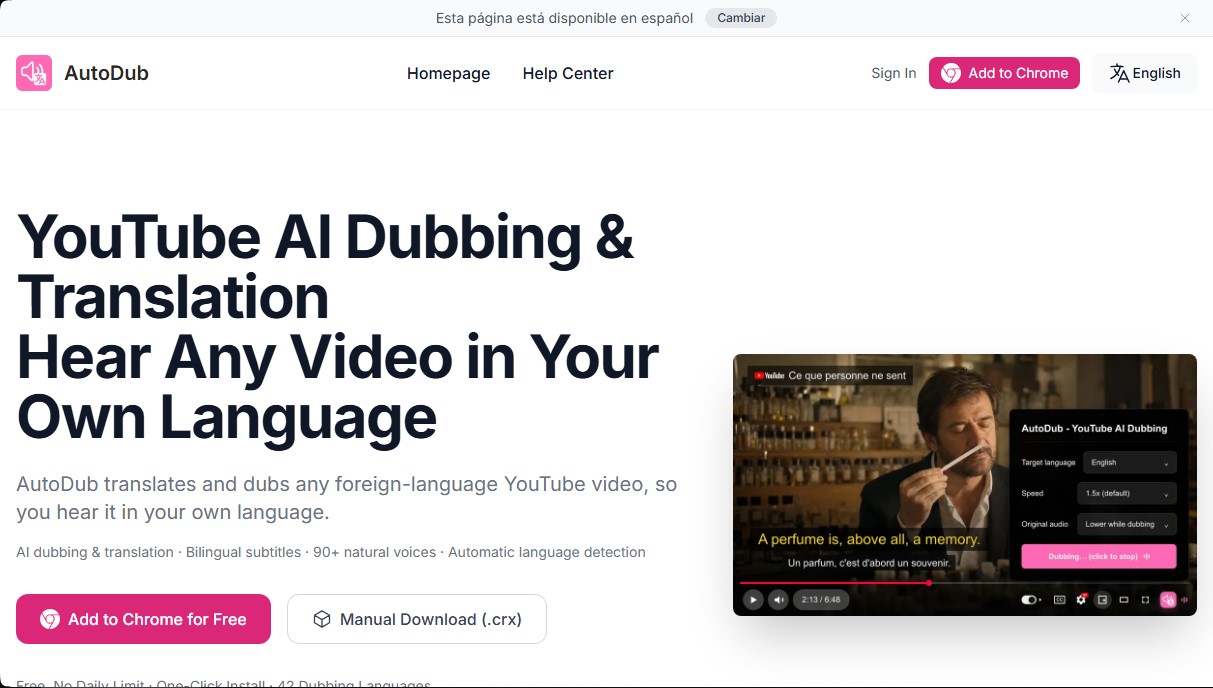
Browser extension that translates and dubs any YouTube video in real time. Features natural AI voices, language detection, and integrated bilingual subtitles.
What is AutoDub?
AutoDub is a browser extension designed for YouTube video dubbing and translation using artificial intelligence. Its primary function allows any user to listen to video content in their own language, instantly removing language barriers while browsing from their computer. This tool integrates directly into YouTube's playback controls, facilitating a smooth and seamless user experience.
The operation of AutoDub is powered by the latest Google AI translation models and the use of high-fidelity neural voices. The system performs automatic detection of the video's original language and processes the subtitle tracks to generate a new, synchronized voiceover. The technology employed allows the tool to offer more than 90 natural voices that mimic human intonation, moving away from conventional robotic voices. For the process to be effective, the original video must have a subtitle track, whether provided by the creator or automatically generated by the platform.
Among the technical capabilities and benefits of this YouTube dubbing extension, the following stand out:
- Translation into 42 target languages, covering languages such as Spanish, English, Chinese, Japanese, German, French, and Arabic, among others.
- The option to enable bilingual subtitles on screen, which allows you to view the original and translated languages simultaneously.
- Optimized background processing that ensures video playback does not suffer from lag or affect browser performance.
- Full compatibility with Chromium-based browsers, such as Chrome, Edge, and Brave, in addition to having a version for Firefox.
This tool is highly useful for various user profiles. Technical users can follow programming tutorials or engineering content from international channels in their native language. In the academic field, it facilitates access to lessons from educational platforms and specialized conferences. Likewise, it is a practical solution for consuming vlogs, documentaries, long-form interviews, and global financial analyses that do not have official dubbing.
Regarding privacy, AutoDub does not require creating an account or logging in for basic use. Data processing is limited to the video subtitles to execute the translation in the cloud, ensuring that user information is not commercialized. As a tool focused on productivity and learning, it allows any viewer to watch dubbed YouTube videos with a single click, making global content immediately accessible.
AutoDub features and use cases
How to use AutoDub
AutoDub FAQ
How much does AutoDub cost?
AutoDub is free for personal use and currently has no daily usage limits.
What languages does AutoDub support?
The tool allows you to dub videos into forty-two different languages and automatically detects the content's original language.
Which browsers can I install the AutoDub extension on?
You can use it on Chrome, Edge, Brave, and other Chromium-based browsers, and a Firefox version is also available.
Why doesn't the dubbing start on some YouTube videos?
AutoDub requires the video to have available or auto-generated subtitles from the platform to perform the translation.
What is the quality of the translation and the voices?
We use the latest Google AI models along with natural neural voices to deliver a smooth and professional result.
Can AutoDub be used on other video platforms like Netflix?
The extension is currently designed specifically for YouTube, though compatibility with other services is being explored for the future.
Do I need to create an account to use AutoDub?
No registration or login is required to use the extension, and user data is never sold to third parties.
Does using the extension affect playback speed?
AutoDub is optimized so that translation processing happens in the background without interrupting the video's flow.
What should I do if I need technical support?
You can submit your inquiries through the extension's feedback feature or email the support team directly.
Does the tool work offline?
No, it cannot be used offline because AutoDub requires internet access to process translations using artificial intelligence.
AutoDub pricing and plans
Free Version: 0 $
Real-time AI dubbing and translation for YouTube videos.
No daily usage limits for personal use.
On-screen bilingual subtitles.
Automatic detection of the video's original language.
Access to over 90 natural and lifelike voices.
Dubbing support for 42 different languages.
Compatible with Chrome, Edge, Brave, and Firefox browsers.
No registration or account creation required.
Restrictions: The video must have a subtitle track (including YouTube's auto-generated captions) and is not compatible with the Safari browser.
For any other plans or additional enterprise features, please visit the official website, as the tool is currently offered for free for personal use.
AutoDub Screenshots
AutoDub alternatives




MicMonster
Generate natural voiceovers from text with 800+ voices in 140 languages. Adjust intonation and pace to create professional videos, podcasts, and audiobooks.
Choicer Voicer
AI tool for voice cloning, video translation, and voiceovers. Design unique sounds and dub games, animations, or social media content.
Palabra.ai
Real-time AI voice translator for events, video calls, and streaming. Offers simultaneous translation with voice cloning, low latency, subtitles, and API integration.