

Share
What is Bannerbear?
Bannerbear is an image and video generation API that turns on-brand templates into images, PDFs, animations and videos for marketing teams, ecommerce stores and developers who need thousands of variations without designing each one. You design the template once, then fill it with data through the API, integrations or AI agents.
What is Bannerbear used for?
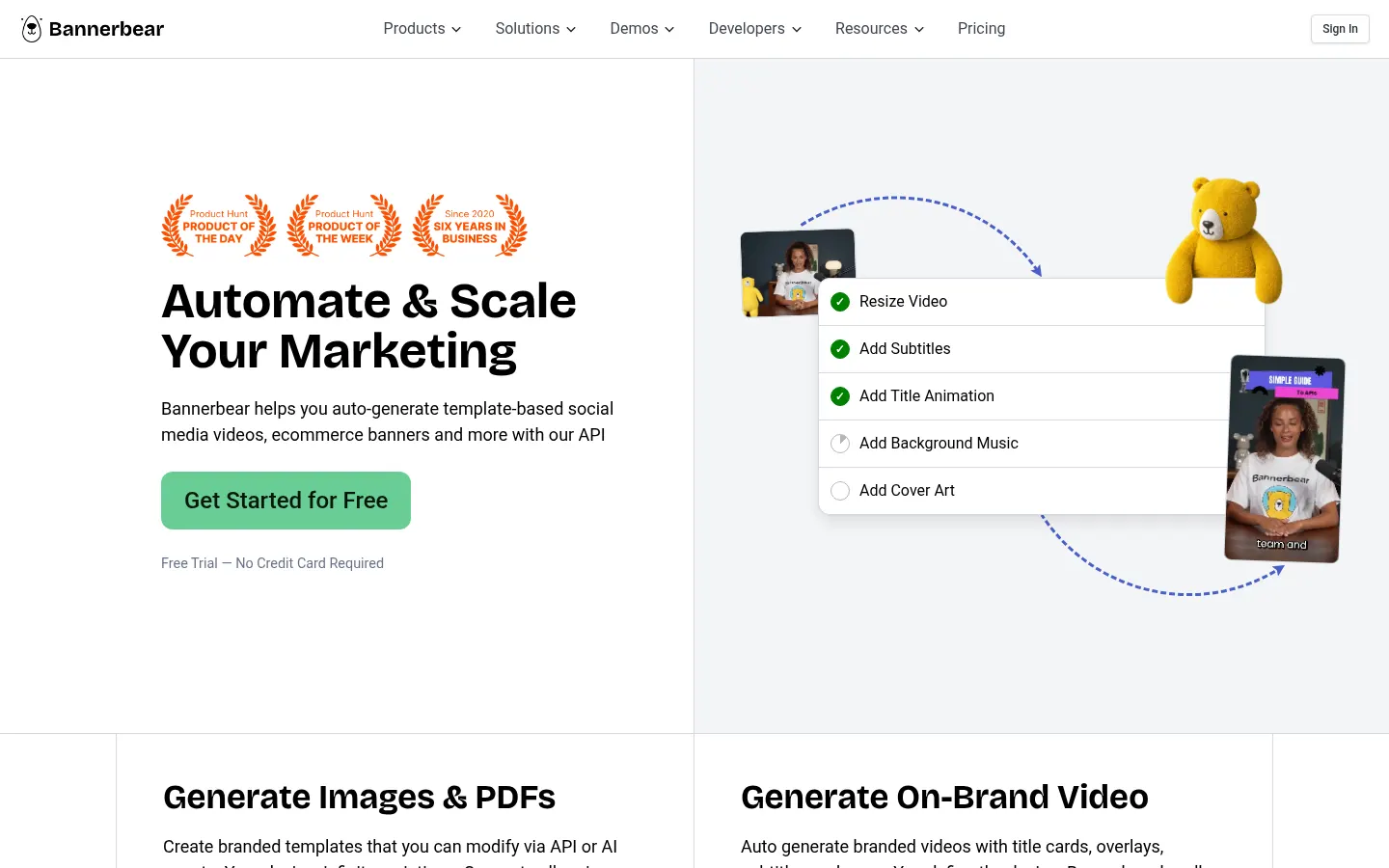
It automates repetitive visual work: product banners, social media graphics, certificates, article cover images or short branded video clips. There are separate endpoints for each job: the Image API (all common image formats), a PDF API for single or multi-page files, an Animation API and a Video API. On video it can resize, burn in subtitles, add animated titles, background music or cover art. Some layers rely on AI to detect faces or subjects, remove backgrounds or generate new ones.
How does Bannerbear work?
You build a template in its editor or start from the library, mark which layers are dynamic (text, image, color) and send the values. There is a documented REST API with an OpenAPI spec and client libraries for major languages, plus a Workflow API that chains steps together. It connects natively to 50+ tools such as Airtable, Notion, WordPress and Ghost, works with Zapier, and ships an MCP server so AI agents can trigger workflows.
Who is Bannerbear for?
- Ecommerce brands producing banners per product and per region.
- Real estate agents generating personalised listing graphics.
- Publishers turning articles into images or short videos.
- Podcasters who want consistent animated intros and captioned clips.
Bannerbear pros and cons
Pros: it keeps brand consistency at very high volume, separates design from data and fits both no-code automations and custom code. Cons: it is not a freeform design editor; everything starts from templates, and getting value from it means setting up dynamic layers carefully. Usage is counted per render and grows with output format, scale, video length and AI layers, so estimate your volume before wiring it into production.
Bannerbear features and use cases
How to use Bannerbear
Bannerbear FAQ
What is Bannerbear?
Bannerbear is an API that generates images, PDFs, animations and videos from on-brand templates to automate repetitive visual content.
Is Bannerbear free?
There is no permanent free tier, but you can try it with credits and no card. Check the pricing section for the paid tiers.
Does Bannerbear have an API?
Yes, the API is the core product: a documented REST API with an OpenAPI spec, official libraries and a Workflow API.
Can I use Bannerbear without coding?
Yes, through Zapier, Airtable, Notion, WordPress or form integrations; the API gives developers finer control.
Does it support other languages like Spanish?
The app and docs are in English, but templates accept any text, so you can render graphics in Spanish or other languages.
How are Bannerbear credits counted?
A basic image render uses one credit, while extra formats, higher scale, AI layers and video work use more.
Can Bannerbear edit video?
Yes, the Video API can resize, crop, join clips, add subtitles, music, animated titles and cover art.
Does Bannerbear work with AI agents?
Yes, its MCP server lets an AI agent trigger workflows and render assets on its own.
What happens when credits run out?
Requests are refused with a message showing the credits needed, so you never end up with a negative balance.
What are the best Bannerbear alternatives?
On GptZone you can compare Canva AI for hands-on AI design and Predis.ai for automated social media posts.
Bannerbear pricing and plans
Reference price: 49 USD / month. Source · Verified: November 7, 2026
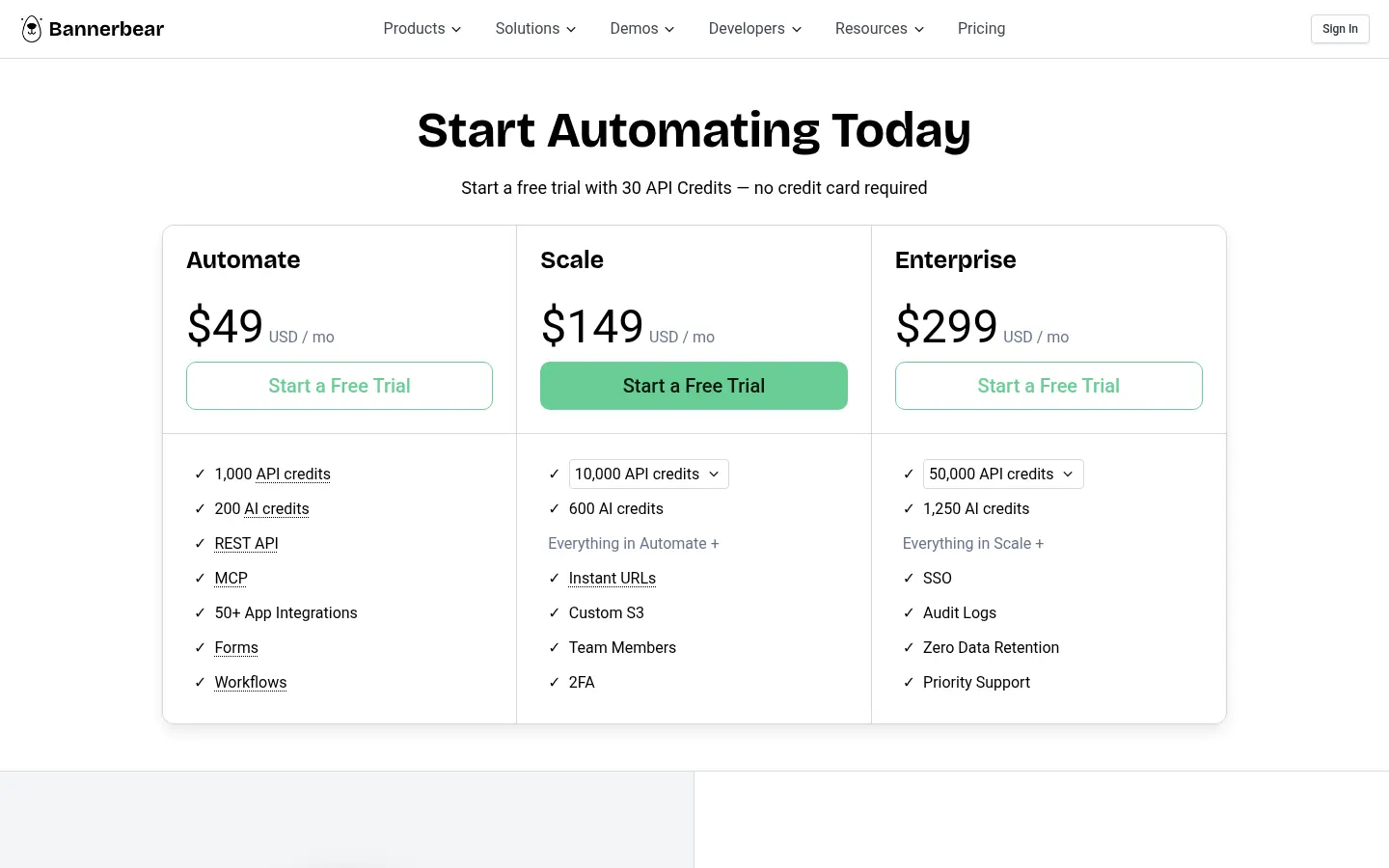
Official pricing in USD (Checked on: 07/11/2026). Free trial with 30 API credits, no card required.
- Automate: $49/month — 1,000 API credits, 200 AI credits, REST API, MCP, 50+ integrations, forms and workflows.
- Scale: $149/month — from 10,000 API credits (up to 40,000), 600 AI credits, instant URLs, custom S3, team members and 2FA.
- Enterprise: $299/month — from 50,000 API credits (up to 2,000,000), 1,250 AI credits, SSO, audit logs, zero data retention and priority support.
One image at scale 1 uses 1 credit; animations use 2 credits per second; video tools use 1 to 4 credits.
Bannerbear Screenshots
Bannerbear user reviews
Write a review
Checking your session...
Bannerbear Reviews
Loading reviews...
Bannerbear alternatives


Logo Foundry
Generate logos with AI and automatically create favicons, app icons, and social media assets. Includes production-ready code for your web projects.

Ad Studio by The Brief
Design, animate, and scale ads with AI. Adapt creatives to 50+ formats, generate multimedia, and automate thousands of variants using dynamic data feeds.

Text Behind Image | MakeItAQuote
Place text behind photo subjects automatically with AI. Runs privately in your browser perfect for social media covers and thumbnails.