
Text Behind Image | MakeItAQuote
Share
Place text behind photo subjects automatically with AI. Runs privately in your browser perfect for social media covers and thumbnails.
What is Text Behind Image | MakeItAQuote?
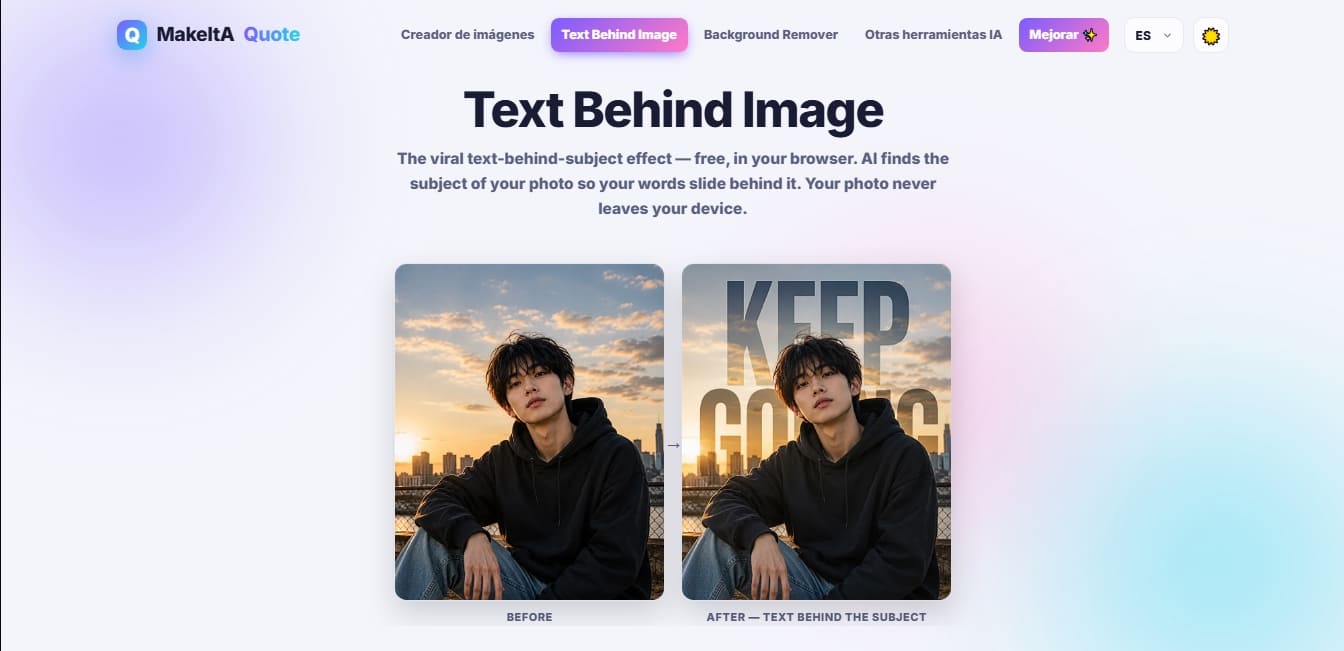
Text Behind Image is an AI-powered visual editing tool designed to automatically apply the popular effect of layering text behind the subject of a photo. This web application allows content creators, designers, and social media users to generate images with professional visual depth without the need for complex editing software. Its primary function is to use algorithms to identify the central element of an image whether it’s a person, a pet, a vehicle, or a product to place customizable text layers between the background and the detected subject.
The functionality of Text Behind Image stands out for its focus on privacy and technical efficiency. Unlike other cloud-based editors, this tool uses a subject detection model that runs locally on the user's computer or browser. This ensures that photos are never uploaded to an external server, maintaining file integrity on the local device. The AI analyzes image segmentation in real-time, separating the foreground from the background to allow words to slide precisely behind the contours of the object or individual.
The platform offers an intuitive interface where users can manage the entire creative process manually or through pre-configured templates. These templates include various visual styles, such as neon effects, elegant serif fonts, and high-impact designs. Once the image is processed, you can adjust the font, size, color, and opacity, as well as freely position the text by dragging it over the preview to achieve the desired framing.
Its core capabilities include:
AI Layer Segmentation: Automatic subject identification to create a multi-layered depth effect.
Local Processing: Enhanced security and speed by running the AI model directly in the browser.
Typography Customization: A wide selection of fonts and style adjustments to fit different visual identities.
High-Quality Export: Download results in high-resolution PNG format, preserving the photo's original dimensions.
Versatile Use Cases: Optimized for creating YouTube thumbnails, Reel covers, digital posters, and promotional product content.
This solution is ideal for users seeking immediate, professional results. By automating a task that traditionally requires the use of layer masks and manual paths, Text Behind Image positions itself as a highly efficient automated graphic design tool. It is especially effective for photographs with a clear subject and good contrast against the background, allowing you to transform a conventional image into a trending visual piece in just a few seconds.
Text Behind Image | MakeItAQuote features and use cases
How to use Text Behind Image | MakeItAQuote
Text Behind Image | MakeItAQuote FAQ
How exactly does the Text Behind Image effect work?
The AI automatically detects the subject of your photo and places the text in a layer between the background and the main object.
Are my photos uploaded to a server when using Text Behind Image?
No, all image processing is done entirely within your browser, and your photos never leave your personal device.
Is the Text Behind Image tool free to use?
Yes, you can create and download unlimited images at no cost, though the free version includes a small watermark.
What kind of photos work best for this effect?
The best results are achieved with images that have a clear, well-defined main subject, such as portraits of people, pets, or products.
How can I remove the watermark from my creations?
To download images without watermarks and unlock all fonts, you must subscribe to the Pro plan or purchase a lifetime license.
Can I use my Text Behind Image subscription on multiple devices?
Yes, you just need to enter your license key on the pricing page of the new device to activate all Pro features.
What download formats does the app offer?
The tool allows you to export your designs in high-resolution PNG format while maintaining the original size of the photo you uploaded.
Is there a download limit for the free version?
There is no set limit for individual downloads, so you can create as many watermarked images as you need.
How can I request a refund if I'm not satisfied with the Pro plan?
You can request a full refund by replying to your purchase confirmation email within the first fourteen days.
What additional benefits does the batch generator offer?
The batch generator allows you to process multiple images at once and, in the Pro version, lets you download a compressed file containing all results without watermarks.
Text Behind Image | MakeItAQuote pricing and plans
Free
$0 forever
All formats and sizes (Stories, Reels, landscape, links).
Basic fonts and gradients.
Photo quotes in color and black and white.
Unlimited downloads with watermarks.
Free daily AI rewrites.
Batch generator limited to 3 downloads per batch.
Restriction: Includes a small watermark on all exports.
Pro (Monthly)
$2.49 per month (introductory offer; regular price $4.99)
No watermarks on any exports.
Access to all premium fonts and gradients.
Unlimited downloads.
Unlimited AI rewrites.
Full batch generator (download as a ZIP file with no watermarks).
Includes a 7-day free trial.
Pro (Lifetime)
$49 (one-time payment)
Lifetime access to all Pro features.
No recurring subscription fees.
Includes all future updates and premium features.
Text Behind Image | MakeItAQuote Screenshots
Text Behind Image | MakeItAQuote user reviews
Write a review
Checking your session...
Text Behind Image | MakeItAQuote Reviews
Loading reviews...
Text Behind Image | MakeItAQuote alternatives

utilz Background Remover
Remove image backgrounds for free with total privacy in your browser. Create transparent or colored backgrounds without uploading files while maintaining original resolution.

ColorCraft
Create Amazon KDP books. Generate coloring pages, stories, puzzles, and print-ready full covers, plus promotional mockups in a single workflow.



