

Share
AI studio for editing and transforming photos or videos. Generate professional portraits, restore images, change styles, and quickly create realistic visual content.
What is BestPhoto?
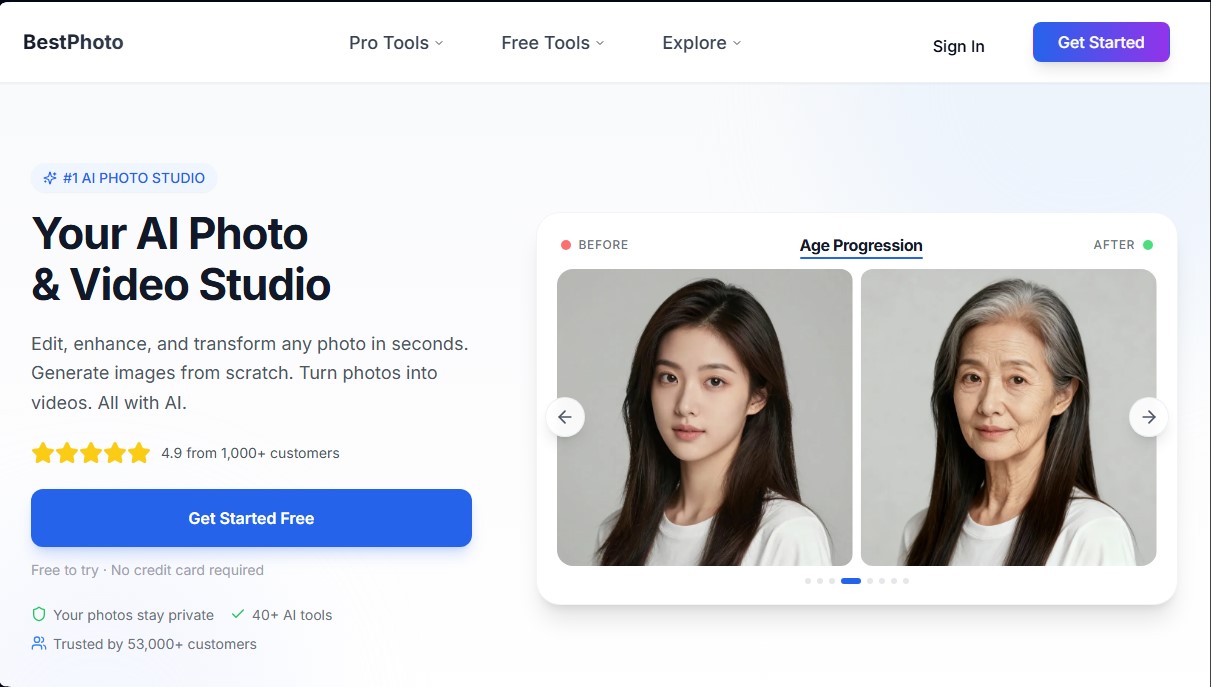
BestPhoto positions itself as a comprehensive AI-powered photo and video studio designed to transform visual content creation. This platform allows users to edit, enhance, and generate high-quality images and videos in seconds, eliminating the need for traditional photo shoots or complex technical skills. It is a versatile tool serving both professionals looking to optimize their digital presence and content creators who require constant, original visual material.
BestPhoto's operation is based on powerful deep learning algorithms that process the user's physical features to generate photorealistic results. By uploading a series of photos from a computer or mobile device, the AI trains a specific model that allows for portraits in various styles and settings. In addition to model-based generation, the tool includes an AI image editor capable of interpreting natural language instructions to instantly add objects, change backgrounds, or modify clothing.
Key capabilities focused on productivity and creativity include:
- Professional Headshots: Creation of corporate images optimized for LinkedIn and company websites, enhancing personal branding.
- Photo Restoration: Tools to repair old, damaged, or blurry images, preserving family memories with modern clarity.
- AI Video Generator: Transformation of static photos into dynamic clips, including "talking head" videos and podcast-style formats for social media.
- Style Tools: Features to try out hairstyles, beards, and complete look changes using generative AI.
- Social Media Content Creation: Generation of YouTube Shorts and viral videos without the need for a camera—ideal for automated channels.
The practical utility of BestPhoto lies in its ability to democratize access to studio-quality visual content. For digital marketing, it facilitates the creation of custom stock videos and promotional material without licensing costs. For personal use, it allows users to improve profiles on dating apps or social media with photos that authentically highlight their best version. The entire process is conducted under strict privacy protocols, where uploaded images are used exclusively for personal model training and can be deleted at any time, ensuring a secure and professional environment for digital identity management. Notably, the platform offers free editing tools that do not require prior registration, facilitating a fast workflow for quick touch-ups.
BestPhoto features and use cases
How to use BestPhoto
BestPhoto FAQ
What is BestPhoto and how does this AI tool work?
BestPhoto is a digital photo studio that lets you edit, enhance, and transform photos or videos in seconds, as well as generate new images using artificial intelligence.
Can I try BestPhoto's features for free?
Yes, the platform allows you to start for free without a credit card, offering twenty free credits upon sign-up to test the various tools available.
Can I create professional LinkedIn headshots with BestPhoto?
Absolutely. You can generate high-quality professional profile pictures specifically designed to enhance your presence on professional networks and job boards.
Are my photos safe and secure on the platform?
Your images are completely private and are used exclusively to train your personal model. You also have the option to delete all your data at any time through the settings.
What kind of video content can I create with BestPhoto?
The tool allows you to transform photos into videos of people speaking, create podcast-style clips, animate old photos, or generate viral social media content.
Can I use the generated images for commercial purposes?
Paid subscription plans grant full commercial rights, allowing you to use the photos on business websites, marketing materials, and advertisements.
How long does it take to get results?
Quick editing tools work in seconds, while full AI-generated headshot packages typically take between forty minutes and an hour.
What are the requirements for photos uploaded to BestPhoto?
For best results, we recommend uploading ten to fifteen varied photos with good lighting. Avoid accessories that cover your face, such as sunglasses or heavy filters.
BestPhoto pricing and plans
Free Version
Free trial available; no credit card required.
- 20 free credits upon registration to test AI tools.
- Access to free editing tools (photo restoration, outfit swap, professional headshots, background removal, and object insertion).
- No registration required for basic image editing features.
Basic Plan
Price: 14,00 € per month (or 7,70 €/mo billed annually).
- 300 credits per month.
- 1 AI model training per month (additional trainings for 100 credits).
- No watermarks.
- Access to over 40 image and video tools.
- Queue up to 6 simultaneous generations.
- Fast, high-resolution (Hi-Res) generations.
- Pro Upscaling and priority support.
Starter Plan
Price: 29,00 € per month (or 17,40 €/mo billed annually).
- 1,000 credits per month.
- 2 AI model trainings per month (additional trainings for 100 credits).
- No watermarks.
- Access to over 40 image and video tools.
- Queue up to 8 simultaneous generations.
- Fast, high-resolution (Hi-Res) generations.
- Pro Upscaling and priority support.
Hobby Plan
Price: 49,00 € per month (or 34,30 €/mo billed annually).
- 2,200 credits per month.
- 3 AI model trainings per month (additional trainings for 100 credits).
- No watermarks.
- Access to over 40 image and video tools.
- Queue up to 10 simultaneous generations.
- Fast, high-resolution (Hi-Res) generations.
- Pro Upscaling and priority support.
Pro Plan
Price: 99,00 € per month (or 79,20 €/mo billed annually).
- 4,000 credits per month.
- 5 AI model trainings per month (additional trainings for 100 credits).
- No watermarks.
- Access to over 40 image and video tools.
- Queue up to 10 simultaneous generations.
- Fast, high-resolution (Hi-Res) generations.
- Pro Upscaling and priority support.
Pay-As-You-Go Credits
Option available exclusively for subscribers of any paid plan.
- Purchase additional credits at a discount.
- Credits do not expire or reset monthly.
BestPhoto Screenshots
BestPhoto alternatives

utilz Background Remover
Remove image backgrounds for free with total privacy in your browser. Create transparent or colored backgrounds without uploading files while maintaining original resolution.

ColorCraft
Create Amazon KDP books. Generate coloring pages, stories, puzzles, and print-ready full covers, plus promotional mockups in a single workflow.



