

Share
What is Boomerang?
Boomerang is a productivity extension for Gmail built by Baydin that adds send later, follow-up reminders, meeting scheduling and an AI writing assistant right inside the Gmail and Google Workspace inbox, with a separate version for Outlook.
What is Boomerang used for?
It gives you control over when you send and when you see each email again. With Send Later you write now and schedule delivery using phrases like "next Monday"; the Boomerang button archives a message and brings it back on the date you pick, and you can be reminded only if nobody replies.
How does Boomerang schedule meetings?
You can suggest times or insert a bookable schedule in an email; guests see your availability in a live calendar image and the event lands on your calendar once they choose. It also offers Meeting Poll for group voting, availability sharing and Zoom and Google Meet integration.
What does the Boomerang AI do?
Respondable is an assistant that, based on data from millions of messages, analyzes your draft in real time and suggests changes to length, tone and structure to get more replies.
What else does Boomerang include?
Inbox Pause stops new email from arriving so you can focus, plus recurring messages, read receipts, click tracking and iPhone and Android apps.
Boomerang pros and cons
- Pro: everything happens inside Gmail without switching tools.
- Pro: combines email and meeting scheduling.
- Pro: SOC 2 Type 2 security certification.
- Con: the AI is limited to analyzing your writing.
- Con: the basic version limits how many messages you can schedule.
Boomerang features and use cases
How to use Boomerang
Boomerang FAQ
What is Boomerang?
It is a Gmail extension that schedules emails, reminds you to follow up, books meetings and helps you write with AI.
Is Boomerang free?
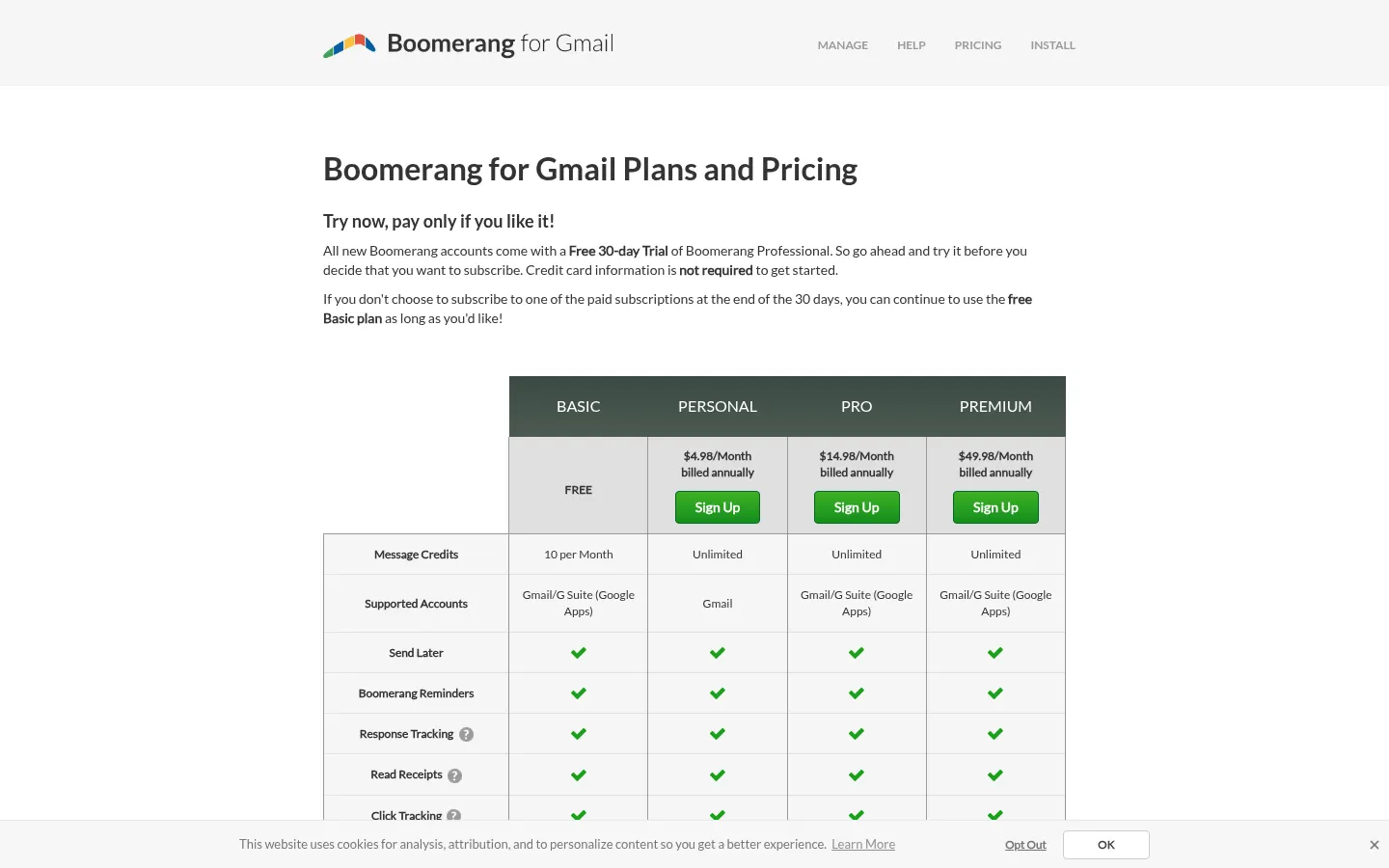
There is a free Basic plan with 10 message credits per month; paid plans start at 4.98 USD/month billed annually.
Does Boomerang have an API?
Its site does not advertise a public API; the Premium plan offers Salesforce and CRM integration.
Does Boomerang work in Spanish?
You can schedule and manage Spanish emails, but the interface and Respondable are designed for English.
Does Boomerang work with Outlook?
Yes, there is Boomerang for Outlook in addition to the Gmail and Google Workspace version.
What is Respondable?
It is the Boomerang AI assistant that analyzes your draft and suggests changes to get more replies.
What is Inbox Pause?
A feature that stops new email from arriving until you decide to see it, so you can focus on deep work.
Does Boomerang have a mobile app?
Yes, Boomerang has apps for iPhone and Android so you can schedule and snooze emails on the go.
What are the best Boomerang alternatives?
On GptZone you can compare Superhuman, Shortwave and Reclaim for AI email and scheduling.
Boomerang pricing and plans
Reference price: 4.98 USD / month. Source · Verified: November 3, 2026
Boomerang Screenshots

Boomerang user reviews
Write a review
Checking your session...
Boomerang Reviews
Loading reviews...
Boomerang alternatives






Cue by Manus
Personal AI agents from Manus with their own phone, email, wallet and computer that make calls, book things and run errands, checking with you first.