Share
What is bulkimg?
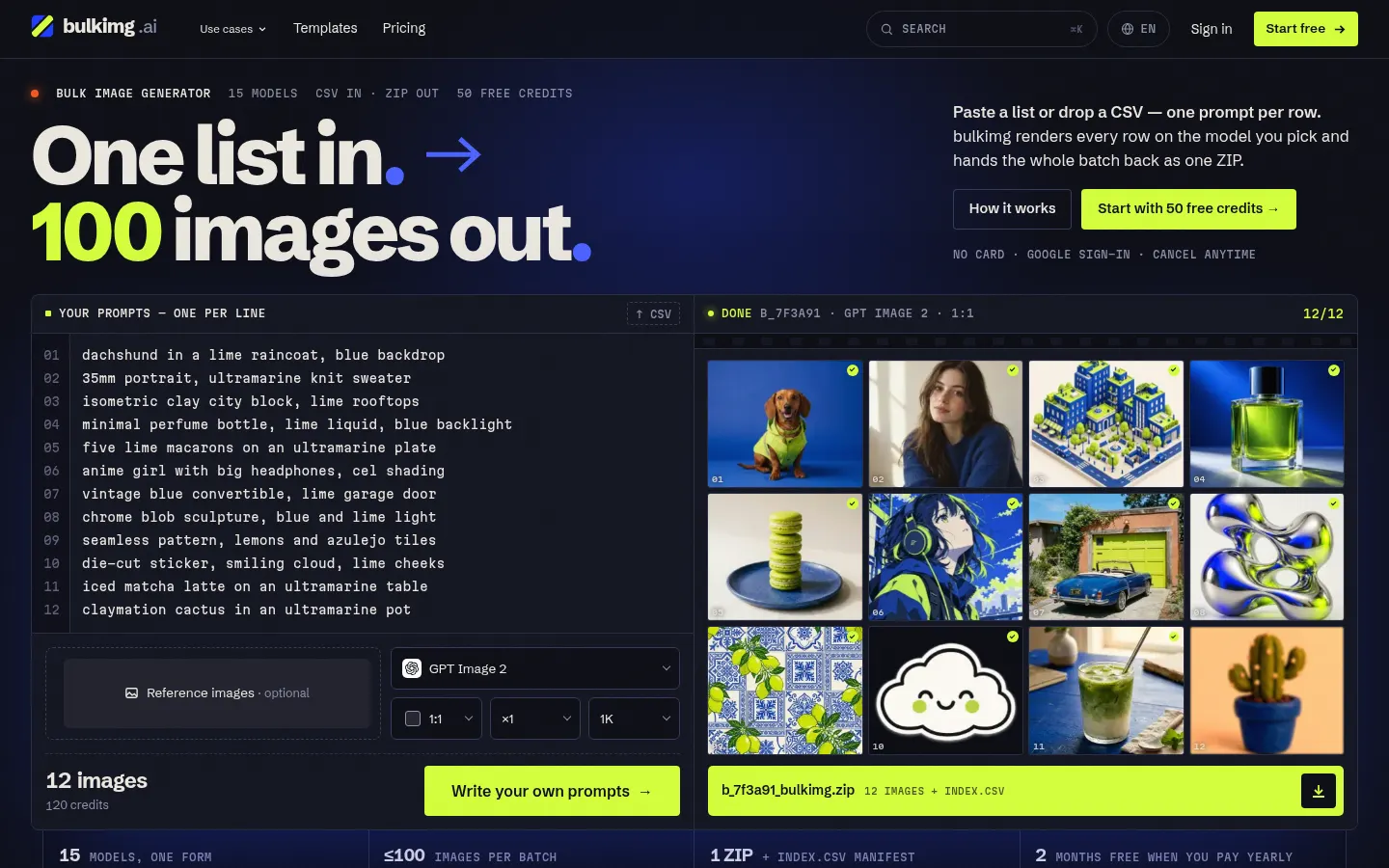
bulkimg is a bulk AI image generator that renders images from a prompt list or a CSV with a prompt column. It is built for production work that needs many images in one consistent style: video storyboards, coloring-book pages, ad variants, catalog or menu photos and flashcards.
What is a bulk image generator and how does bulkimg work?
Instead of one prompt and one wait, you paste one line per image or drop a CSV, choose a single model, aspect ratio (1:1, 16:9, 9:16, 4:5, 3:4), resolution and images per prompt. bulkimg renders the rows in parallel, saves them to your library and hands back one ZIP with an index.csv mapping every file to its prompt. You see the total credit charge before the batch starts.
Which image models does bulkimg include?
It puts 15 models behind one form: OpenAI's GPT Image, Google's Nano Banana, ByteDance's Seedream, Black Forest Labs' Flux 2 Pro, Alibaba's Qwen Image and Meta's Muse Image. Every model accepts reference images, which keeps a character or product consistent across a set. Failed renders are retried and their credits refunded automatically.
Who is bulkimg for?
- E-commerce teams that need one product shot in many settings.
- Ad teams testing dozens of creative variants.
- Makers of storyboards, coloring books, icon sets and avatar packs.
bulkimg pros and cons
Pros: switch models per batch without switching tools, no watermarks, and the indexed ZIP saves a lot of file wrangling. Cons: each batch runs on one model, the maximum images per batch depends on your tier, finished images are only kept for at least 14 days, and usage rights follow each model's license.
bulkimg features and use cases
How to use bulkimg
bulkimg FAQ
What is bulkimg?
It is a bulk AI image generator: turn a prompt list or CSV into dozens of images on one model and download them as a ZIP.
Is bulkimg free?
You can start free with 50 credits on sign-up, no card; after that there are subscriptions and top-ups. See the pricing section.
How many images can one batch make?
It depends on your tier: 5 on Free and up to 10, 50 or 100 on paid tiers. The form shows the total before you start.
Can I upload a CSV or spreadsheet?
Yes. Upload a CSV with a prompt column (other columns are ignored) or paste one prompt per line; each row becomes an image.
How do I keep a character or product consistent?
Repeat the same style words on every row and add a reference image, which every model accepts.
Which model should I pick?
GPT Image 2 is the most used and handles text in images well; Nano Banana 2 Lite and Seedream 5.0 Flash use the fewest credits.
Who owns the images?
You do, subject to the license of the model that made them; bulkimg adds no watermarks.
Is bulkimg available in Spanish?
Yes, the site has a Spanish version alongside English, German, Japanese, Korean, French and Portuguese.
Does bulkimg have an API?
The official site does not mention a public API; the flow is upload the list or CSV and download the ZIP.
What are bulkimg alternatives?
Our directory lists Ideogram, Leonardo AI and Midjourney, image generators geared more to creating pieces one at a time.
bulkimg pricing and plans
Reference price: 19.9 USD / month. Source · Verified: November 20, 2026
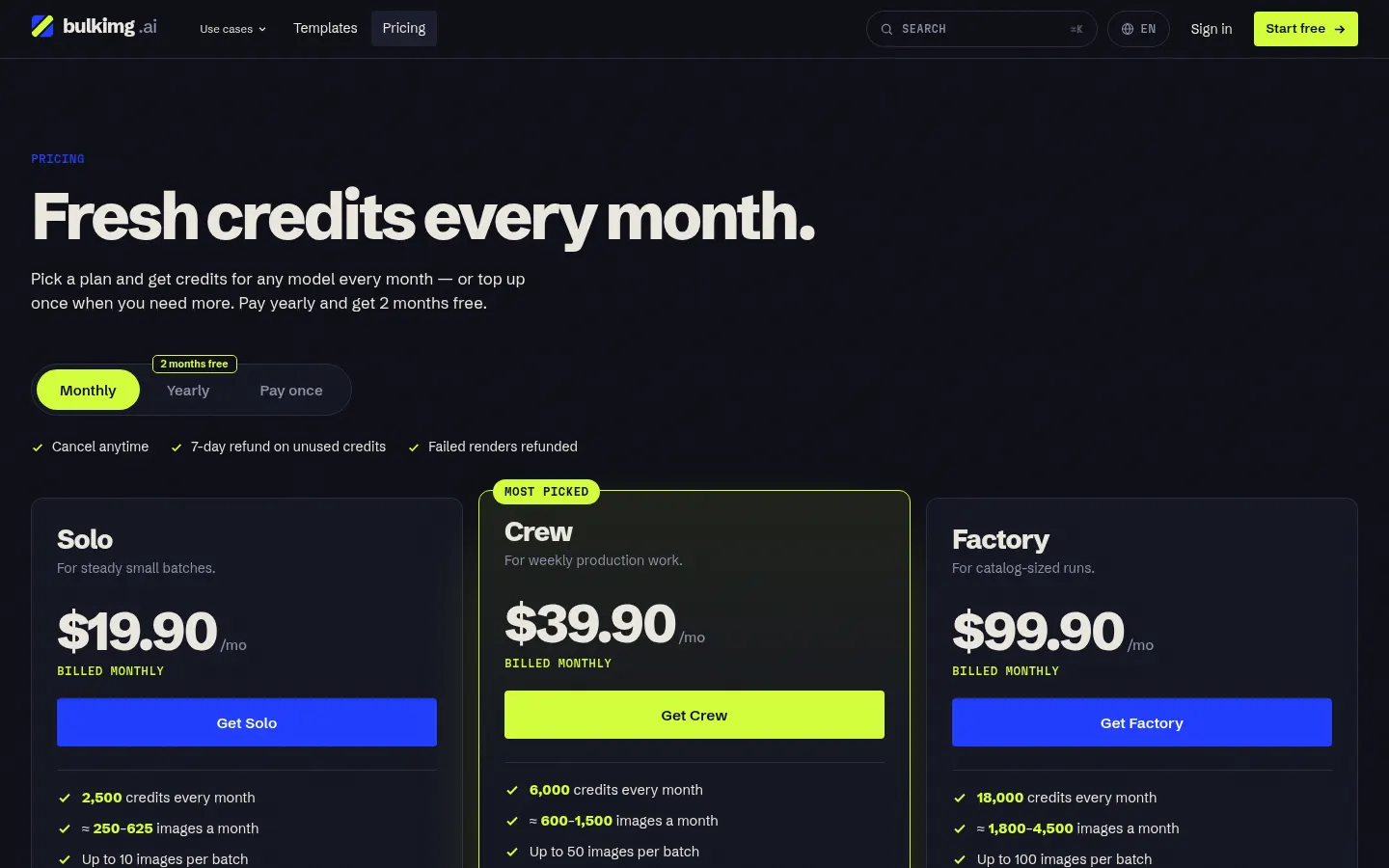
Prices in US dollars (USD) from the official website. Checked on: 20/11/2026. Monthly or yearly subscription (yearly gives 2 months free), cancel anytime; each month's credits expire at month end. One-off top-ups never expire. Refund within 7 days if credits are unused. Each image costs 4 to 50 credits depending on model and resolution.
Free: 50 credits on sign-up, no card; up to 5 images per batch and all 15 models.
Solo: $19.90/month, 2,500 credits a month, 10 images per batch, 1 batch at a time.
Crew: $39.90/month, 6,000 credits a month, 50 images per batch, 10 batches at a time.
Factory: $99.90/month, 18,000 credits a month, 100 images per batch, 20 batches at a time.
bulkimg Screenshots
bulkimg user reviews
Write a review
Checking your session...
bulkimg Reviews
Loading reviews...
bulkimg alternatives
Mew Design
Mew Design is an AI agent that turns a brief into posters, ads and editable layouts, with chat-based edits and reusable design rules you can save.

InkStudio.ai
InkStudio.ai is an AI tattoo generator: describe your idea, pick a style and body spot, see it on a model, then try the design on a photo of yourself.

Text to GIF
Text to GIF is an AI GIF generator that creates looping animations from a written description, with frame and timing control, plus sticker packs and SVG files.