

Share
Convert text, images, or files into digital calendars. Create a link for Apple, Google, or Outlook that syncs and updates automatically when you edit schedules.
What is Calfeed?
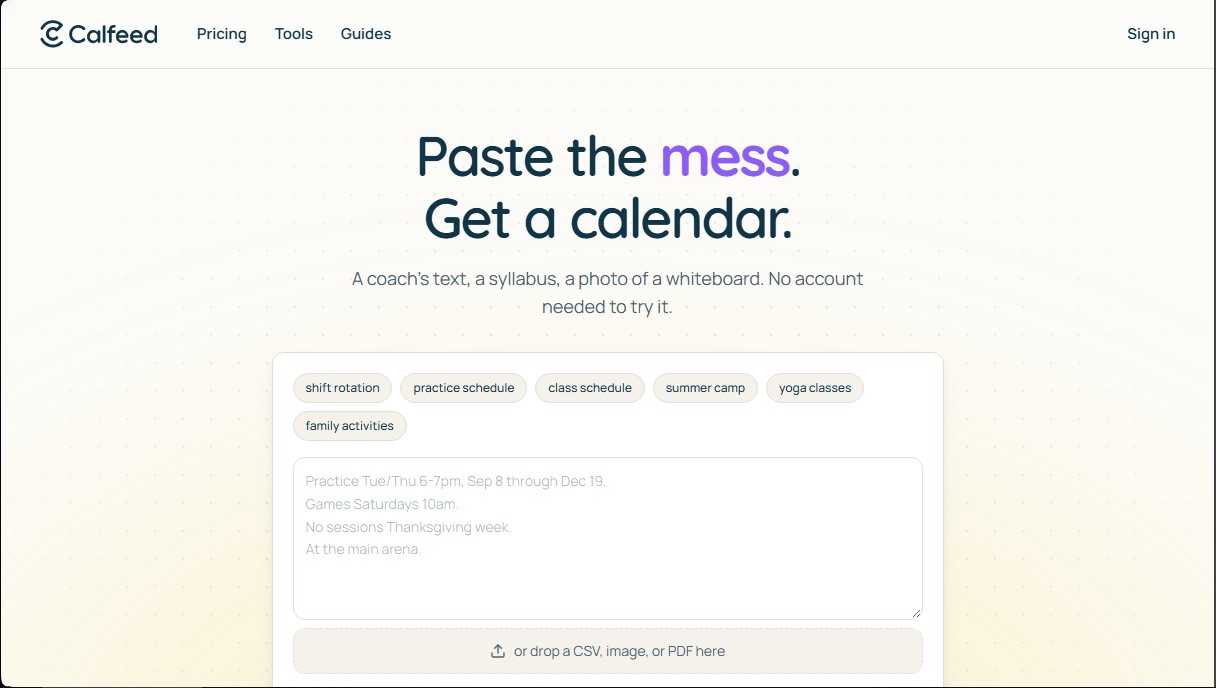
Calfeed is an artificial intelligence tool designed to simplify calendar creation and management from unstructured data sources. Its primary function is to transform any type of scheduling information—whether it's plain text, a photo of a whiteboard, a PDF file, or a public link—into a dynamic, subscribable calendar feed. This solution eliminates the need for manual event entry, allowing users to convert scattered data into an organized digital format in seconds.
Calfeed's operation relies on natural language processing and data recognition to interpret dates, times, and recurrences. Users simply need to paste descriptive text, such as a class schedule or work shifts, or upload an image of a flyer. The AI processes the information and generates a stable iCal link compatible with the most widely used applications, including Google Calendar, Apple Calendar, Outlook, and Microsoft 365. One of the key technological advantages is that the URL is permanent; if the organizer makes changes in the dashboard, they are automatically synced to all subscribers' computers or mobile devices without the need for new imports.
Key capabilities and practical benefits include:
- Multi-format conversion: Ability to read and process plain text, images, CSV files, and event web pages.
- Real-time updates: Edits made in the Calfeed dashboard propagate instantly to all connected calendars.
- Calendar merging: Allows combining multiple data sources into a single link, making it easier to manage various teams or activities in one place.
- Visual customization: Option to add specific logos and colors so the calendar page maintains a consistent visual identity.
- Validation tools: Includes a conflict checker to detect overlapping schedules and a natural language recurrence rule (RRULE) generator.
This tool is particularly beneficial for sports coaches, teachers, event organizers, and rotating shift managers who need to distribute schedules to large groups. By using Calfeed, communication is optimized, ensuring that all participants always have up-to-date information on their personal devices. Additionally, the system allows you to embed the calendar on any website using an iframe code that automatically adjusts to the layout, improving the visibility and accessibility of the planning.
Calfeed features and use cases
How to use Calfeed
Calfeed FAQ
What is Calfeed and what exactly is it used for?
Calfeed is a tool that transforms any text, image, PDF, or link into a dynamic calendar that can be synced with external apps using a unique link.
How can I enter my schedules into Calfeed?
You can paste text directly, upload a photo of a flyer, attach a CSV file, or provide a public link so the tool can automatically generate the events for you.
Is Calfeed compatible with my usual calendar app?
Yes, the generated link works perfectly with Apple Calendar, Google Calendar, Outlook, Microsoft 365, and Yahoo.
Do I need to create an account to start using the tool?
There is no need to sign up or provide payment details to try it out and see how your initial events are generated.
What happens if I make changes to a schedule that has already been published?
When you edit information in your dashboard, the changes are automatically updated on all devices subscribed to the link without the need to re-import anything.
How much does it cost to use Calfeed permanently?
Creating a calendar is free and includes syncing for the first two weeks. Unlimited access to the full calendar costs five dollars or one credit per calendar.
Can I combine several Calfeed calendars into a single link?
Yes, the tool allows you to merge multiple sources into a single stable link so that users can see all unified events in one place.
Is it possible to customize the appearance of the calendar page?
You can add your own logo and choose a brand color so that the public page and link previews match your visual identity.
How are updates managed in subscriber calendars?
Changes are pushed directly to users' apps automatically, keeping the information up to date without them having to do anything.
Can I embed the Calfeed calendar on my own website?
Yes, the tool provides a simple code to integrate the calendar into any website using a frame that automatically adjusts to the layout.
Calfeed pricing and plans
Free Version
Price: 0 $
Create calendars from text, images, PDFs, or links—no registration or credit card required.
Syncing limited to the first two weeks of the schedule in calendar apps.
Free editing allowed for the first 7 days after calendar creation.
Access to a hosted public page displaying the full schedule.
Pay Per Calendar
Price: 5 $ per calendar
Permanent sync coverage for all events in the schedule.
Stable sharing URL that never changes.
Live updates that automatically reflect in Apple, Google, Outlook, and Yahoo.
Combine up to 10 calendar sources into a single link.
Custom branding with logos and colors on the public page and previews.
Option to embed the calendar on any website via iframe.
Credit Packs
Price: From 9 $ to 249 $
3-Credit Pack: 9 $ (3 $ per credit).
10-Credit Pack: 25 $ (2.50 $ per credit).
50-Credit Pack: 89 $ (1.78 $ per credit).
200-Credit Pack: 249 $ (1.25 $ per credit).
1 credit is equal to the full activation of a new calendar or unlocking a free one.
Editing restriction: after the initial 7-day free period, each additional 7-day editing window consumes 1 credit.
Calfeed Screenshots
Calfeed alternatives





Everest AI Scheduling Assistant
AI assistant that syncs Google and Outlook calendars to schedule meetings via email. It suggests times, negotiates availability, and books appointments automatically.