

Share
Chrome extension to bulk delete or archive ChatGPT chats. Select multiple conversations at once to organize your history and easily clean up the sidebar.
What is ChatSweep?
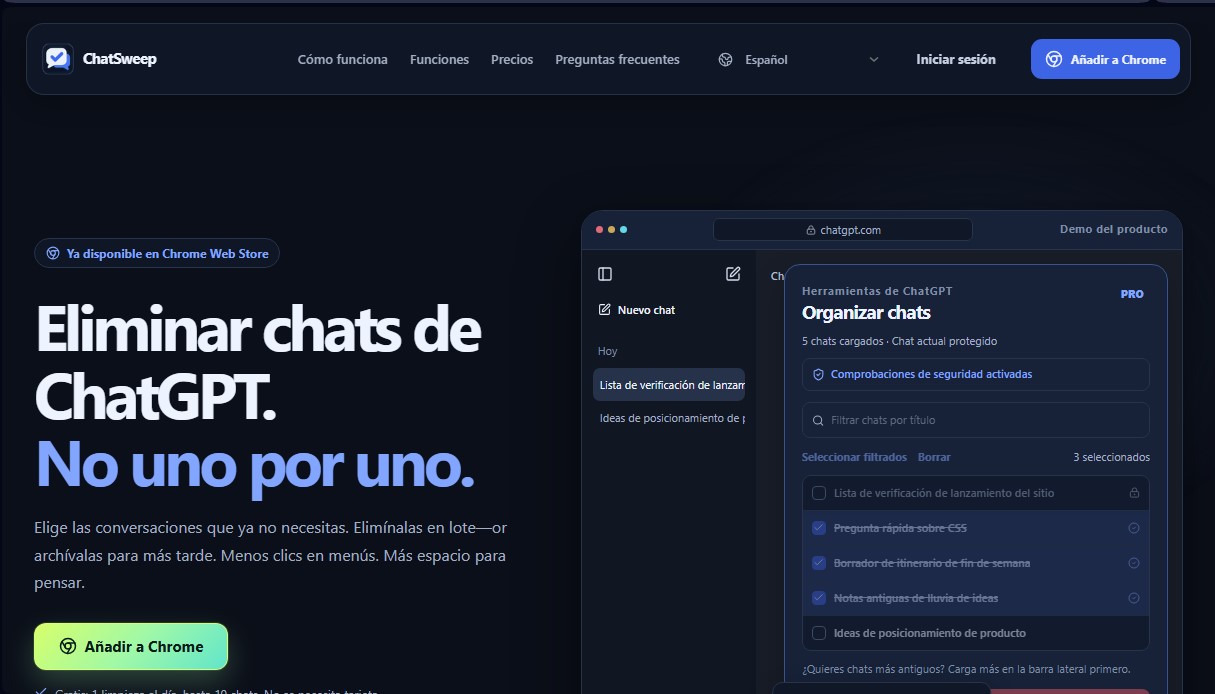
ChatSweep is a browser extension specifically designed to optimize conversation management on the ChatGPT desktop interface. Its primary function is to allow users to bulk delete or archive chats, bypassing the tedious manual process of deleting interactions one by one. Installed directly into Google Chrome, this tool simplifies digital workspace organization, helping maintain a clean and focused sidebar by mass-removing old drafts, temporary questions, or inquiries that are no longer needed.
The application works by interacting directly with the elements loaded in the computer's browser. Once the extension is activated, checkboxes appear next to each conversation in the sidebar. It is important to note that the tool detects chats that have already been loaded into the history; to manage older conversations, the user simply needs to scroll down the sidebar list before starting the process. ChatSweep technology utilizes a secure controlled automation approach that emulates the necessary clicks, featuring integrated verification systems that halt the task if unexpected changes are detected in the ChatGPT interface.
Key functional capabilities and practical benefits include:
- Multi-selection and filtering: Allows users to manually choose specific conversations or use title filters to quickly identify what to delete.
- Active chat protection: The system automatically excludes the conversation currently being viewed, ensuring that the active workflow is never interrupted.
- Bulk archiving: Offers the option to move chats out of the main view without permanently deleting them, allowing users to preserve their history without cluttering the visual interface.
- Review before execution: Before performing any irreversible action, the tool presents a summary of the selected batch for final confirmation.
- Local privacy and security: The cleaning process occurs entirely within the user's browser. The extension does not read message content or upload chat titles to external servers, maintaining the integrity of personal data.
This tool is especially useful for professionals, developers, and artificial intelligence power users who generate a high volume of daily sessions. By reducing visual clutter and automating repetitive tasks, ChatSweep improves operational efficiency when using language models, enabling smoother navigation and total control over chat history without surprises or accidental deletions.
ChatSweep features and use cases
How to use ChatSweep
ChatSweep FAQ
What exactly is ChatSweep, and what is it for?
It’s a Chrome extension designed to manage your ChatGPT history by allowing you to bulk delete or archive conversations instead of doing it one by one.
Will my currently open conversation be deleted when I use ChatSweep?
No, the tool automatically protects the chat you are currently viewing to prevent it from being accidentally deleted during the process.
Can I recover chats once they’ve been deleted?
No, deleting conversations is permanent and cannot be undone. We recommend double-checking your selection before confirming the action.
What is the difference between deleting and archiving within the tool?
Deleting permanently erases the chat, while archiving removes it from the sidebar but keeps the content so you can access it later.
Does ChatSweep read my private messages or upload them to a server?
The cleanup is performed locally in your browser. The extension only reads chat titles so you can select them, and it never accesses the actual content of your messages.
What are the limitations of the free version of ChatSweep?
The free plan allows for one cleanup per day of up to ten chats and does not require a credit card to use.
How can I manage my older ChatGPT chats?
You first need to scroll down the ChatGPT sidebar to load your older chats, then refresh the extension’s selector so they appear in the list.
What happens if the ChatGPT interface suddenly changes?
The extension checks page controls before taking action and will automatically stop if it detects layout changes that prevent a safe cleanup.
How do I activate my Pro plan after purchasing?
Just log in to the extension using the same Google account or email address you used for payment, and your plan will sync automatically.
ChatSweep pricing and plans
Free
$0
1 bulk deletion per day.
Limit of up to 10 chats per run.
Current chat protection.
Confirmation before deleting.
Pro
$4.99 per month or $19.99 per year
Unlimited bulk deletions.
No limit on chats per run.
Bulk archive feature included.
Flexible billing (monthly or annual with 67% savings).
Lifetime
$39.90 (one-time payment)
Includes all Pro plan features.
All future updates guaranteed.
No recurring charges.
ChatSweep Screenshots
ChatSweep alternatives


MakeASkill
MakeASkill creates a free personal skill for your AI assistant from a few quick questions, plus up-to-date steps to set it up in each app.



Nuclr Commander
Workspace for running multiple AI agents in parallel with a file manager. Supports local or external models and remote mobile monitoring.

rabbit OS3
Agentic OS that automates tasks and manages files, connecting your computers with AI models to run workflows using natural language.