Share
Remove background noise, wind, and echo from audio and video files with AI. Achieve professional voice clarity and studio quality with just one click.
What is Cleanaudio?
Cleanaudio is an advanced AI voice purification platform designed to automatically remove unwanted background noise from audio and video recordings. Its primary function is to transform mediocre sound captures into studio-quality files with a single click, eliminating the need for complex or expensive editing software. This tool is essential for any user who needs crisp, professional sound without having technical knowledge in audio engineering.
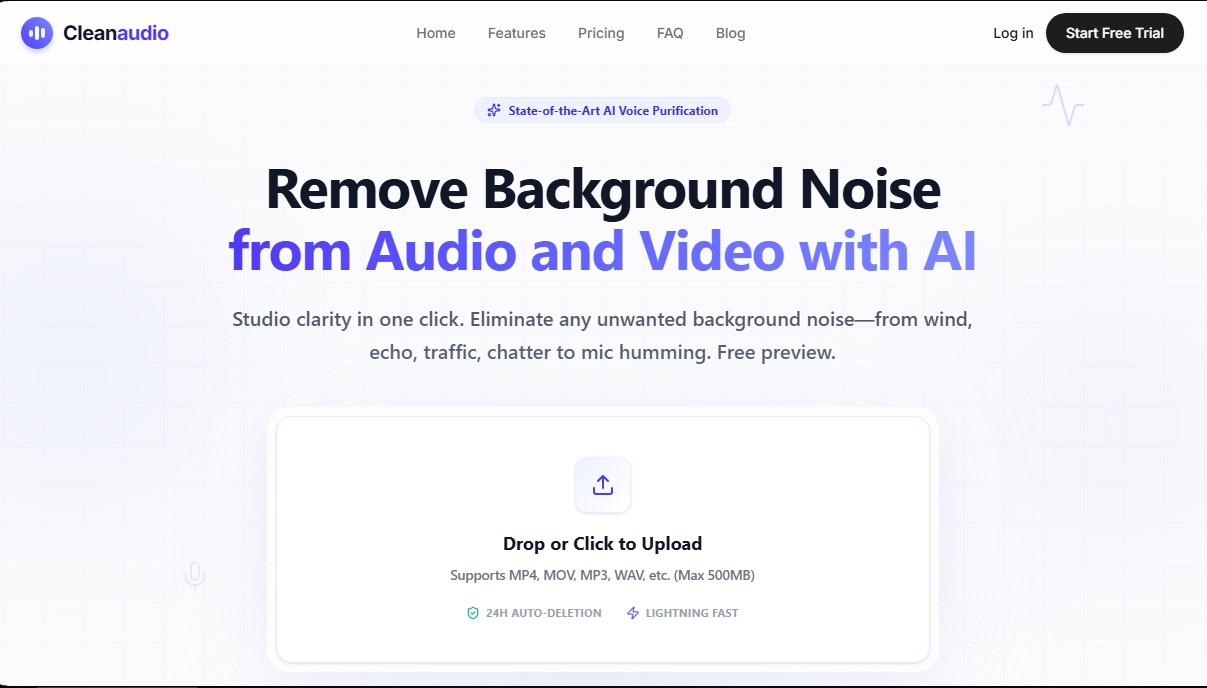
The solution operates using a next-generation AI engine that analyzes the file's waveform to isolate the human voice from environmental interference. Unlike traditional filters, Cleanaudio's deep learning technology naturally distinguishes between speech and disruptive elements, preventing the voice from sounding robotic. The process is entirely online and runs directly in the browser, allowing users to upload files in formats such as MP3, WAV, MP4, and MOV with a limit of up to 500 MB.
Among the most notable technical capabilities of this AI noise reducer are:
- Ambient noise removal: Effectively filters out traffic sounds, heavy wind, air conditioning, and fan hum.
- Interference suppression: Cleans up microphone hiss, electronic hum, and background static.
- Acoustic correction: Includes de-reverb features to mitigate echo in empty rooms, achieving a closer and clearer voice.
- Unexpected noise filtering: The ability to isolate and suppress barking dogs, sirens, or background conversations unrelated to the main recording.
This tool is especially beneficial for podcasters recording remote interviews, YouTubers creating outdoor content, and educators developing training materials. It is also a practical solution for marketing professionals and casual users who want to clean up voice notes or interviews recorded on a mobile device. As an optimized web application, it runs smoothly on both computers and mobile devices.
Regarding security and workflow, Cleanaudio guarantees content privacy by processing files in a secure environment; files are automatically deleted from their servers after 24 hours and are not used to train AI models. The platform provides a free 30-second preview to verify the effectiveness of the AI audio processing before proceeding with the full file download, ensuring optimal results for every project.
Cleanaudio features and use cases
How to use Cleanaudio
Cleanaudio FAQ
What types of noise can Cleanaudio remove from my recordings?
This tool uses artificial intelligence to automatically remove wind, echo, traffic, barking, and electronic hums.
Do I need to sign up for a free trial?
No account or credit card information is required to listen to a 30-second preview of your processed file.
Which file formats are supported by Cleanaudio?
The platform supports popular formats such as MP4, MOV, MP3, and WAV, provided the file size does not exceed 500 MB.
Are my files secure when using this service?
Privacy is our priority; therefore, all files are permanently deleted from our servers after 24 hours.
How does Cleanaudio help podcasters and video creators?
It delivers studio-quality clarity with a single click, removing unwanted ambient noise so your voice sounds professional and crisp.
Can I use the tool from my mobile browser?
Yes, the website is fully responsive and allows you to clean up recordings or voice memos directly from any iOS or Android device.
What payment options are available if I need to download full files?
You can choose between pay-as-you-go hourly bundles or an unlimited monthly subscription designed for professionals and frequent creators.
Cleanaudio pricing and plans
Free Trial
Price: Free.
Upload any audio or video file (up to 500 MB).
Instant 30-second preview of cleaned audio.
No sign-up or credit card required.
PRO Unlimited
Price: $16.99/month.
Unlimited audio cleaning (subject to a fair use policy of 30 hours per billing cycle).
Priority processing queue to skip the wait.
Support for 10+ audio and video formats.
No watermarks and no ads.
Cancel anytime.
Pay As You Go
Price: One-time payment based on hours used.
1 hour: $4.99.
5 hours: $9.99.
10 hours: $16.99.
Purchased credits are valid for 1 year.
Ideal for one-off projects or occasional use with the same quality as the PRO plan.
Cleanaudio Screenshots
Cleanaudio alternatives

Noise Cleaner
Remove background noise from audio and video files using AI. Clean up podcasts, interviews, and meetings in various formats with a comparison preview before downloading.