
Share
Separate vocals and instruments from any song using AI. Extract individual tracks, remove noise, and create high-quality karaoke backing tracks.
What is Clumi AI?
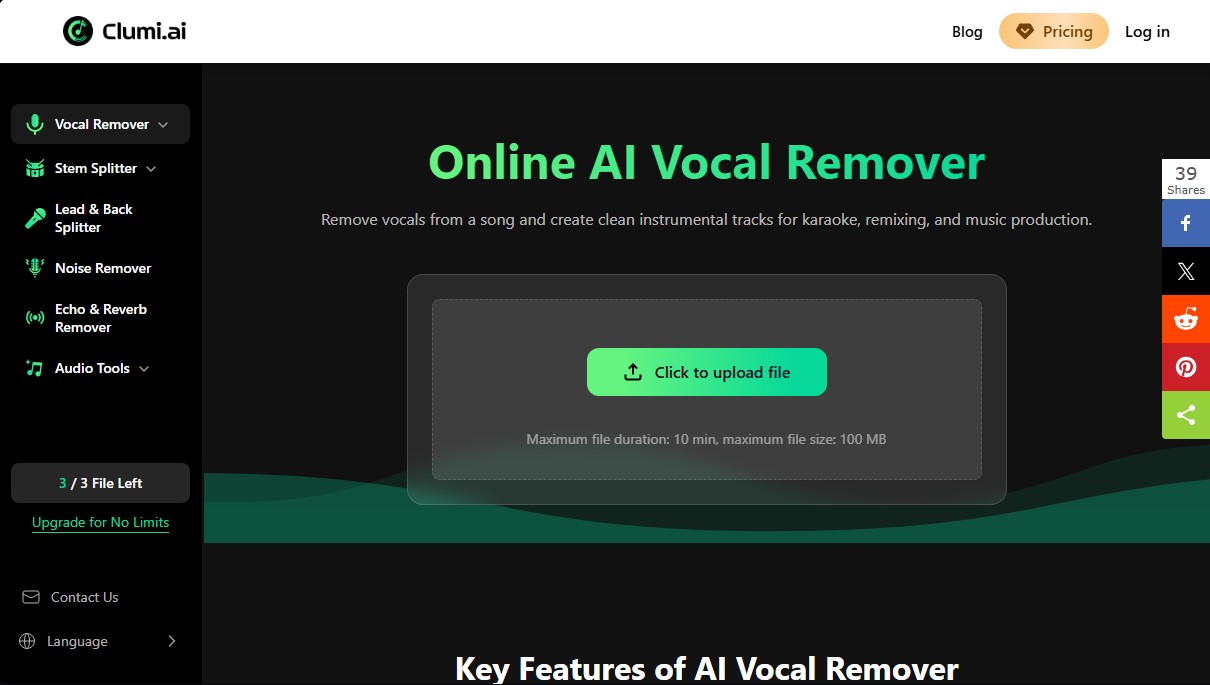
Clumi AI is an advanced web-based audio processing platform specifically designed for vocal removal and the creation of high-fidelity instrumental tracks using artificial intelligence. This tool allows users to automatically break down songs into their individual components, making it easy to obtain acapellas and backing tracks for creative projects without the need to install heavy software on a computer or mobile device.
Clumi AI's core technology uses deep learning algorithms to perform high-precision stem splitting. The system analyzes the uploaded audio file to identify and isolate specific frequencies, allowing for the extraction of not only vocals but also individual instruments with minimal loss in sound quality. The workflow is intuitive: after uploading a file in compatible formats such as MP3, WAV, M4A, or FLAC, the AI processes the information in the cloud and generates independent files. The system supports files up to 100 MB and a maximum duration of 10 minutes per track.
The main features of this application include:
- Vocal Remover: Isolates the lead vocal to generate clean instrumental tracks, ideal for karaoke or musical practice.
- Stem Splitter: Splits the song into independent elements such as drums, bass, piano, and other instruments.
- Lead & Back Splitter: A specialized feature to separate the lead vocal from backing vocals or vocal accompaniments.
- Noise & Echo Remover: Cleaning tools that remove background noise, hiss, and unwanted reverb from recordings.
- Audio Enhancer: Improves the overall clarity and tonal balance of processed tracks.
This tool is highly useful for music producers who require clean samples, DJs preparing remixes or mashups, and content creators who need custom background music for their videos. Additionally, it is a practical resource for vocal coaches and music students, as it allows for the analysis of complex arrangements and practicing with reference tracks without distractions. As an online solution, Clumi AI guarantees full accessibility from any browser, offering a secure and fast environment that optimizes the audio editing workflow for both professionals and amateurs.
Clumi AI features and use cases
How to use Clumi AI
Clumi AI FAQ
What is Clumi AI, and what is it used for?
It is an online AI-powered tool designed to separate vocals from music and create high-quality instrumental or acapella tracks.
Can I use Clumi AI for free?
Yes, the platform allows you to separate vocals from songs for free without the need to install any additional software.
What audio formats does the tool support?
You can upload files in the most popular formats, such as MP3, WAV, M4A, and FLAC, to process them directly without any prior conversion.
Do I need to create an account to use Clumi AI?
No, registration or account creation is not required to use the basic vocal removal and track separation features.
Is it safe to upload my personal files to the platform?
Yes, the site guarantees the security and protection of your personal information and any audio files you choose to upload for editing.
What are the file size and duration limits on Clumi AI?
The platform accepts files with a maximum duration of ten minutes and a size of up to 100 megabytes per upload.
Can I separate specific instruments like drums or bass?
Yes, using the track separation feature, you can accurately isolate individual elements such as piano, bass, guitar, and drums.
How long does the audio separation process take?
Thanks to AI technology, most songs are analyzed and processed in just a few minutes, so you can download your results quickly.
Does Clumi AI offer tools to improve sound quality?
Yes, in addition to separating vocals and instruments, the platform includes features to remove background noise, echo, and reverb to achieve a more professional sound.
Can I use the tool from my mobile phone?
Yes, since it is a browser-based tool, you can access all its features from computers, tablets, and mobile devices without any issues.
Clumi AI pricing and plans
Free Plan (0 $)
Vocal/instrument separation and noise removal.
No account or registration required.
3-file total limit.
10-minute maximum duration per upload and 100 MB maximum file size.
Processing restriction: Only the first 60 seconds of each track can be processed and downloaded.
Unlimited Plan ($9.99 per month or $4.99 per month billed annually)
Unlimited processing and exports.
Unlock full tracks (removes the 60-second limit).
Fast, priority processing queue.
Export in MP3 and WAV formats.
Minute Packs (One-time payment of $6.99 for 10 minutes or $39.99 for 300 minutes)
Time credits that never expire.
Unlock full tracks (removes the 60-second limit).
Fast processing queue.
Export in MP3 and WAV formats.
Clumi AI Screenshots
Clumi AI alternatives

Noise Cleaner
Remove background noise from audio and video files using AI. Clean up podcasts, interviews, and meetings in various formats with a comparison preview before downloading.


Cleanaudio
Remove background noise, wind, and echo from audio and video files with AI. Achieve professional voice clarity and studio quality with just one click.