Share
Convert in-person meeting audio into structured notes, decisions, and tasks. Generate professional summaries ready to send to clients without bots in the room.
What is ClearCortex?
ClearCortex is a specialized platform for managing in-person meetings using artificial intelligence. Its primary function is to transform audio recordings into structured notes that are ready to send to clients, eliminating the need for manual note-taking or introducing recording bots into the room. This AI productivity tool is designed for professionals who require an accurate record of decisions and actions without losing focus during the conversation.
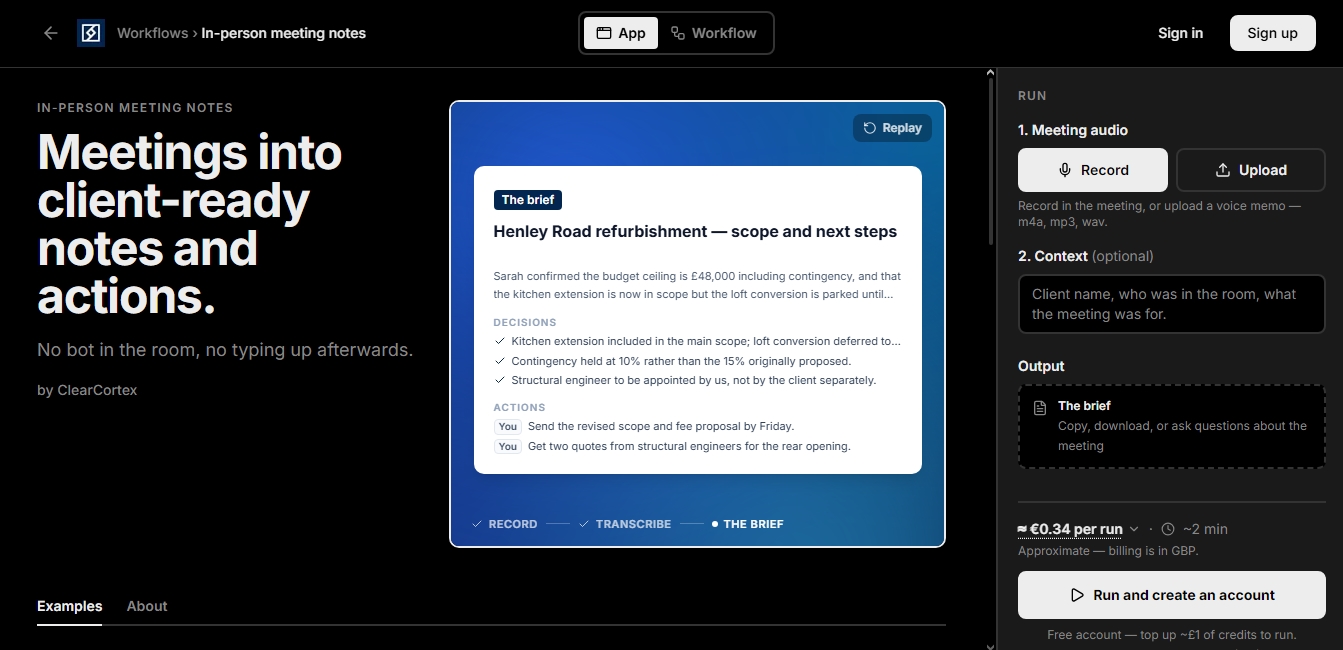
The operation of ClearCortex is based on a simple and efficient workflow. Users can record audio directly from their mobile device or computer, or upload existing files in common formats such as m4a, mp3, or wav. To improve the accuracy of the results, the system allows for the addition of optional context, such as attendee names or the session's objective. Once processed, its natural language processing engine analyzes the conversation to structure the information logically.
Key capabilities and practical benefits include:
Executive Summary Generation: Creates a concise report that synthesizes key points and the overall context of the session.
Identification of Decisions and Action Items: Automatically extracts agreements reached and pending tasks, clearly identifying those responsible for each action.
Full Transcription and Search: Provides the complete text of the meeting, allowing for the verification of exact data, figures, or specific technical terms.
Post-Meeting Inquiry Assistant: Allows for direct questions about the discussion content—such as mentioned budgets or agreed-upon deadlines—obtaining answers based exclusively on the transcription.
Field Notes and Site Visits: Ideal for recording measurements, defects, or verbal instructions that are automatically converted into structured records.
This meeting note automation solution is especially useful in sectors such as consulting, architecture, or sales, where discovery meetings and technical visits generate a heavy documentation workload. By using ClearCortex, users ensure the capture of critical details, such as specific client concerns or mentions of regulations, which are often omitted in traditional notes.
The platform's technology stands out for its ability to handle natural conversations and various accents. Privacy is a fundamental pillar of the service; recordings and notes are stored in a private workspace, are not shared, and are not used for training external AI models. The final result is a professional document that can be copied or downloaded for immediate integration into emails, proposals, or project management systems.
ClearCortex features and use cases
How to use ClearCortex
ClearCortex FAQ
What exactly does ClearCortex do for my in-person meetings?
This tool turns your meeting recordings into professional notes—including summaries, key decisions, and action items—so you don't have to take notes by hand.
Do I need to invite a bot to the meeting to use ClearCortex?
No, you don’t need bots or extra devices in the room. You can record audio directly from your smartphone or upload a pre-recorded file.
How accurate is the transcription for technical names and numbers?
The transcription is highly reliable with natural language and various accents. You can also improve accuracy by adding proper names or specific details in the context box before processing the audio.
Are my audio files secure and private on ClearCortex?
Your recordings and notes are private, stored in your own workspace, and are never used to train AI models.
What format are the results generated by the app?
You’ll receive a structured summary featuring decisions made, action items assigned to each participant, and a full transcript that you can easily copy or download.
How much does it cost to process a meeting with ClearCortex?
The system operates on a pay-as-you-go model with no mandatory subscriptions. A typical meeting costs approximately thirty euro cents after you top up your account balance.
Can I ask specific questions about the meeting content once it's processed?
Yes. Once the report is generated, you can ask the system direct questions about any detail mentioned, such as agreed-upon budgets or commitments made during the conversation.
What types of audio files can I upload to the platform?
You can upload voice memos or recordings in standard formats like m4a, mp3, and wav. The system will then process them and generate your notes automatically.
ClearCortex pricing and plans
Free Account
Price: 0 € (to sign up).
Provides access to the platform and user account creation.
Requires a minimum credit top-up to process meetings or run workflows.
Pay-As-You-Go
Price: Approximately 0.34 € per execution (30p per meeting).
No mandatory monthly subscription fees.
Requires an initial credit top-up of approximately 1 £ (approx. 1.20 €).
Processing for live recordings or uploaded files (m4a, mp3, wav).
Generation of structured notes including summaries, decisions made, action items with assignees, and key takeaways.
Includes full meeting transcripts.
Interactive chat to ask specific questions about the processed audio content.
Privacy Guarantee: Data is not used to train AI models.
ClearCortex Screenshots
ClearCortex user reviews
Write a review
Checking your session...
ClearCortex Reviews
Loading reviews...