

Share
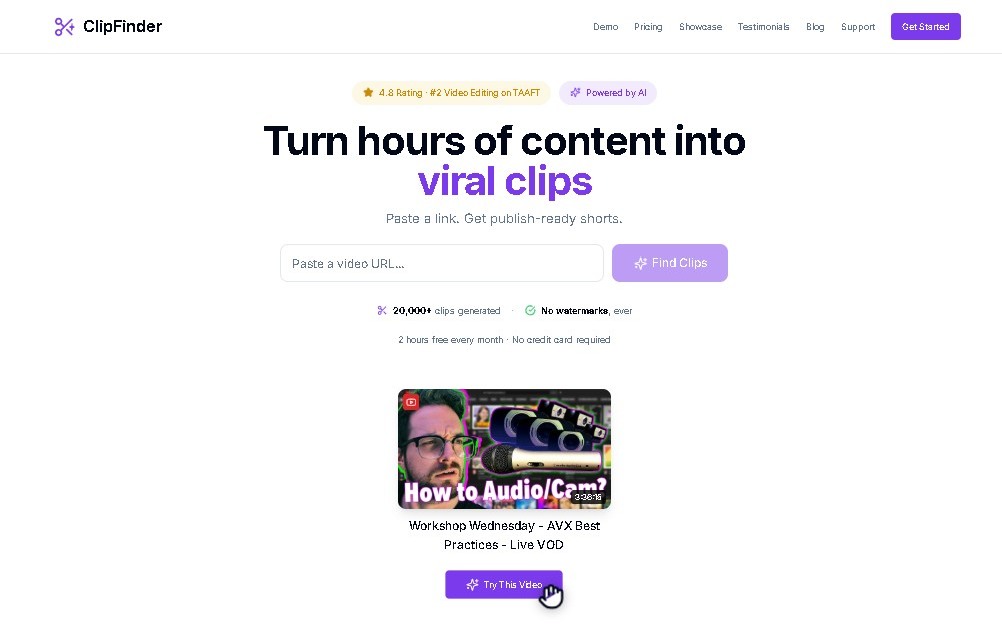
Turn YouTube and Twitch videos into short clips with AI. Detect the best moments, add captions, reframe to vertical, and publish directly to YouTube.
What is ClipFinder IA?
ClipFinder is an advanced artificial intelligence tool designed for streamers, VTubers, and podcasters who need to optimize the creation of derivative content from long-form recordings. Its primary function is transforming YouTube and Twitch VODs into short-form clips, eliminating the need to manually review hours of footage. By using video analysis algorithms, the platform automatically identifies moments with the highest impact potential, allowing users to go from raw video to ready-to-publish content in a matter of minutes.
ClipFinder’s technology analyzes the entire video to locate highlight segments using precise timestamps. The AI scores each fragment based on critical parameters such as hook strength, detected emotional peaks, and the content's replay value. This technical approach ensures that users get the most engaging snippets for their audience without having to watch through 3 to 8-hour streams on their computers.
The tool integrates a complete editing workflow that facilitates post-production from a single interface. Key functional capabilities include:
- AI Auto-Reframe: Adapts original content into vertical (portrait) format for use on Shorts or TikTok, keeping the focus on the main action.
- Embedded Captions: Automatic caption generation with various visual styles to improve accessibility and retention.
- Hook Text Overlays: Tools for adding eye-catching text that captures the viewer's attention from the very first second.
- Dual-Crop Gaming Mode: A specific feature that allows for simultaneous framing of the facecam and the gameplay, which is essential for gaming content creators.
- Direct Publishing: The ability to send edited content directly to YouTube channels without leaving the application.
From a practical standpoint, ClipFinder stands out for its ability to centralize the entire clip-cutting and fast-editing process. Although cloud processing for long videos can take between 10 and 15 minutes, the automated filtering of key moments represents substantial time savings. It is an ideal solution for optimizing the social media presence of channels that generate high volumes of live content, allowing for the agile and professional distribution of the best moments from every session. As a cloud-based platform, it requires no complex installations, though it does rely on an internet connection for file processing.
ClipFinder IA features and use cases
How to use ClipFinder IA
ClipFinder IA FAQ
What is ClipFinder and what exactly does it do?
It's an AI-powered tool designed for streamers and podcasters to turn their long-form YouTube or Twitch videos into short, optimized clips for social media.
How does ClipFinder identify the best moments from a livestream?
The AI analyzes the entire video, detecting opening hooks, emotional peaks, and replay value to automatically score and extract the most engaging segments.
What editing features are included in the ClipFinder workflow?
It features auto-reframing for vertical formats, customizable subtitle styles, hook text overlays, and a dual-crop mode for gaming setups.
How much does it cost to use the platform?
The tool operates on a freemium model, with a pay-as-you-go option priced at two dollars per processed video.
How long does it take to get results after pasting a URL?
Cloud processing typically takes between ten and fifteen minutes for long-form videos ranging from three to eight hours.
Can I post my videos directly to social media from ClipFinder?
Currently, the tool supports direct posting to YouTube, though the auto-post feature for TikTok is not yet available.
Do I need to download any software or apps to use ClipFinder?
No installation is required since it's a cloud-based web tool; however, please note that there is currently no mobile app available.
What is the "dual-crop mode" included in the tool?
It's a specialized feature for gaming creators that allows you to display both your face cam and gameplay simultaneously in the same vertical clip.
ClipFinder IA pricing and plans
Free Version (Freemium)
- Initial platform access to test the AI-powered clip detection tools.
- Analysis of YouTube and Twitch VODs to identify highlights.
- Clip scoring based on hook strength and emotional peaks.
Pay-as-you-go
- Price: 2 $ per unit.
- Full AI analysis of long-form videos (3-8 hours).
- End-to-end editing workflow with auto-reframing for vertical formats (Shorts/TikTok).
- Auto-captioning with various styles and hook text overlays.
- Specific dual-crop mode for gaming (facecam + gameplay).
- Direct publishing to YouTube right from the tool.
- 10 to 15-minute processing time for long videos.
ClipFinder IA Screenshots
ClipFinder IA alternatives
OptimaClip
Turn long videos and podcasts into social clips. AI detects viral moments, adds captions, reframes, and schedules content automatically.

SocialClip Studio
Transform long videos into short social media clips. Use AI to generate captions, reframe footage, and select the best highlights.


Exemplary AI
Convert long videos into short clips, summaries, and blog posts. Includes transcription, subtitles in 120 languages, and silence removal to optimize social media content.

Vmaker Video Editor
Edit videos automatically with AI, add captions, and music. Create social media clips from long videos and generate professional content from text.