

Share
Generate dynamic videos from images and text using AI. Easily animate photos, sync movements, and create visual content effortlessly.
What is Collart?
Collart is an advanced generative AI platform designed to transform static images and text descriptions into dynamic, high-quality videos. This tool specializes in creating animated visual content without requiring prior technical knowledge in film editing. Its primary function is to provide natural movement to photographs, designs, or illustrations, allowing users to generate professional audiovisual pieces in just a few seconds using cutting-edge AI models.
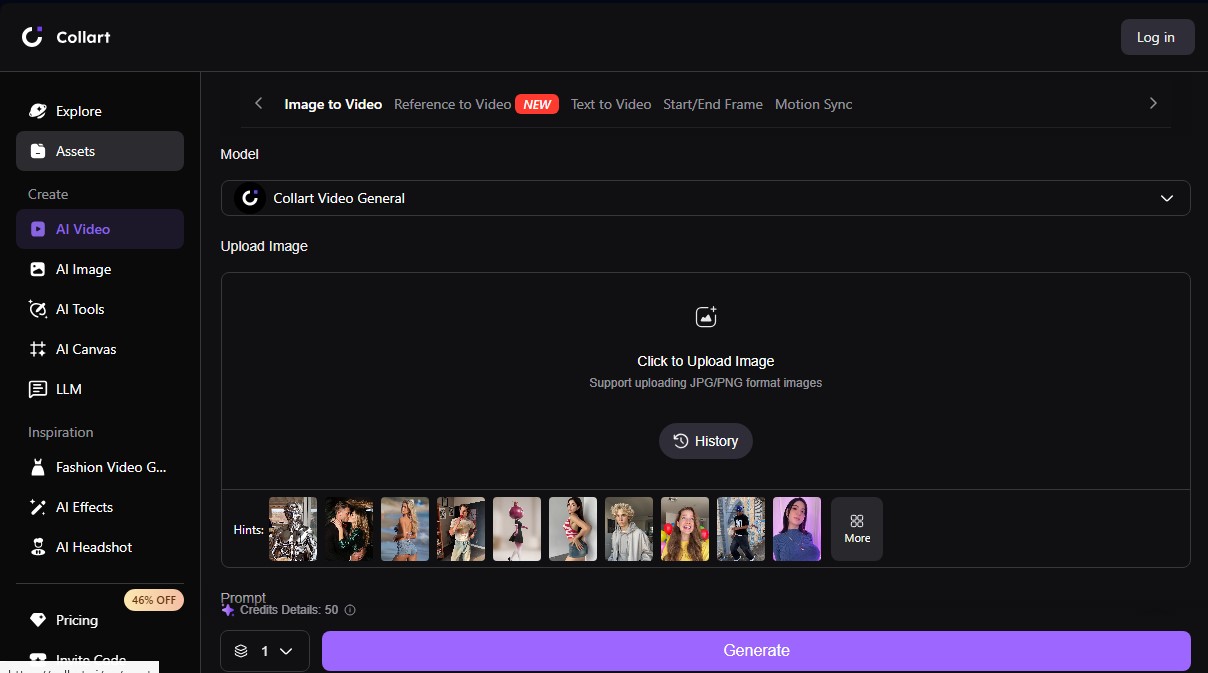
The technology behind Collart is based on the integration of various next-generation processing engines such as Kling, Minimax, and PixVerse. The system allows for deep customization through features like Motion Sync, which synchronizes the generated movement with the user's intent, and Start/End Frame settings to precisely define the beginning and end points of the animated sequence. Additionally, the platform supports Text to Video generation and the animation of JPG and PNG files through its Image to Video function.
Key capabilities and practical benefits include:
- 1080p Video Generation: Create clips with sharp resolution and fluid motion up to 5 seconds in length.
- Advanced Motion Control: Adjust animation intensity and style using detailed prompts that include subject, style, and mood.
- Video Enhancer: Integrated tools to optimize and upscale the visual quality of the final result.
- Watermark Removal: The ability to obtain clean files ready for professional distribution across different platforms.
- 4K Image Generation: Functionality to create ultra-high-resolution static art that serves as the foundation for animations.
Using Collart is especially beneficial for content creators, digital marketers, and designers looking to realistically animate product photos, portraits, or landscapes. By maintaining the visual consistency of the original image, the tool ensures the result is coherent and professional. It is an effective solution for producing impactful ads, storytelling videos, or social media content that needs to capture attention immediately.
The workflow is purely functional: the user uploads an image to their computer, enters a descriptive prompt for the desired movement, and selects customization parameters. The system processes the information to deliver a video with a cinematic finish, while also allowing for the generation of content suitable for commercial use. This tool optimizes audiovisual production time by automating complex animation tasks through computer vision algorithms.
Collart features and use cases
How to use Collart
Collart FAQ
What is Collart and how does it help create visual content?
It is an AI platform that turns static images and text into dynamic videos with smooth, realistic motion in just a few seconds.
Can I use Collart for free?
Yes, the tool offers a free version that provides thirty daily credits upon logging in, allowing you to generate content at no cost.
What image formats does Collart support for video generation?
The platform supports JPG and PNG files for AI-powered image-to-video conversion.
Does Collart allow commercial use of the generated videos?
Content created under paid subscription plans is authorized for commercial use and allows you to remove the tool's watermarks.
What advanced features does Collart offer for customizing animations?
The tool includes features like Motion Sync and start/end frame settings to precisely control the movement of elements.
What is the maximum video resolution in Collart?
Users subscribed to Standard, Pro, or Premium plans can generate high-definition 1080p videos and utilize the built-in video optimizer.
Which AI models does the Collart platform use?
The system integrates various advanced models such as Kling, Minimax, PixVerse, and Grok to offer a wide range of styles and high-quality results.
How do credits work in Collart?
Credits are used to generate content and can be obtained through the free daily allowance or by purchasing additional packages based on your needs.
Collart pricing and plans
Free Plan
Price: 0 $ (Free forever).
30 daily credits (valid for Collart models).
Option to purchase additional credits at regular pricing.
Standard Plan
Price: 9,99 $ per month (or 5,83 $/mo with 69,99 $ annual billing).
400 credits per month.
30 additional free daily credits.
Unlimited model usage.
1080p video and 4K image generation.
Watermark removal on all creations.
High-priority generation (Fast-track).
Includes Video Enhancer and Video Watermark Remover.
Generated content is licensed for commercial use.
Pro Plan
Price: 19,99 $ per month (or 10,83 $/mo with 129,99 $ annual billing).
800 credits per month.
30 additional free daily credits.
Unlimited model usage.
1080p video and 4K image generation.
Watermark removal on all creations.
High-priority generation (Fast-track).
Includes Video Enhancer and Video Watermark Remover.
Generated content is licensed for commercial use.
Premium Plan
Price: 39,99 $ per month (or 21,67 $/mo with 259,99 $ annual billing).
3.200 credits per month.
30 additional free daily credits.
Unlimited model usage.
1080p video and 4K image generation.
Watermark removal on all creations.
High-priority generation (Fast-track).
Includes Video Enhancer and Video Watermark Remover.
Generated content is licensed for commercial use.
Credit Packs (One-time payment)
400 credits: 10,99 $.
800 credits: 20,99 $.
1.600 credits: 35,99 $.
3.200 credits: 65,99 $.
6.400 credits: 116,99 $.
20.000 credits: 355,99 $.
40.000 credits: 699,99 $.
Collart Screenshots
Collart alternatives



NeotypeLab
NeotypeLab uses AI to plan paint schemes for Gunpla, mecha girls and Zoids, with real hobby paint codes, a spraying sequence, a shopping list and an HD preview.

AlreadyRan
AlreadyRan brings dozens of AI image, video and audio models into one web studio with a single credit balance and the cost shown before every generation.


Vidverse AI
Vidverse AI brings several AI video, image and voice models into one web and mobile app, so you can turn text or photos into clips, images and voiceovers.