
Share
Convert text and images into 3D printable models. Segment parts, optimize meshes, and export directly to slicing software.
What is Crisp3D?
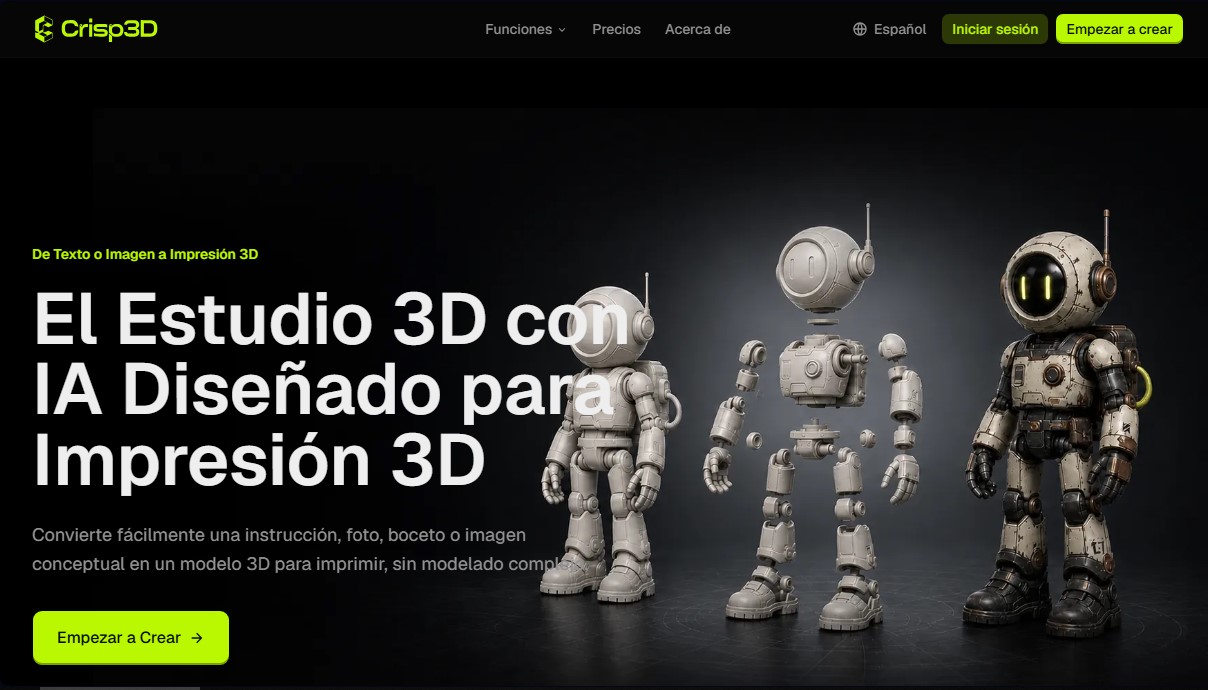
Crisp3D is an AI-assisted design studio specializing in the creation of models for 3D printing. Its primary function is to transform text prompts, photographs, or conceptual sketches into 3D objects ready for manufacturing, eliminating the need to master complex modeling software. This platform is aimed at a broad spectrum of users, from hobbyists and makers to miniature artists, product designers, and cosplay accessory creators looking to streamline their workflow from their computers.
The tool works by integrating various cutting-edge generative AI models, such as Tripo3D, Meshy, Hunyuan3D, Rodin, and Hi3D. This multi-model approach allows users to choose the algorithm that best fits their specific project, whether they need quick concepts, detailed figures, or technical geometry. Crisp3D technology processes input data to generate optimized meshes, facilitating a process that connects the initial idea directly to the print bed.
Key capabilities and practical benefits include:
- Text and Image-to-3D Generation: Enables the creation of miniatures, collectibles, and functional prototypes from detailed descriptions or reference images.
- AI Texturing: Facilitates the exploration of colors, materials, and virtual paint finishes before starting the physical printing process.
- Smart 3D Segmentation: Splits complex or large-scale models into individual printable parts. It allows for the addition of practical connections, such as ball joints or dovetail joints, to simplify assembly.
- AI Retopology: Automatically simplifies dense geometry, creating a lighter, cleaner mesh that preserves essential details and streamlines processing in slicing software.
The Crisp3D workflow is structured into four steps: reference definition, geometry generation, part segmentation, and asset texturing. One of its greatest operational advantages is direct integration with popular slicers such as Bambu Studio, OrcaSlicer, Creality Print, ElegooSlicer, and Snapmaker Orca. This allows generated models to be sent directly to print preparation software without the need for manual intermediate downloads.
In practice, the tool stands out for offering production-ready 3D assets. By providing integrated preparation tools, users can validate shapes and proportions, saving material and time on failed prints. It is a comprehensive solution covering everything from design conception to technical mesh optimization, enabling designers and print studios to efficiently and professionally convert visual concepts into physical objects.
Crisp3D features and use cases
How to use Crisp3D
Crisp3D FAQ
Do I need advanced modeling skills to use Crisp3D?
No, the platform is designed to generate 3D models from text or images without requiring expertise in complex modeling software.
Can I use designs created in Crisp3D for commercial purposes?
Yes, users on paid subscription plans have a commercial license for their creations, provided they comply with the terms of service.
What tools does Crisp3D offer for preparing large models?
The tool includes an AI-powered segmentation feature that splits complex models into smaller pieces and allows you to add mechanical joints for assembly.
Can I export directly from Crisp3D to my slicing software?
Yes, you can send your models directly to compatible programs such as Bambu Studio, OrcaSlicer, Creality Print, ElegooSlicer, and Snapmaker Orca.
What happens if I run out of monthly credits on my Crisp3D plan?
You can purchase credit top-up packs that never expire. These credits remain available in your account even if your monthly subscription ends.
Can I improve the quality of a dense mesh using Crisp3D?
Yes, the AI-powered retopology feature simplifies complex geometries to create lighter, cleaner meshes while preserving all the model's essential details.
What is the difference between the free plan and the paid options in Crisp3D?
The free plan lets you explore the tool using public models and basic features, while paid plans offer unlimited downloads, privacy, and priority processing.
Does Crisp3D allow you to add textures and colors to models before printing?
Yes, the AI texturing feature allows you to explore different colors, materials, and finishes on the 3D model before starting the physical print.
Crisp3D pricing and plans
Free: 0 US$
1 concurrent task.
Public models.
Non-commercial license.
No downloads allowed.
Limited AI models and basic features.
Basic: 19.9 US$ per month (15.92 US$/mo with annual billing)
1,000 credits per month (up to 50 3D models).
5 concurrent tasks.
Private models and commercial license.
Unlimited downloads.
Access to all AI models and advanced features.
Priority processing.
Pro: 39.9 US$ per month (31.92 US$/mo with annual billing)
3,900 credits per month (up to 195 3D models).
20 concurrent tasks.
Private models and commercial license.
Unlimited downloads.
Access to all AI models and advanced features.
Priority processing.
Ultra: 119.9 US$ per month (95.92 US$/mo with annual billing)
12,000 credits per month (up to 600 3D models).
50 concurrent tasks.
Private models and commercial license.
Unlimited downloads.
Access to all AI models and advanced features.
Priority processing.
Credit top-ups (requires an active subscription):
1,000 credits: 22 US$ (one-time payment).
5,000 credits: 99 US$ (one-time payment).
10,000 credits: 150 US$ (one-time payment).
Top-up credits do not expire and remain available after the plan ends.
Crisp3D Screenshots
Crisp3D user reviews
Write a review
Checking your session...
Crisp3D Reviews
Loading reviews...
Crisp3D alternatives



Triverse AI
Triverse AI generates 3D models from an image or a text prompt, adds AI PBR textures and produces assets ready for games, 3D printing and XR.

ImageToSTL.org
Convert JPG and PNG images into STL files for 3D printing using AI. Generate detailed 3D models ready for instant download.

Image to 3D
Convert 2D images and sketches into textured 3D models using AI. Export in GLB, STL, or USDZ for video games, 3D printing, and augmented reality.