Share
Build a support assistant trained on your website and docs. Responds in 95+ languages, cites sources, and allows mobile management. Fast, no-code setup.
What is CustomerBot?
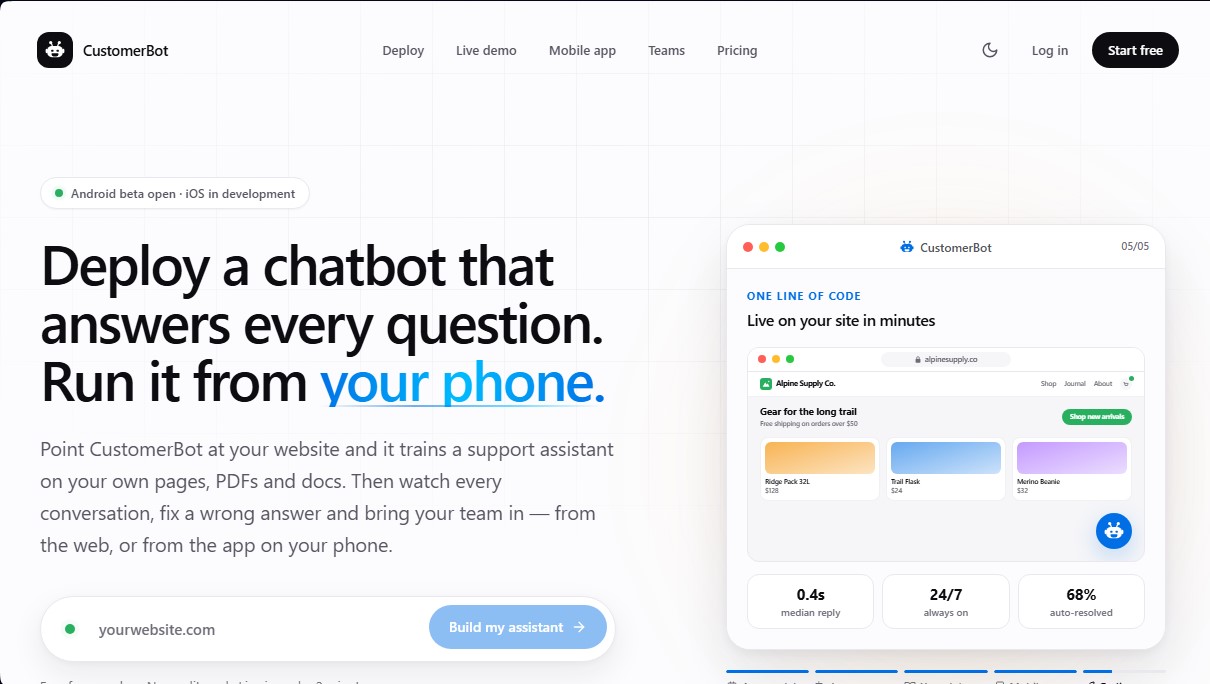
CustomerBot is an advanced AI-powered customer support solution designed to automate technical and sales support for any website. This tool allows you to deploy an intelligent assistant that is trained exclusively on a company’s specific content, such as web pages, PDFs, manuals, and internal documents. It is an ideal choice for businesses seeking 24/7 support without sacrificing accuracy, enabling the bot to answer complex questions based on real, verifiable data.
The platform stands out for its technological flexibility under the "one bot, many brains" concept. Users can select and switch between their preferred language models—including GPT-5.5, Claude Sonnet 5, Gemini 3.1 Pro, or Llama 4 Maverick—while always maintaining their existing training. Integration is seamless and requires no coding knowledge; simply enter the website URL for the AI to index the content, then paste a single line of code to make the widget operational on platforms like WordPress, Shopify, Webflow, or raw HTML.
Key capabilities and functional benefits include:
- Multichannel Training: The ability to process URLs, PDFs, text files, and custom Q&A pairs to create a robust knowledge base.
- Global Support: Automatically detects the visitor's language and responds in over 95 languages with natural, fluent grammar.
- Transparency and Accuracy: Every response cites the original source of the information, allowing users to verify the data and helping support teams identify outdated content.
- Mobile Management: Includes a mobile app (Android in beta, iOS in development) to view the inbox, rewrite incorrect answers to improve machine learning, and export leads in real time.
- Collaborative Workflow: Team management via invitations with four specific roles (Owner, Admin, Editor, and Viewer), making it easy for marketing and support teams to work simultaneously without sharing credentials.
CustomerBot differentiates itself from generic chatbots by avoiding made-up answers; if the information is not found in the provided documents, the system admits it or escalates the query to a human agent. Additionally, it allows you to define a custom tone of voice (formal, friendly, or sales-oriented) using natural language instructions. With a deployment process that takes just two minutes, this AI tool optimizes query resolution and lead generation efficiently and automatically.
CustomerBot features and use cases
How to use CustomerBot
CustomerBot FAQ
How do I train CustomerBot using my website's content?
Simply enter your website's URL so the system can crawl the content, or upload PDFs and other documents directly.
How many languages can the assistant communicate in?
CustomerBot automatically detects the visitor's language and can respond in over 95 different languages.
How long does it take to get the chat up and running?
Initial setup takes less than two minutes and only requires copying a single line of code into your website's source code.
What happens if CustomerBot can't find an answer in my documents?
The assistant will admit it doesn't know the answer to avoid making up information, and it can ask for the user’s email address so your team can follow up later.
Can I manage customer inquiries from my mobile phone?
Yes, the tool features an app for Android and iOS that lets you review transcripts and correct responses in real time from anywhere.
Can I invite other team members to help manage the service?
You can add multiple team members and assign specific roles—such as administrator, editor, or viewer—so they can collaborate without sharing login credentials.
Which AI models does the platform use?
You can choose from several advanced models from providers like OpenAI, Anthropic, or Google, and switch between them whenever you need to.
Is my data secure, and is it used to train other AI models?
All information is encrypted, and CustomerBot never uses your content or conversations to train shared AI models.
Is there a free version to try out the tool?
We offer a permanent free plan that doesn't require a credit card and allows you to manage up to 50 conversations per month with one assistant.
How can I control the chatbot's tone of voice?
You can set custom instructions in plain English to make the assistant formal, friendly, or use a specific style that matches your brand.
CustomerBot pricing and plans
Free
$0/mo
1 assistant.
50 conversations per month.
Website and PDF training.
Community support.
Hobbyist
$39/mo ($33/mo billed annually)
1 assistant.
5,000 conversations per month.
40 MB knowledge base.
Lead capture and transcripts.
Email support.
Pro
$79/mo ($66/mo billed annually)
2 assistants.
10,000 conversations per month.
40 MB knowledge base per assistant.
Watermark removal.
API access and priority support.
Enterprise
Pricing: Inquire on official website
Higher conversation volume.
SSO authentication.
Data Processing Agreement (DPA).
CustomerBot Screenshots
CustomerBot user reviews
Write a review
Checking your session...
CustomerBot Reviews
Loading reviews...
CustomerBot alternatives


Voice AI Portal
Voice AI Portal is a white-label dashboard for voice agent agencies: clients see their calls, transcripts and summaries, and the agency bills them for minutes.