
Share
Edit and replace text in any image while preserving the original font and background. Ideal for fixing typos or translating signs and screenshots.
What is EditTextInImage?
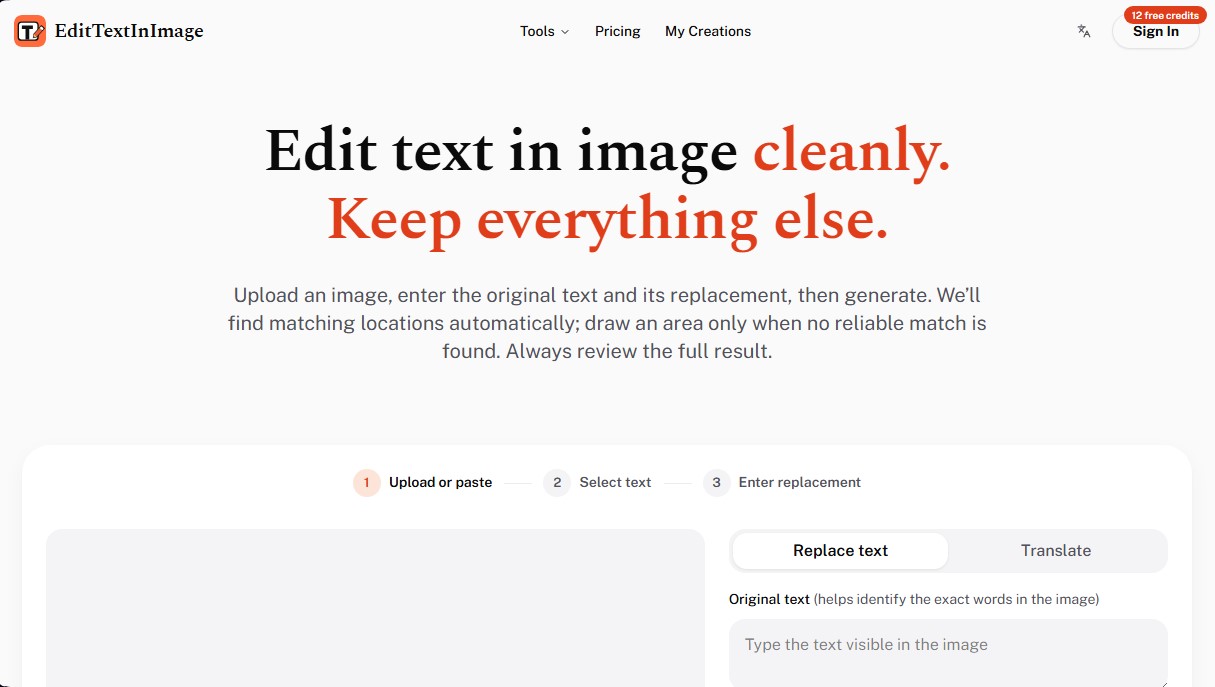
EditTextInImage is an AI-powered tool designed to modify text within finished images cleanly and professionally. Its primary function is to allow word editing without the need for complex graphic design software or advanced technical knowledge. Unlike traditional editors, this application uses AI algorithms to replace text while maintaining the visual coherence of the original file, including typography, color, size, and perspective.
The operation of EditTextInImage is straightforward and follows a structured process. Users upload an image in PNG, JPEG, or WebP format (up to 10 MB), enter the original text they wish to change, and type the new content. The tool utilizes an automatic text matching system to locate the exact words within the graphic. In cases where a match is not immediate or multiple identical words exist, it allows for manual selection of the target area to guide the AI with precision.
Key technical capabilities include background preservation and the protection of unselected elements, ensuring the original design remains intact while the new content is generated. This same-font text editing technology is especially useful for optimizing workflows across various sectors:
- App Localization: Quickly translate user interface screenshots from a computer without rebuilding the entire design.
- E-commerce: Ideal for updating product labels, prices, or ingredients in promotional photos without having to reshoot.
- Marketing and Advertising: Facilitates testing different headlines and calls to action (CTA) in social media creatives.
- Event Materials: Easily reuse posters, banners, and flyers by instantly updating dates, speakers, or locations.
- Corporate Presentations: Helps correct typos or update data in slides exported as images or digital brochures.
The platform delivers results in 1K and 2K quality, guaranteeing sufficient sharpness for commercial use. The system is optimized to work with one text area at a time, allowing for detailed reviews before downloading the final file. It is important to note that EditTextInImage enforces a responsible use policy; therefore, it does not process ID documents, bank statements, or official seals. Its focus is on productivity and creative agility, allowing for precise adjustments from any browser—whether on a mobile device or a desktop—saving time and resources on recurring graphic editing tasks.
EditTextInImage features and use cases
How to use EditTextInImage
EditTextInImage FAQ
What exactly is EditTextInImage?
It is an online AI tool designed to modify text within an image while preserving the original font, color, and style.
Does EditTextInImage offer free credits for new users?
Yes, new users receive twelve free credits after completing their registration to test the platform's features.
How can I change the text in an image with this tool?
Simply upload the file, enter the original text you want to remove, and type the new content so the system can perform the replacement automatically.
What file types and sizes does the platform support?
You can use images in PNG, JPEG, or WebP format with a maximum file size of ten megabytes per upload.
Is commercial use allowed for images edited on EditTextInImage?
Commercial use is permitted for the results as long as you own the original image or have a valid license to edit it.
Can I edit official documents or bank receipts?
No, the system strictly prohibits editing identification documents, official seals, bank statements, or any type of receipt for deceptive purposes.
Do credits purchased in paid packages expire?
Credits from paid packages do not have an expiration date, so you can use them whenever you need without any time limit.
Is it possible to edit multiple text areas at the same time?
To ensure maximum quality and accuracy, it is recommended to edit one text region at a time and review the result before proceeding to the next one.
When should I use manual selection for the text area?
You should only draw the selection box when the automatic system fails to correctly identify the location of the words you want to change.
What happens if a text edit fails?
In the event that an edit is not completed successfully, the system will automatically refund the credits used for that process.
EditTextInImage pricing and plans
Free Plan: $0
- 12 free credits for new users upon sign-up.
- Allows for one text edit in standard quality (1K consumes 12 credits).
Starter: $14.90 (one-time payment)
- 800 credits (equivalent to about 66 edits in 1K quality or 40 edits in 2K).
- 2K editing quality and original image dimensions maintained.
- Commercial use included.
- Credits never expire.
- Automatic credit refunds for failed edits.
Pro: $29.90 (one-time payment)
- 2,000 credits (equivalent to about 166 edits in 1K quality or 100 edits in 2K).
- 2K editing quality and original image dimensions maintained.
- Commercial use included.
- Credits never expire.
- Automatic credit refunds for failed edits.
Max: $49.90 (one-time payment)
- 4,000 credits (equivalent to about 333 edits in 1K quality or 200 edits in 2K).
- 2K editing quality and original image dimensions maintained.
- Commercial use included.
- Credits never expire.
- Automatic credit refunds for failed edits.
Custom Volume: Contact support
- Custom pricing for needs exceeding 10,000 credits.
EditTextInImage Screenshots
EditTextInImage user reviews
Write a review
Checking your session...
EditTextInImage Reviews
Loading reviews...
EditTextInImage alternatives



FaceTouchUp
AI-powered cosmetic surgery simulator to visualize facial and body enhancements. Streamline consultations and help patients preview their final look.

utilz Background Remover
Remove image backgrounds for free with total privacy in your browser. Create transparent or colored backgrounds without uploading files while maintaining original resolution.

ColorCraft
Create Amazon KDP books. Generate coloring pages, stories, puzzles, and print-ready full covers, plus promotional mockups in a single workflow.
