

Share
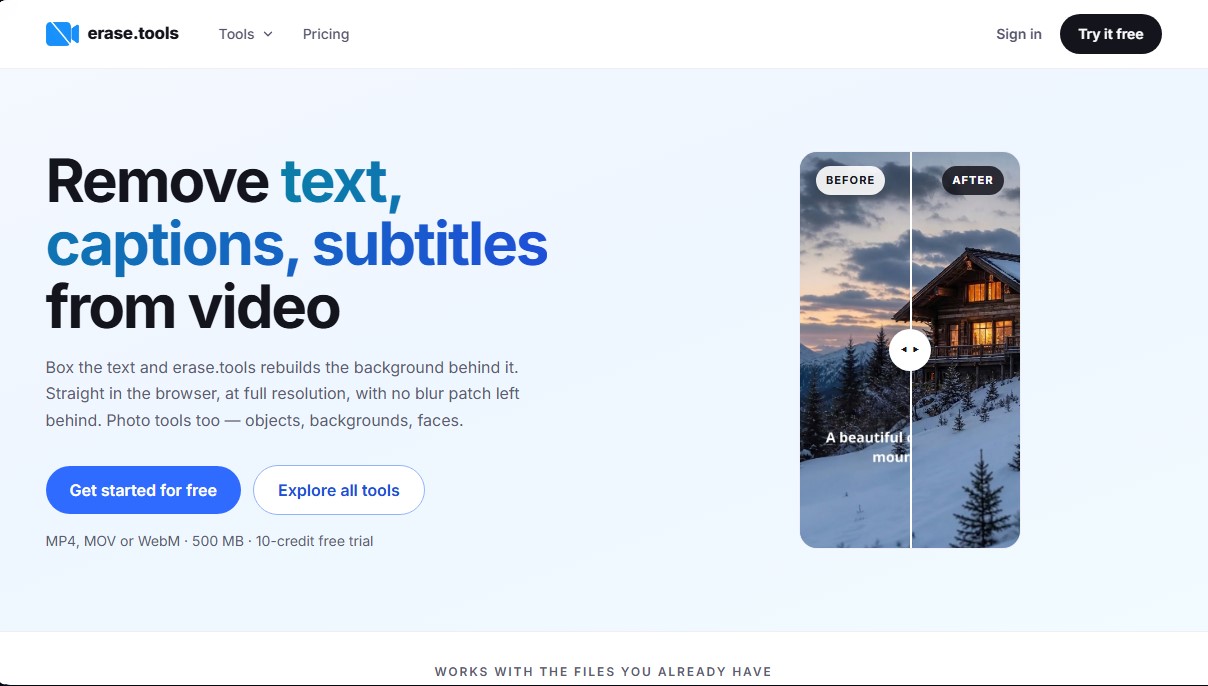
Remove text, watermarks, and objects from photos or videos in your browser. Automatically reconstruct backgrounds in high resolution without blur or loss of quality.
What is erase.tools?
erase.tools is an online platform specialized in removing unwanted elements from video and image files using advanced artificial intelligence algorithms. Its primary function is to allow any user to clean up their visual files by removing text, burned-in subtitles, watermarks, or specific objects without compromising the quality of the original material. It is a practical solution for content creators, editors, and professionals who need to reuse clips or photos by quickly eliminating visual distractions directly from their computer browser.
The technology behind erase.tools is based on pixel reconstruction and motion tracking. Unlike other methods that simply blur or crop the image, this tool reconstructs the background behind the removed element, achieving a clean and natural result. To remove watermarks from a video, the system uses a tracking feature that locks onto the selected area throughout the timeline, making it easy to edit elements moving across the screen. The system supports common video formats such as MP4, MOV, and WebM with a limit of up to 500 MB.
In the photography section, the application allows users to erase objects, people, or signs using a precise selection brush. Additionally, it includes features to remove an image background at full resolution, allowing for exports with transparency or white backgrounds. A key technical feature is that file conversion processes—such as converting HEIC to JPG or WebP to PNG—as well as tools to pixelate faces or censor data, are executed locally in the browser. This ensures that sensitive information is not uploaded to external servers, reinforcing user privacy.
Its core capabilities and functional benefits include:
- Maintaining original quality: The system processes only the pixels within the selection, preserving the original resolution, bitrate, and file container. A 4K video is downloaded while maintaining that same quality level.
- Batch processing: It allows for the management of up to 50 files simultaneously, applying the same selection area to all of them to save time on repetitive tasks.
- No software installation: As a web-based tool, it doesn't require downloading heavy programs or performing complex configurations on your operating system.
- Clean export: Final results do not include watermarks from the platform itself, ensuring a professional finish right away.
The workflow on erase.tools is straightforward: simply upload the file, mark the area to be removed, and process the export. Its ability to handle burned-in subtitles in video offers results indistinguishable from an original master, positioning itself as a fast alternative to professional editors that require manual masking and tracking processes.
erase.tools features and use cases
How to use erase.tools
erase.tools FAQ
What are the main features of erase.tools?
The tool allows you to remove text, subtitles, watermarks, and objects from both photos and videos by reconstructing the original background without leaving any blurring.
Is there any loss in quality when processing a file with erase.tools?
No, the platform maintains the original resolution and bitrate by processing only the selected pixels, ensuring that a 4K clip remains 4K after editing.
Does erase.tools add its own watermark to exported videos?
A watermark is never added to the final results, even when using the free version or the trial period.
What file types can I upload to the platform?
You can work with MP4, MOV, and WebM video files up to 500 MB, as well as PNG, JPG, WebP, and HEIC images.
Is it possible to remove hardcoded subtitles from an entire video?
Yes, simply draw a box over the subtitle area and the tool will remove them from the entire clip while keeping the background intact.
How does the erase.tools credit system work?
Processing is based on a credit system where one credit equals one second of video, and each edit has a minimum cost of ten credits.
Can I process multiple files at the same time?
The tool allows you to upload up to fifty files at once and apply the same area selection to all of them to speed up your workflow.
Do I need to install any software to use the tool?
No installation is required, as the entire editing and file conversion process takes place directly in your web browser.
Can erase.tools track a watermark that moves across the screen?
Yes, the tracking system locks onto the selected watermark along the timeline to remove it, even if its position changes within the video.
What file conversion options does the website offer?
It allows you to convert HEIC images to JPG and WebP files to JPG or PNG format locally on your device without having to upload the files to the server.
erase.tools pricing and plans
Free Version
Price: 0 $
Free 10-credit trial for one video.
Full source resolution with no quality loss.
No watermarks on exported results.
Access to all image and browser tools.
Monthly Plan
Price: 14,99 $ per month
600 monthly credits (0,025 $ per credit).
Full source resolution with no quality loss.
No watermarks on results.
Access to all image and browser tools.
Process clips up to 90 seconds and 500 MB.
Restrictions: 1 credit equals 1 second of video, with a 10-credit minimum per processed video.
6-Month Plan
Price: 12,50 $ per month (billed as a single payment of 74,99 $ every 6 months)
750 monthly credits (0,017 $ per credit).
Full source resolution with no quality loss.
No watermarks on results.
Access to all image and browser tools.
Process clips up to 90 seconds and 500 MB.
Restrictions: 1 credit equals 1 second of video, with a 10-credit minimum per processed video.
Yearly Plan
Price: 5 $ per month (billed as a single payment of 59,99 $ per year)
900 monthly credits (0,0056 $ per credit).
Full source resolution with no quality loss.
No watermarks on results.
Access to all image and browser tools.
Process clips up to 90 seconds and 500 MB.
Restrictions: 1 credit equals 1 second of video, with a 10-credit minimum per processed video.
erase.tools Screenshots
erase.tools alternatives


utilz Background Remover
Remove image backgrounds for free with total privacy in your browser. Create transparent or colored backgrounds without uploading files while maintaining original resolution.




AlreadyRan
AlreadyRan brings dozens of AI image, video and audio models into one web studio with a single credit balance and the cost shown before every generation.