
Share
What is Flux AI?
Flux AI is an AI tool by Flux for designing printed circuit boards (PCBs) in the browser, acting as a hardware engineer that proposes, draws and reviews the design for electronics engineers, hardware startups and product teams.
What is Flux AI and what can it design?
It covers the whole board workflow: brainstorming, planning, schematic capture, component placement and automatic routing, including differential pairs, RF traces and power nets. It supports multilayer boards up to eight layers and also helps with enclosure design, simulation and firmware. When you are done it exports Gerbers, drill files, bill of materials, pick-and-place data and netlists.
How does the AI work inside the editor?
You describe what you need and the agent reads component datasheets, sizes passives, pull-ups and decoupling capacitors, and runs rule checks before manufacturing. While you choose parts it shows distributor availability and lead times.
- Project import from Altium, KiCad, Eagle, Fusion Electronics, EasyEDA, OrCAD/Allegro, PADS, CADSTAR, DipTrace, Proteus or SOLIDWORKS PCB, plus IPC-2581 and IDF.
- Real-time collaboration on the same project, with per-project permissions.
- Encryption in transit and at rest, SOC 2-aligned infrastructure and single sign-on (SSO).
Flux AI pros and cons
Pros: nothing to install, it speeds up repetitive electronics design work and it lets you migrate projects from the most common EDA tools. Cons: AI usage is metered in compute units that run out on large projects, the interface and docs are in English only, and like any assistant its proposals must be reviewed by an experienced engineer before the board goes to the fab. After the evaluation period, an unpaid account can only interact with public projects.
Flux AI features and use cases
How to use Flux AI
Flux AI FAQ
What is Flux AI?
It is a browser-based electronics design tool with an AI agent that creates schematics, routes PCBs and produces manufacturing files.
Is Flux AI free?
There is no full free tier; it offers a 7-day trial on individual options. See the pricing section.
Is it the same as the FLUX image model?
No. Flux AI (flux.ai) is a hardware design tool, while FLUX is the image model from Black Forest Labs.
Can I import my KiCad or Altium projects?
Yes, it imports projects from Altium, KiCad, Eagle, EasyEDA, OrCAD/Allegro, PADS and standard formats such as IPC-2581.
Which manufacturing files does it produce?
It exports Gerbers, drill files, bill of materials, pick-and-place data and netlists for the manufacturer.
How many layers does it support?
According to its site, the AI can work on multilayer boards up to eight layers as well as simpler designs.
Does it work in Spanish?
The interface and docs are in English, although you can describe your requirements to the agent in Spanish.
Does it have an API?
The site does not publish an API for integrating it with other systems; you work from the browser editor.
Is it safe for confidential projects?
It encrypts data in transit and at rest, runs on SOC 2-aligned infrastructure and offers SSO and per-project permissions.
What are the best Flux AI alternatives?
GptZone lists few AI PCB tools so far; outside the directory, the classic references are KiCad, Altium Designer and EasyEDA.
Flux AI pricing and plans
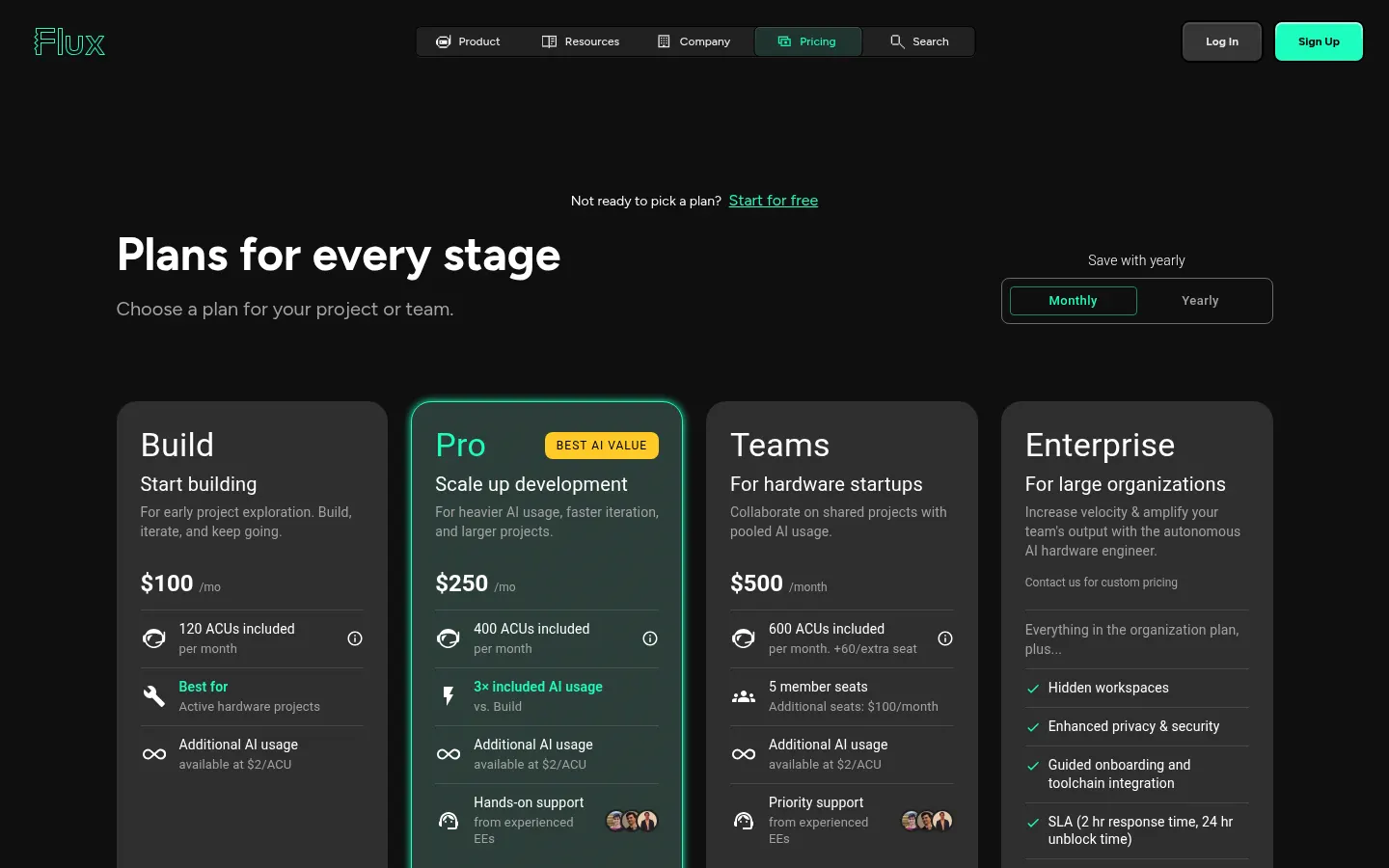
Reference price: 100 USD / month. Source · Verified: November 5, 2026
Information from the official site (Checked on: 05/11/2026). Currency: USD. 7-day trial on individual tiers; extra AI usage at 2 USD per ACU (compute unit).
- Free account: 0 USD; only lets you interact with public projects.
- Build: 100 USD per month; 120 ACUs.
- Pro: 250 USD per month; 400 ACUs and hands-on engineering support; the trial requires a 250 USD hold.
- Teams: 500 USD per month with 5 seats and 600 ACUs; 100 USD per extra seat (+60 ACUs); no trial.
- Enterprise: custom pricing with SLA and hidden workspaces.
Flux AI Screenshots

Flux AI user reviews
Write a review
Checking your session...
Flux AI Reviews
Loading reviews...
Flux AI alternatives

AI CSS Animations
AI CSS Animations is an AI CSS animation generator: describe the effect, answer a few questions and get keyframe code with a live preview.