

Share
Upscale images to UHD with AI for natural finishes. Restore textures in portraits and designs for high-quality, print-ready files.
What is Foca Upscaler?
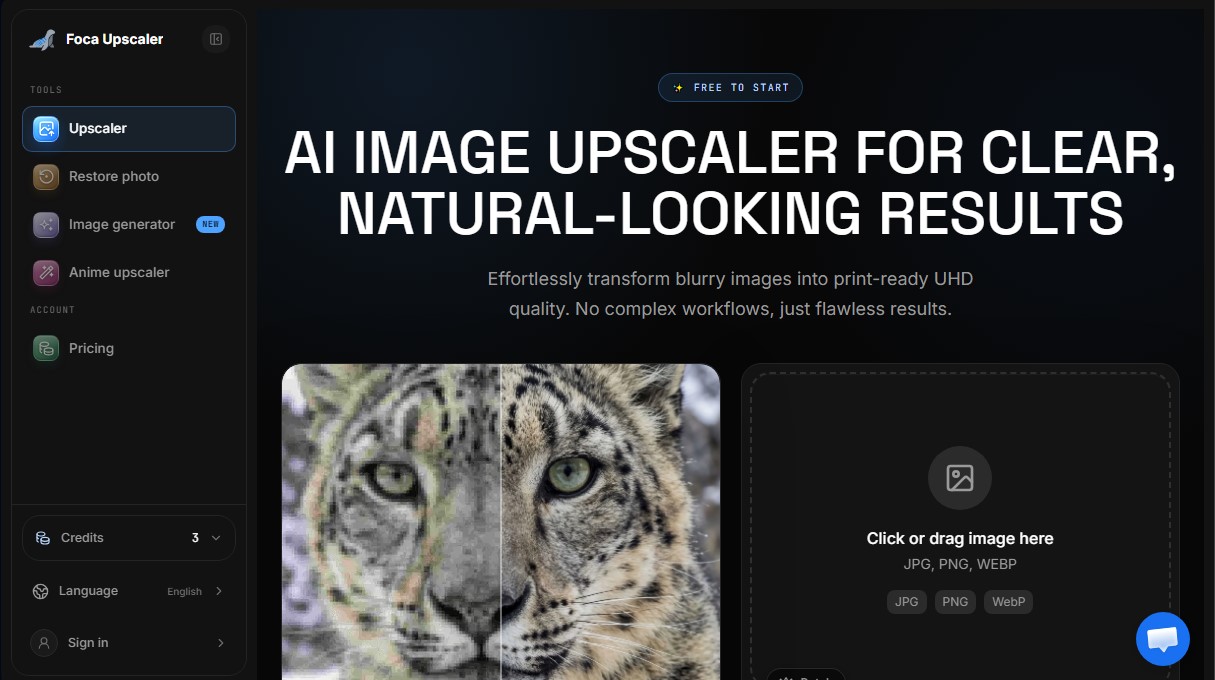
Foca Upscaler is an AI image upscaler designed to transform low-resolution files into UHD quality images with a natural, professional finish. Unlike other tools that simply stretch pixels and apply blur to hide noise, this application utilizes physics-aware reconstruction technology to recover real textures and structures. It is an advanced solution for photographers, graphic designers, architects, and e-commerce professionals who need print-ready images or high-definition visuals without the typical artificial or "waxy" look generated by other models.
The functionality of Foca Upscaler is powered by a dual smart engine system that adapts processing based on the nature of the content. The Foca Sharp engine is optimized for graphics, logos, text, and screenshots, removing artifacts and providing immediate sharpness without distorting original shapes. Conversely, the Foca Physics engine employs AI algorithms to reconstruct complex organic details, such as skin pores, hair strands, textile fibers, and construction materials. This technology avoids the "hallucination" of fake details, prioritizing fidelity to the original image and respect for real-world geometry at all times.
The tool stands out for its versatility across various professional scenarios:
- Portraits and Fashion Photography: Restores skin and hair textures with authentic micro-contrast, maintaining the natural appearance of faces.
- Architecture and Interior Design: Preserves clean straight lines and material credibility, making it ideal for high-end presentations.
- 3D Renders: Enhances edges and surfaces of renders without altering the original artistic style.
- Products and E-commerce: Ensures crisp typography and precise material finishes for digital catalogs and online stores.
- Batch Processing: Allows professional users to upscale multiple images simultaneously, optimizing turnaround times in demanding workflows.
This online image optimizer is fully accessible from a desktop or mobile device as a cloud-based platform. It supports JPG, PNG, and WebP formats, delivering results with a resolution of up to 300 DPI, which guarantees extreme sharpness for large-format prints. Additionally, Foca Upscaler protects user privacy by automatically deleting files from its servers after 24 hours. The process is remarkably simple: just upload the file, select the appropriate AI engine, and download the enhanced image in seconds, enabling professional image upscaling with a single click.
Foca Upscaler features and use cases
How to use Foca Upscaler
Foca Upscaler FAQ
What is Foca Upscaler and what is it used for?
It is an AI-powered tool designed to increase the resolution of blurry images, transforming them into high-quality files with a natural, professional finish.
What is the difference between Foca Upscaler’s Sharp and Physics engines?
Sharp mode provides instant clarity for graphics and text without distortion, while Physics mode reconstructs organic textures like skin or fabric according to the laws of physics.
Can I use Foca Upscaler for free?
Yes. Guests receive three free daily credits, and registered users get fifteen initial credits to try out the texture reconstruction features.
Which file formats does the tool support?
You can upload JPG, PNG, and WebP images with a maximum file size of 20 MB to achieve the best upscaling results.
Are my images stored on the server permanently?
No. Your history is stored temporarily for 24 hours to allow for downloads and comparisons before being permanently deleted to ensure your privacy.
Can I process multiple photos at once with Foca Upscaler?
Subscribed users on paid plans have access to batch processing, which allows them to enhance multiple images simultaneously and efficiently.
Who owns the images after they have been enhanced?
You retain full ownership and copyright of any processed files, ensuring you can use them for commercial purposes without restrictions.
How does Foca Upscaler help with printing low-resolution photos?
The tool upscales images to UHD quality and ensures a density of 300 DPI, which prevents edges from appearing pixelated when printed.
Foca Upscaler pricing and plans
Free Version:
3 daily guest credits (no registration required).
15 account credits for new registered users.
Unlock the Foca Physics engine after logging in.
Starter Plan: $9.9/month (or $4.9/month billed annually).
700 credits per month.
+15 additional daily credits.
Advanced AI upscaling up to 4K.
Batch processing.
Email support.
Standard task queue.
Pro Plan: $24.9/month (or $12.4/month billed annually).
2,400 credits per month.
+30 additional daily credits.
Advanced AI upscaling up to 8K.
Batch processing.
Priority support.
Priority task queue.
Elite Plan: $49.9/month (or $24.9/month billed annually).
6,500 credits per month.
+50 additional daily credits.
Advanced AI upscaling up to 16K.
Batch processing.
Dedicated support.
Dedicated task queue.
Credit Packs (Pay-as-you-go):
1,000 credits: $15 (3-month validity).
2,500 credits: $35 (3-month validity).
7,000 credits: $85 (3-month validity).
Foca Upscaler Screenshots
Foca Upscaler alternatives


AlreadyRan
AlreadyRan brings dozens of AI image, video and audio models into one web studio with a single credit balance and the cost shown before every generation.

Album Art Creator
Generate professional album covers with AI. Create editable designs tailored to your music's genre and style, optimized for Spotify, Apple Music, and other streaming platforms.

Unpixelate
Enhance blurry or pixelated images with AI. Upscale resolution and restore details in faces and old photos for free.

Vireel AI Photo to 4K
Upscale images to 4K with AI. Restore textures, eliminate noise, and fix blur for crisp, high-quality results.

AI Photo Editor Free
Generate images from text, upscale resolution, remove backgrounds, and expand frames. Access various AI models for high-quality illustrations, designs, and portraits.