
Froging AI Image Studio
Share
Generate AI images and videos from text. Edit photos, change styles or backgrounds, and animate visuals using various high-quality models.
What is Froging AI Image Studio?
Froging AI Image Studio is a comprehensive visual creation platform that allows users to generate and edit content using generative artificial intelligence. This tool stands out by unifying various advanced models into a single interface, making it easy to produce high-quality images and videos directly from the browser of any computer or mobile device, without the need to manage multiple separate subscriptions.
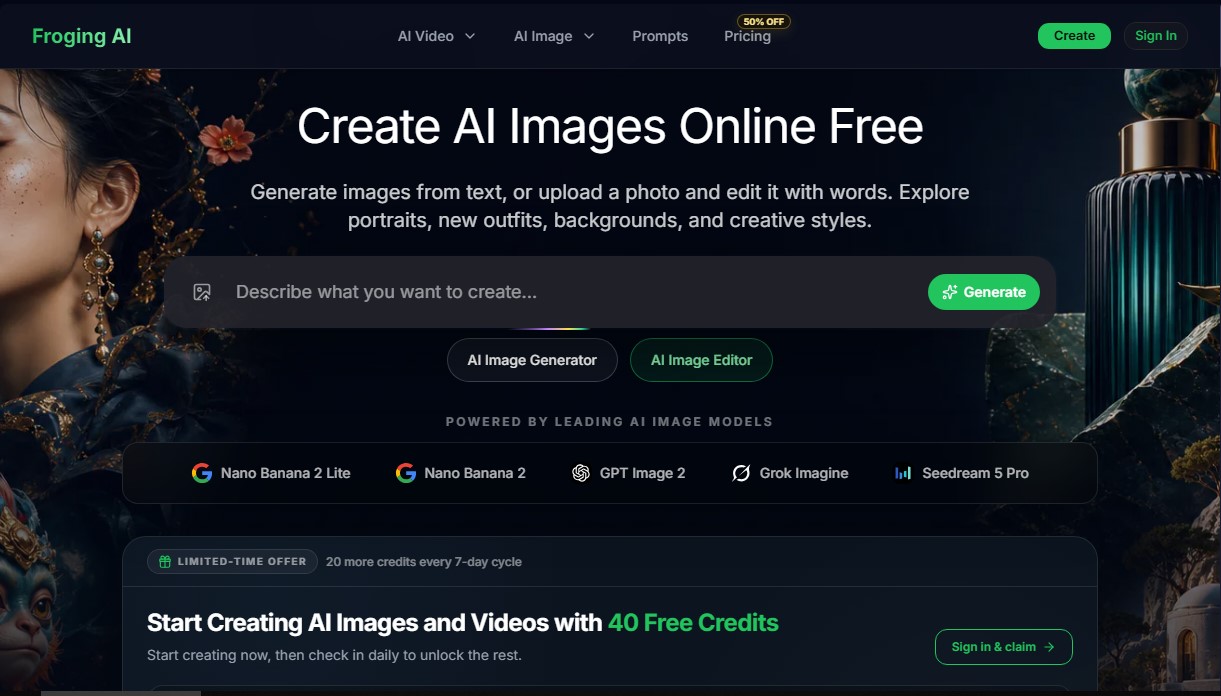
The core feature of Froging AI is its AI image generator, which utilizes cutting-edge models such as Nano Banana 2, GPT Image 2, Seedream 5 Pro, and Grok Imagine. Each of these engines offers different specializations: from extreme photorealism and precise text rendering to complex artistic compositions or anime and 3D design styles. Users can create content from scratch using detailed text prompts or transform existing files.
The AI image editor allows for specific changes to uploaded photos through written instructions. This semantic editing capability facilitates functional tasks such as:
- Changing the outfit of a subject in a portrait while maintaining physical consistency and original features.
- Modifying the environment or background of a scene, allowing an object or person to be moved to any imagined location.
- Altering the visual style, converting a real photograph into a fashion illustration, an oil painting, or a digital rendering.
In addition to static images, the tool integrates AI video generation capabilities, allowing users to convert images into animated clips or create sequences directly from text. This is particularly useful for content creators, marketing agencies, and designers looking to produce professional-grade material for social media, advertising, or blogs without watermarks in its premium versions.
The workflow in Froging AI Image Studio is simply structured: describe the concept or upload reference material, select the appropriate AI model (such as GPT Image 2.5 Flare for fast generation or Sunburst for detailed edits), and download in high resolution, with support for 2K and 4K formats. The platform covers a wide variety of styles, including product photography, brutalist architecture, concept art, and logo design.
For professional users, the tool provides commercial use rights for creations, facilitating their legal integration into ad campaigns, marketing materials, and client projects. By centralizing next-generation models, Froging AI positions itself as a versatile solution for optimizing creative workflows through advanced AI technology.
Froging AI Image Studio features and use cases
How to use Froging AI Image Studio
Froging AI Image Studio FAQ
Is the Froging AI image generator free?
Yes, you can create images for free by signing up. You will receive welcome credits without needing to provide any credit card information.
How can I edit my own photos in Froging AI Image Studio?
Simply upload your image to the editor and use a text prompt to describe the changes you want, such as changing an outfit or moving the portrait to a different setting.
Can I use Froging AI images for commercial projects?
Yes, users on paid plans have full commercial rights to use their creations in advertisements, websites, and marketing materials.
What types of AI models does the platform include?
The platform combines several leading models, such as GPT Image 2, Nano Banana 2, and Seedream 5 Pro, to provide everything from photorealism to artistic illustrations.
How do I get more credits on the platform?
You can earn additional credits by logging into your account daily, purchasing one-time credit packs, or subscribing to a monthly or annual plan.
Is it possible to generate videos as well as images?
Yes, the tool allows you to directly transform any generated image into a short motion video using the built-in conversion feature.
What is the resolution of the downloaded images?
Images are downloaded in high resolution, and premium plan users can access superior quality exports of up to 4K without watermarks.
Do credits purchased through one-time payment plans expire?
No, credits purchased through Mini, Basic, or Pro one-time packs do not have an expiration date and will remain in your account until you use them.
Do I need to sign up to use Froging AI Image Studio?
Yes, registration is required so that free credits can be assigned to your profile and to allow you to save or download your creations.
Froging AI Image Studio pricing and plans
Free Plan
Price: 0 €
- 40 total free credits (20 upon sign-up and an additional 20 through a 7-day access cycle).
- Access to the AI image generator and editor.
- Limited to personal use and evaluation purposes.
Mini (One-time payment)
Price: 4,90 $
- 80 one-time use credits (equivalent to approximately 16 images or 8 short videos).
- Credits never expire.
- No recurring charges.
- Includes all features and commercial use rights.
Basic (One-time payment)
Price: 39,90 $
- 800 one-time use credits (equivalent to approximately 160 images or 80 short videos).
- Credits never expire.
- No recurring charges.
- Includes all features and commercial use rights.
Pro (One-time payment)
Price: 89,90 $
- Between 2,000 and 5,000 one-time use credits (equivalent to approximately 400 images or 200 short videos).
- Credits never expire.
- No recurring charges.
- Includes all features and commercial use rights.
Basic (Subscription)
Price: 9,90 $/mes (or 8,25 $/mes with 99 $ annual billing)
- 200 credits per month (up to 40 images or 20 videos).
- AI video generation and watermark-free downloads.
- 2K/4K resolution image generation.
- Access to premium AI models.
- Audio-enabled videos.
- Commercial use rights and community support.
Starter (Subscription)
Price: 29,90 $/mes (or 23,33 $/mes with 280 $ annual billing)
- 800 credits per month (up to 160 images or 80 videos).
- AI video generation and watermark-free downloads.
- 2K/4K resolution image generation.
- Access to premium AI models.
- Audio-enabled videos.
- Commercial use rights and community support.
Pro (Subscription)
Price: 99,90 $/mes (or 50,00 $/mes with 600 $ annual billing)
- Between 1,600 and 4,000 credits per month (up to 800 images or 400 videos).
- Faster generation speeds.
- Priority support.
- Early access to new models.
- Includes all features from previous plans (AI video, 4K, no watermarks, and commercial use).
Froging AI Image Studio Screenshots
Froging AI Image Studio alternatives



NeotypeLab
NeotypeLab uses AI to plan paint schemes for Gunpla, mecha girls and Zoids, with real hobby paint codes, a spraying sequence, a shopping list and an HD preview.

AlreadyRan
AlreadyRan brings dozens of AI image, video and audio models into one web studio with a single credit balance and the cost shown before every generation.


Vidverse AI
Vidverse AI brings several AI video, image and voice models into one web and mobile app, so you can turn text or photos into clips, images and voiceovers.