
Share
AI generator for icons, logos, and vector illustrations. Create consistent, editable SVG sets with a unified visual style.
What is GlyPho?
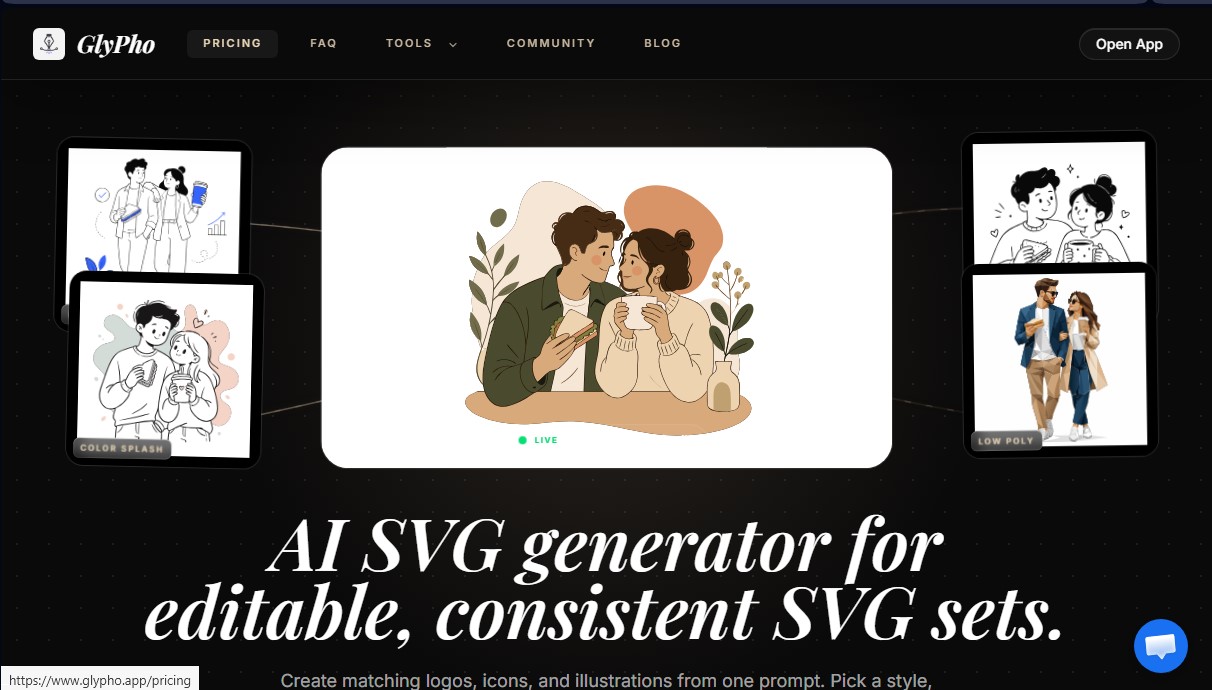
GlyPho is an advanced AI SVG generator specifically designed to create consistent and fully editable vector graphic sets. Unlike conventional stock image search engines, this tool allows you to generate icons, logos, and illustrations that maintain the same aesthetic style from a text description or prompt. Its primary function is to help designers, developers, and project founders produce digital assets that share the same line weight, shape language, and color palette, ensuring visual consistency across web interfaces, mobile apps, or marketing materials.
The functionality of GlyPho is based on a system of presets and use context. Users define the element's function and select one of the available visual styles for the AI to apply specific graphic rules. By using the same preset for different elements, the tool ensures that a logo, a set of UI icons, and campaign illustrations all feel like part of the same visual family. This AI vector generation technology eliminates the need for manual cleanup of rasterized files, delivering clean SVG code directly.
The platform stands out by offering various configurable visual styles tailored to different design needs:
- Minimal Outline: Clean, monochromatic strokes for logos and product symbols.
- Notion Style: Editorial illustrations with a warm touch, ideal for guides and documentation.
- Line Art: Technical graphics with constant line weights for minimalist interfaces.
- Sticker: Designs with bold silhouettes and high visual impact, useful for brand mascots.
- Duotone: Two-color systems designed to maintain corporate identity within complex design systems.
One of the most important practical advantages of GlyPho is that the final output is a natively editable SVG file. This allows professionals to inspect the markup, adjust vector paths, modify colors, or integrate the graphic directly into their code without losing quality. Additionally, the tool includes a private library to organize generations and allows for the reuse of prompt logic that has worked best.
It is an ideal solution for teams that need custom vector UI assets quickly, allowing them to go from an abstract concept to a production-ready icon set in just a few minutes. By focusing on the generation of SVG families, this application solves the common problem of visual fragmentation that occurs when combining resources from different stock sources. The workflow is rounded out by a community where users can explore others' results and find inspiration for new visual systems.
GlyPho features and use cases
How to use GlyPho
GlyPho FAQ
What exactly is GlyPho and what is it used for?
It is an AI-powered vector graphic generator designed to create visually consistent sets of icons, logos, and editable illustrations.
How does GlyPho ensure that an icon set maintains the same style?
The tool allows you to reuse style presets and prompt contexts so that every new element follows the same visual rules as the previous ones.
Can I edit the files after downloading them from GlyPho?
Yes, results are exported in a fully editable SVG format, allowing you to modify colors, paths, and nodes in any design software or directly in the code.
Is it possible to keep my GlyPho designs in a private library?
Users on Pro and Business plans can save their assets to a private library and choose which ones they want to share with the community.
Can GlyPho illustrations be used for commercial projects?
Yes, paid plans include commercial usage rights, allowing you to use the graphics in products, websites, and marketing campaigns.
How does the GlyPho community reward system work?
For every ten original files you share publicly for the first time in the community gallery, you will receive one free credit for your account.
What types of visual styles does the GlyPho generator offer?
It features various presets such as Minimal Outline, Notion Style, Low Poly, Color Splash, and Duotone to suit different branding needs.
How should I write my prompts to get the best results in GlyPho?
We recommend describing the element's function, where it will appear, and the specific subject, while always combining it with one of the available style presets.
What makes GlyPho different from a conventional vector library?
Unlike static stock image libraries, this tool generates new, editable files based on your specific needs while maintaining visual consistency.
GlyPho pricing and plans
Free Plan
0 $/forever
Explore public community SVGs.
Generate your first design direction to test the service quality.
Pro Plan
20 $/month (or 16 $/month billed annually)
70 monthly AI credits.
Private library to save your designs.
Commercial use license.
Access to community rewards (1 free credit for every 10 original SVGs shared).
Includes all Free plan features.
Business Plan
60 $/month (or 48 $/month billed annually)
250 monthly AI credits.
Collaborative workflow for teams.
Priority support.
Includes all Pro plan features.
GlyPho Screenshots
GlyPho user reviews
Write a review
Checking your session...
GlyPho Reviews
Loading reviews...
GlyPho alternatives


AppLaunchFlow
Generate screenshots, ASO copy, icons, videos, and mockups for app stores. Includes localization, social graphics, and app ranking tracking.



utilz Background Remover
Remove image backgrounds for free with total privacy in your browser. Create transparent or colored backgrounds without uploading files while maintaining original resolution.
