
Share
Convert images and text into high-quality 3D models. Generate assets for video games, printing, or design and export production-ready GLB files instantly.
What is Image-to-3D.ai?
Image-to-3D.ai is an advanced artificial intelligence platform designed for 3D model generation from 2D images and text descriptions. This tool allows designers, game developers, and 3D printing enthusiasts to transform static files into functional three-dimensional assets in seconds, significantly optimizing creative workflows that would traditionally require hours of manual computer modeling.
The operation of Image-to-3D.ai is based on shape and depth reconstruction algorithms that analyze the structure, edges, and proportions of the source file. When uploading a JPG, PNG, or WEBP image (up to 6 MB), the AI processes the information to create high-precision geometry. The technology allows users to choose between two types of output depending on project needs: a textured mesh with UV mapping for realistic rendering, or a geometry-focused model with clean topology, ideal for subsequent manual retopology or animation processes.
Among its core capabilities is the text-to-3D model generator, which builds recognizable volumetric shapes from descriptive prompts. Additionally, the tool offers advanced options such as enabling PBR materials (Physically Based Rendering) and selecting the generation type to adjust the level of detail. The resulting models are fully editable and exported in GLB format, a lightweight industry standard compatible with the most widely used software and engines, such as Blender, Unity, and Unreal Engine.
This AI 3D modeling solution is particularly useful across various professional sectors:
- Game Development: Rapid prototyping of characters, props, and environments, facilitating direct integration into the game engine.
- 3D Printing: Obtaining print-ready models from character illustrations or three-view drawings.
- Interior Design: Generating 3D previews of furniture and decorative elements for home projects.
- E-commerce: Transforming product photos into interactive assets that enhance visualization in online stores.
- Education: Developing interactive learning materials and visual models for academic environments.
The platform includes built-in utilities such as a 3D file viewer and a format converter, allowing users to preview the result before downloading. By automating smart retopology, Image-to-3D.ai ensures that models maintain consistent structural integrity from multiple angles. It is a key tool for those looking to obtain production-ready 3D assets quickly, eliminating the technical barriers of traditional modeling.
Image-to-3D.ai features and use cases
How to use Image-to-3D.ai
Image-to-3D.ai FAQ
What exactly is Image-to-3D.ai and what is it used for?
It is an artificial intelligence tool designed to automatically convert 2D images or text descriptions into structured three-dimensional models.
Can I try Image-to-3D.ai for free?
Yes, the platform provides new users with free credits to explore the core features and generate test models before committing to a subscription.
What kind of images provide the best quality in Image to 3D AI?
The best results are achieved with images that feature clear subjects, simple backgrounds, good lighting, and well-defined edges to facilitate geometric reconstruction.
What file formats can be downloaded from Image-to-3D.ai?
All generated models are exported in GLB format, ensuring compatibility with professional editing tools such as Blender, Unity, or Unreal Engine.
Can I use my own sketches or photographs in Image to 3D AI?
Yes, you can upload your own images as references to create custom assets based on your designs, product photos, or original artistic concepts.
What output options does the tool offer for generated models?
The platform allows you to choose between a model with detailed textures and realistic materials or a model focused exclusively on geometry with a clean, editable mesh.
Who owns the copyright to the models created with Image-to-3D.ai?
The user retains ownership and rights to the generated 3D models, especially when the creation is based on files or references provided by the user.
Are my privacy and images secure when using Image to 3D AI?
Privacy is a top priority; all uploaded files are processed securely and are not shared publicly or used for other purposes without your express consent.
What is the file size limit for uploads to Image-to-3D.ai?
The platform supports JPG, PNG, or WEBP formats with a maximum size of six megabytes per reference image.
Which industries benefit most from using Image to 3D AI?
This tool is ideal for game development, 3D printing, interior design, and the quick and easy creation of interactive educational materials.
Image-to-3D.ai pricing and plans
Free Version (Price: Free)
Includes free credits or trial access for new users.
Allows users to explore the tool's features and generate sample models.
Access to image-to-3D conversion and text-to-3D generation.
Paid Plans (Subscriptions and Credits)
Access advanced features through subscriptions, one-time purchases, or usage-based credits.
High-precision 3D model generation with PBR materials.
Export models in editable GLB format for engines like Unity or Unreal Engine.
Two output types: textured mesh (UV mapping) or geometry-only with clean topology.
Intelligent auto-retopology and online preview.
Specific pricing is not detailed; please visit the official website or contact via email for information regarding subscription rates and credit packages.
Image-to-3D.ai Screenshots
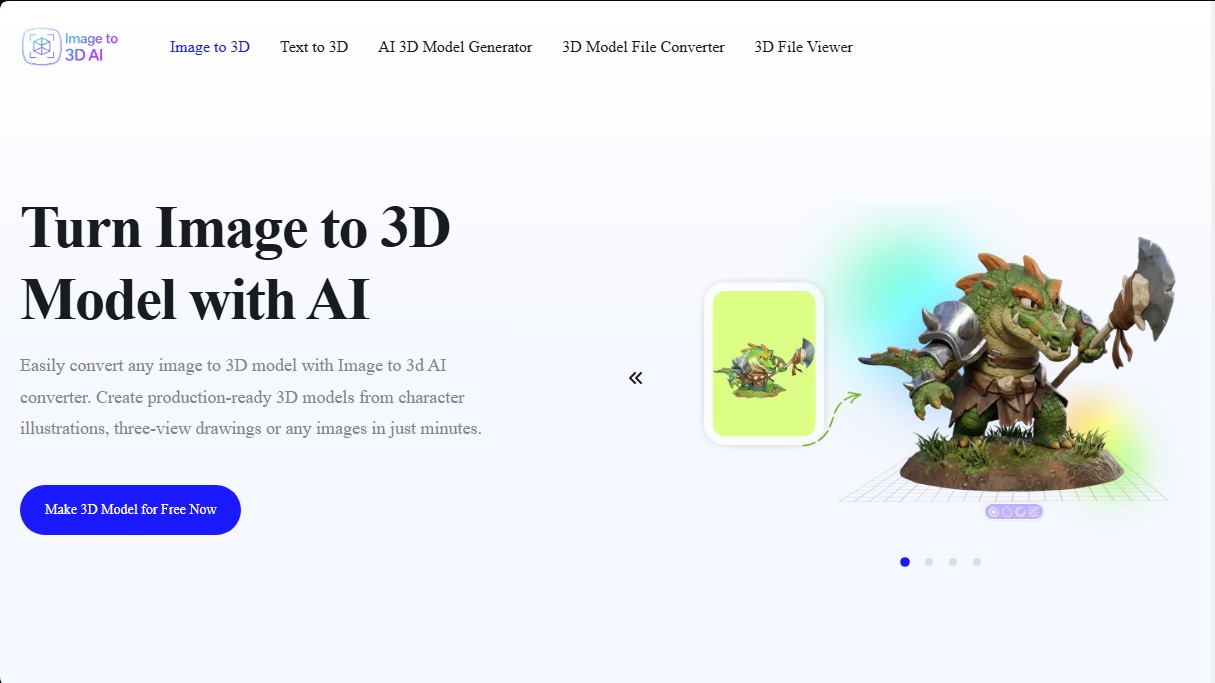
Image-to-3D.ai user reviews
Write a review
Checking your session...
Image-to-3D.ai Reviews
Loading reviews...
Image-to-3D.ai alternatives

Triverse AI
Triverse AI generates 3D models from an image or a text prompt, adds AI PBR textures and produces assets ready for games, 3D printing and XR.

ImageToSTL.org
Convert JPG and PNG images into STL files for 3D printing using AI. Generate detailed 3D models ready for instant download.

Image to 3D
Convert 2D images and sketches into textured 3D models using AI. Export in GLB, STL, or USDZ for video games, 3D printing, and augmented reality.