
Share
Convert images into editable layered PSDs. AI separates subjects, objects, and backgrounds, reconstructing hidden areas for professional design and editing.
What is Image2Layer?
Image2Layer is an artificial intelligence tool designed to transform flat images into editable layered files. Unlike conventional background removers, this application allows you to decompose JPG, PNG, or WebP files into independent elements such as subjects, objects, text graphics, shadows, and backgrounds. Its primary function is to streamline the creative workflow by converting a single static image into a structured project ready for professional editing on your computer.
The operation of Image2Layer is based on semantic layer separation using advanced AI models. The process begins by uploading an image of up to 24 MB with a minimum resolution of 512x512 pixels. The system analyzes the visual composition to identify and isolate up to 10 editable layers. One of its most notable technical capabilities is background reconstruction, a technology that uses AI to reconstruct areas hidden behind foreground objects. This allows you to move or remove elements without leaving empty gaps, maintaining the integrity of the entire scene.
Its core capabilities and practical benefits include:
- Image to PSD Conversion: Generates files with rasterized layers compatible with Photoshop, Photopea, GIMP, Affinity Photo, and Krita, preserving the original stacking order.
- Multi-format Export: In addition to PSD, it allows you to download individual layers as transparent PNGs or compressed ZIP packages.
- Smart Element Detection: Automatically isolates products, logos, portraits, typography, and shadows for precise segmentation.
- Custom Separation: Users can choose the number of layers or add optional notes to guide the AI on which specific elements to preserve or separate.
This tool is especially useful for graphic designers, marketing specialists, animators, and game artists who need to prepare assets for design revisions or complex scenes. Image2Layer optimizes e-commerce content production by allowing products to be isolated from their environments for reuse in different creative assets. It is also valuable for creators looking to generate parallax effects or new compositions from character illustrations or flat posters where the original source file is unavailable.
The workflow is straightforward and efficient, completing the AI layer separation within 60 to 120 seconds. By automating time-consuming manual masking tasks, Image2Layer positions itself as a creative productivity solution for professionals who need to transform flat images into production-ready assets for immediate use. The results offer an output resolution of approximately 0.4 MP per layer, ensuring a solid foundation for digital retouching and compositing.
Image2Layer features and use cases
How to use Image2Layer
Image2Layer FAQ
What is Image2Layer and what is it used for?
It is an AI-powered tool that transforms flat images into editable layered files to streamline graphic design and professional editing.
How many layers can Image2Layer split an image into?
The platform allows you to separate a single image into up to ten independent layers, including subjects, shadows, objects, text, and reconstructed backgrounds.
What file formats are supported for image uploads?
You can use JPG, PNG, or WebP files with a maximum size of 24 megabytes and a minimum resolution of 512 pixels.
How does Image2Layer differ from a conventional background remover?
Unlike a simple removal tool, this software doesn't just cut out the subject; it reconstructs the hidden background and maintains each element as an independent layer.
In what formats can I download my completed projects?
Users can export their work as Photoshop-compatible PSD files, transparent PNG images, or compressed ZIP archives.
Does the tool offer a free trial for new users?
Upon signing up for the first time, new users receive ten free credits to test the service without needing to provide any credit card information.
Can I edit the generated files in software other than Photoshop?
Yes, the exported PSD files work perfectly in Adobe Photoshop, Photopea, GIMP, Affinity Photo, and Krita.
How long does the Image2Layer separation process take?
The AI typically takes between 60 and 120 seconds to process and separate all semantic elements from the original image.
What happens to the background when an object is removed from the image?
Background reconstruction technology automatically fills in the areas that were hidden, ensuring the final design is fully usable and free of gaps.
How many credits does each layer generation use?
Each process of separating an image into editable layers consumes 20 credits from your available balance.
Image2Layer pricing and plans
Free (0 $)
10 welcome credits upon sign-up.
Use credits on compatible conversion tools.
Detailed or Targeted layer modes.
Output formats in PNG or PSD.
Free wait queue (approximately 1 minute).
No credit card required.
Starter (9 $ per month or 7 $ per month with 84 $ annual billing)
200 credits per month (approximately 10 successful generations).
Image-to-layers and image-to-PSD tools.
Detailed or Targeted layer modes.
Export in PNG, JPG, WebP, or PSD formats.
Priority generation with no wait times.
Creator (29 $ per month or 22 $ per month with 264 $ annual billing)
1,000 credits per month (approximately 50 successful generations).
Detailed and Targeted layer workflows.
PSD, PNG, JPG, and WebP exports.
Background reconstruction workflow.
Result history saved (30 days).
Priority generation.
Studio (79 $ per month or 59 $ per month with 708 $ annual billing)
4,000 credits per month (approximately 200 successful generations).
Full image-to-layers and PSD export.
Specific workflows for products, posters, logos, and characters.
Top-priority generation.
API early access option.
General Restrictions: Each generation consumes 20 credits. The upload limit is 24 MB per file (JPG, PNG, or WebP). Output layers have a resolution of approximately 0.4 MP. A maximum of 10 layers are created per image.
Image2Layer Screenshots
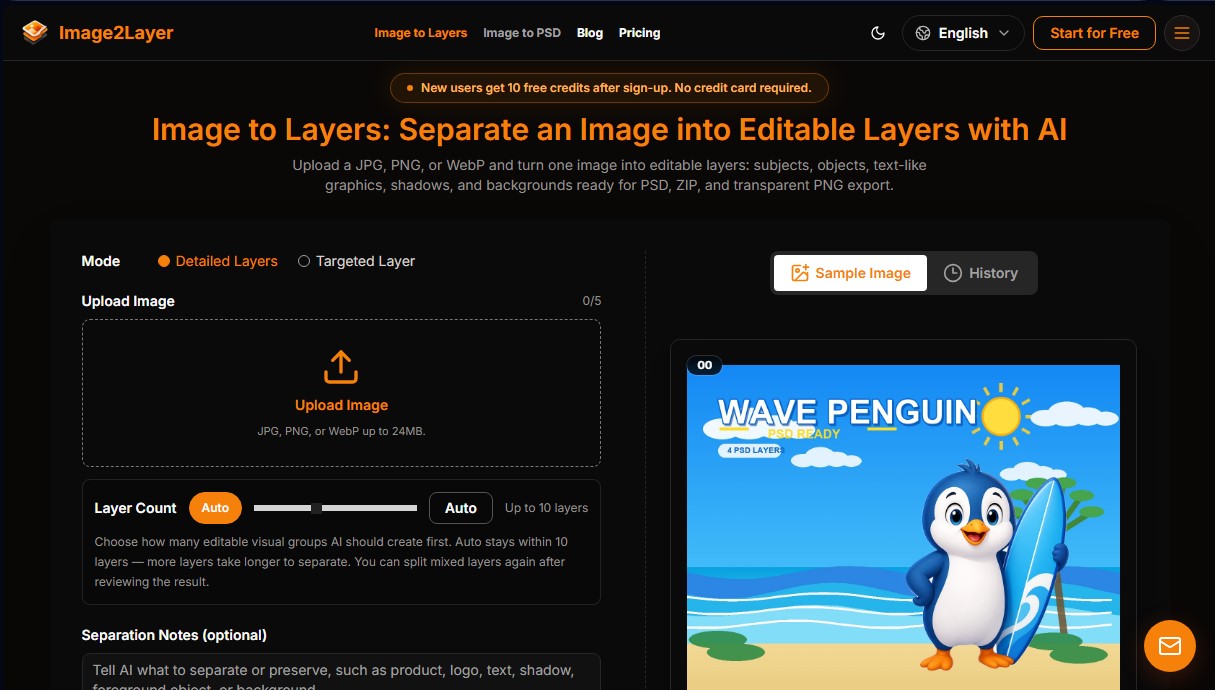
Image2Layer user reviews
Write a review
Checking your session...
Image2Layer Reviews
Loading reviews...
Image2Layer alternatives


AppLaunchFlow
Generate screenshots, ASO copy, icons, videos, and mockups for app stores. Includes localization, social graphics, and app ranking tracking.



utilz Background Remover
Remove image backgrounds for free with total privacy in your browser. Create transparent or colored backgrounds without uploading files while maintaining original resolution.
