
Share
Transform images into 3D models for printing using AI. Generate slice-ready STL files in your browser with no external software required.
What is Image3D.io?
Image3D.io is an advanced artificial intelligence tool designed to transform 2D images into print-ready 3D models. Its primary function is to serve as an image-to-STL generator, allowing users to obtain three-dimensional files from photos, illustrations, or sketches without needing to master complex modeling software like Blender. This web application is particularly useful for 3D printing enthusiasts, product designers, and content creators looking to streamline their workflow from a computer or any modern browser.
The operation of Image3D.io is based on AI algorithms that analyze the uploaded image to estimate depth and surface geometry. The process consists of two fundamental technical stages: first, the AI reconstructs a complete 3D mesh based on the subject of the image; second, a browser-integrated exporter converts that mesh into a binary STL file. Since it runs entirely online, it requires no heavy installations and allows you to define printing dimensions in millimeters directly before downloading, ensuring the model fits the print bed perfectly.
The platform offers different precision levels to suit various functional needs. Ultra mode is highly recommended for final results, as it generates meshes with up to one million faces, preserving critical surface details for physical manufacturing. In addition to the STL format, which is the universal standard for slicing software, the tool allows for exports in GLB, OBJ, and PLY, facilitating its use in web viewers, augmented reality, or video game development.
Among its most notable practical applications and benefits are:
- Custom figures: Creating miniatures and statues from concept art or toy photos.
- Product prototyping: Converting concept renders into physical models to evaluate shape and ergonomics.
- Tabletop scenery: Generating detailed castles, ruins, and terrain elements for RPGs or strategy games.
- Cosplay props: Scaling armor pieces, weapons, or helmets for life-sized printing.
- E-commerce: Transforming AI-generated art into physical products for sale on print-on-demand platforms.
Files generated on Image3D.io are fully compatible with the market's leading slicers, including Cura, PrusaSlicer, Bambu Studio, and OrcaSlicer. For optimal results, it is recommended to use images with a single, well-defined subject against a simple background. This allows the AI to clearly distinguish the silhouette and volume, avoiding geometric reconstruction errors that often occur with complex backgrounds or low-resolution images.
Image3D.io features and use cases
How to use Image3D.io
Image3D.io FAQ
What is Image3D.io and how does it work for 3D printing?
It is an AI-powered tool that transforms 2D images into print-ready 3D models. The system analyzes the photo's depth and generates a mesh that you can export as an STL file directly from your browser.
Can I use Image3D.io for free?
Yes, all new users receive thirty free credits upon sign-up to test the tool. This allows you to perform up to three standard-quality generations without needing to enter payment information or install any additional software.
Which slicing programs are compatible with Image3D.io files?
The exported STL files are universal and work with any slicer on the market. You can use them directly in popular programs like Cura, PrusaSlicer, Bambu Studio, OrcaSlicer, or Simplify3D to prepare your print.
Which Image3D.io quality level is recommended for printing?
For the best physical results, the Ultra level is recommended, as it generates a mesh of up to one million faces that preserves fine details. The Pro level is suitable for rapid prototyping, and the Standard level is primarily used for shape previews.
Is it possible to adjust the size of the model before downloading it?
Yes, the tool's exporter includes an option to set the exact size of the model in millimeters. Just enter the desired measurement for the longest side, and the system will automatically scale the piece before generating the final file.
What kind of images work best with Image3D.io?
The best models are obtained from images featuring a single, well-defined subject against a simple background. Product photography, character concept art, and designs with clear silhouettes allow the AI to process the geometry with higher precision.
Do I need to know how to use Blender or other complex design software?
No prior 3D modeling knowledge is required to use this platform. The entire process of creation and conversion to STL format is handled automatically and intuitively within the browser-based studio interface.
What file formats can I get besides STL?
In addition to the standard format for 3D printing, the tool allows you to export models in GLB format with textures for web and augmented reality use, as well as OBJ and PLY files. This offers versatility if you decide to use your model in video games or animation software.
Image3D.io pricing and plans
Free Plan
Price: 0 €
30 welcome credits (equivalent to 3 Standard quality generations).
Exclusive access to Standard quality.
Image-to-3D and Text-to-3D generation.
Export in GLB, OBJ, STL, and PLY formats.
Includes commercial license.
Starter Plan
Price: $9.99 per month ($5.99/mo billed annually).
2,500 monthly credits.
Access to all quality levels: Standard (10 credits), Pro (100 credits), and Ultra (350 credits).
PBR textures included.
Permanent storage for generated models.
Commercial license.
Creator Plan
Price: $39.99 per month ($23.99/mo billed annually).
11,000 monthly credits.
Priority processing queue.
Option to purchase additional credit packs.
Includes all Starter plan features.
Power Plan
Price: $89.99 per month ($53.99/mo billed annually).
30,000 monthly credits.
Top-priority processing queue.
Dedicated technical support.
Option to purchase additional credit packs.
Includes all Creator plan features.
Credit Packs (One-time payment)
First Timer Pack: $0.99 for 200 credits (new users only; permanently unlocks Pro and Ultra qualities).
Starter Pack: $4.99 for 1,000 credits.
Power Pack: $9.99 for 3,000 credits.
Restrictions: Credits from these packs never expire and are stackable with any subscription.
Image3D.io Screenshots
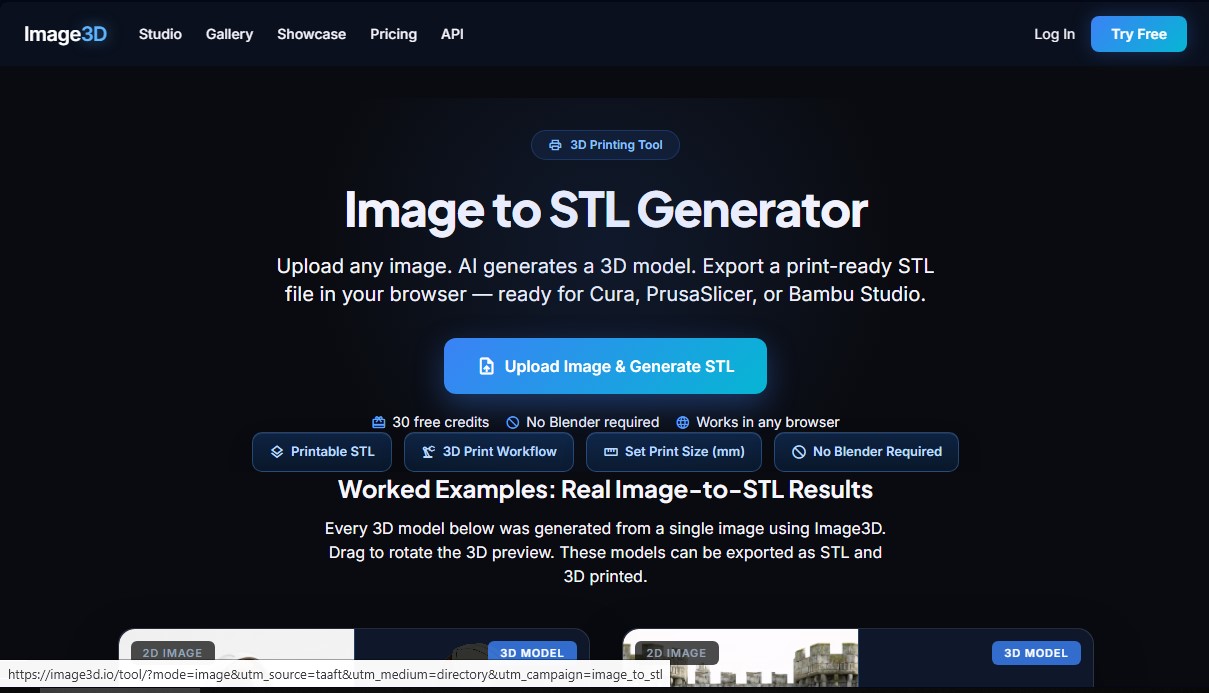
Image3D.io user reviews
Write a review
Checking your session...
Image3D.io Reviews
Loading reviews...
Image3D.io alternatives

Triverse AI
Triverse AI generates 3D models from an image or a text prompt, adds AI PBR textures and produces assets ready for games, 3D printing and XR.

ImageToSTL.org
Convert JPG and PNG images into STL files for 3D printing using AI. Generate detailed 3D models ready for instant download.

Image to 3D
Convert 2D images and sketches into textured 3D models using AI. Export in GLB, STL, or USDZ for video games, 3D printing, and augmented reality.