
Share
What is LiveSwap.ai?
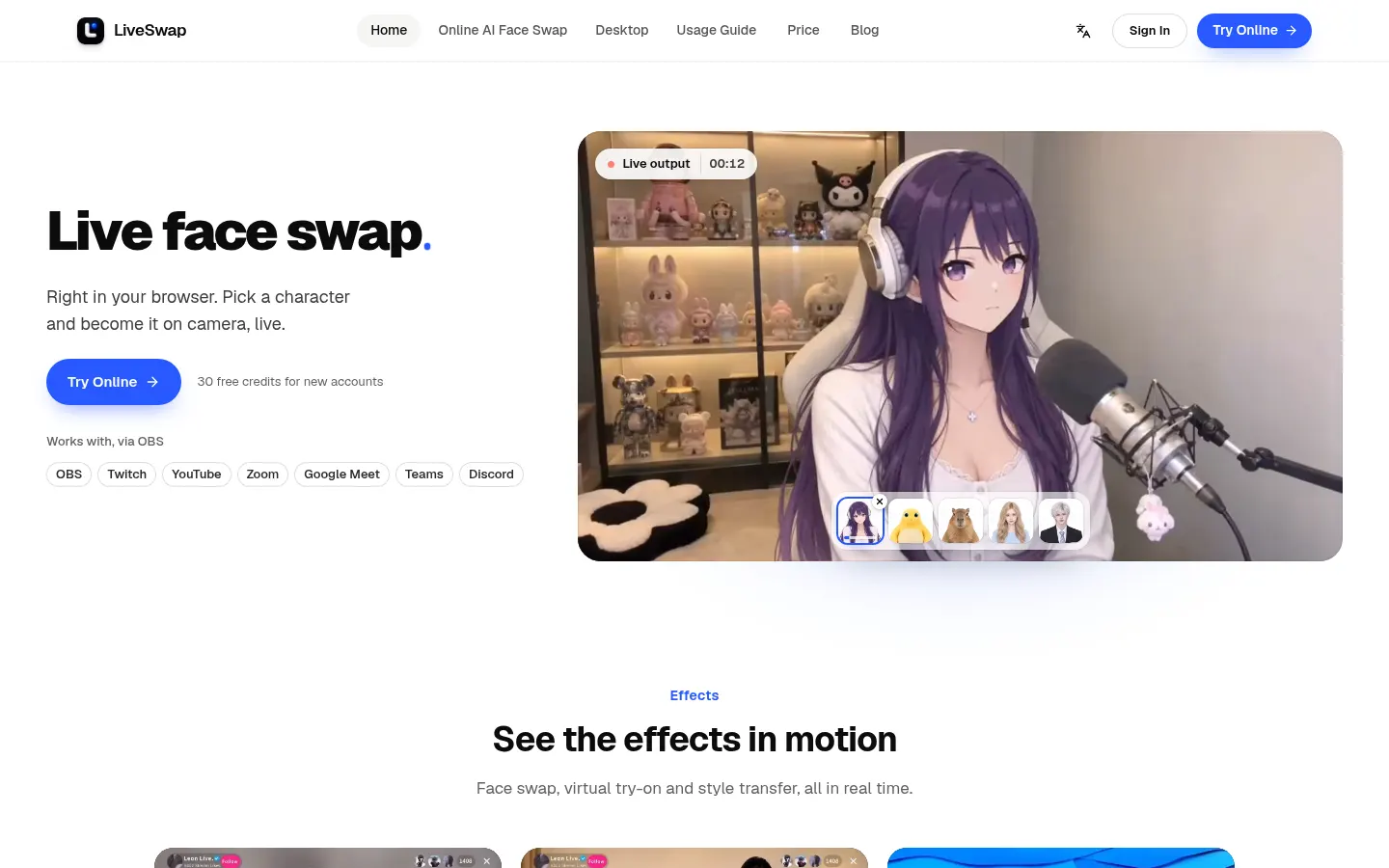
LiveSwap.ai is a real-time AI face swap tool that runs in the browser: turn on your camera, pick a character and the output already wears that face, ready to send to OBS, Twitch, YouTube, Zoom, Google Meet, Microsoft Teams or Discord. It is built for streamers, VTubers, short-form creators and live sellers.
What is LiveSwap.ai used for?
It lets you appear on camera as someone else without recording and editing afterwards. Besides face swapping it offers live virtual try-on and style transfer. The library holds 157 characters (real people, anime, pets and creative styles) that switch with one tap, and you can also save private references, which are stored encrypted.
How does LiveSwap.ai work?
The camera preview stays on your device; once generation starts, the reference and camera stream go to the model provider and the processed output comes back. Two models are available: X-Max 2.1, the lighter one, and Lucy 2.6, which uses more credits. In the browser you capture the output window in OBS or use OBS Virtual Camera. The Windows desktop app installs LiveSwap Camera, which shows up as a regular webcam in calling apps; a macOS version is announced.
Who is LiveSwap.ai for?
- Streamers and VTubers who would rather not show their face.
- Skit and short-video creators playing several characters.
- Fashion brands and live sellers showing garments with virtual try-on.
- Anyone wanting a fun twist on video calls with friends.
LiveSwap.ai pros and cons
There is nothing to install, usage is metered by the second and output carries no watermark. Its own guide warns that results depend on motion, lighting, network and the reference, and that likeness is not guaranteed; on phones, support varies by browser. The service's usage rules govern which references are allowed, worth checking before using another person's face.
LiveSwap.ai features and use cases
How to use LiveSwap.ai
LiveSwap.ai FAQ
What is LiveSwap.ai?
LiveSwap.ai is an AI tool that swaps your face live on webcam so you can use that feed on streams and video calls.
Is LiveSwap.ai free?
New accounts get 30 welcome credits; ongoing use is paid. See the pricing section of this page.
What do I need to use LiveSwap.ai?
A recent browser, a camera, a stable connection and an account. On Windows you can also use the desktop app.
Does it work with Zoom, Meet or Teams?
Yes. In the browser you use OBS Virtual Camera, and the Windows app installs LiveSwap Camera, which you select as a webcam in those apps.
Are my images sent off my device?
The preview stays local; during generation the reference and camera stream go to the model provider, and private references are stored encrypted.
How do I get the best result?
Be alone in frame, face the camera and use even lighting; motion and network quality also affect likeness.
Does it work on mobile?
You can try it in a recent browser with camera permission, but results depend on the device, browser and connection.
Does LiveSwap.ai have an API?
The official site does not mention a public API; it runs in the online studio or the Windows app.
Does LiveSwap.ai work in Spanish?
The interface is in English, though the effect is visual and language-independent.
What are the alternatives to LiveSwap.ai?
On GptZone you can compare it with Akool, EasyFaceSwap or Viggle AI, although these mostly work with recorded video or images.
LiveSwap.ai pricing and plans
Reference price: 15 USD / month. Source · Verified: November 14, 2026
Prices in US dollars (USD) as listed on the official site. Checked on: 14/11/2026. The page says "Payments not yet open".
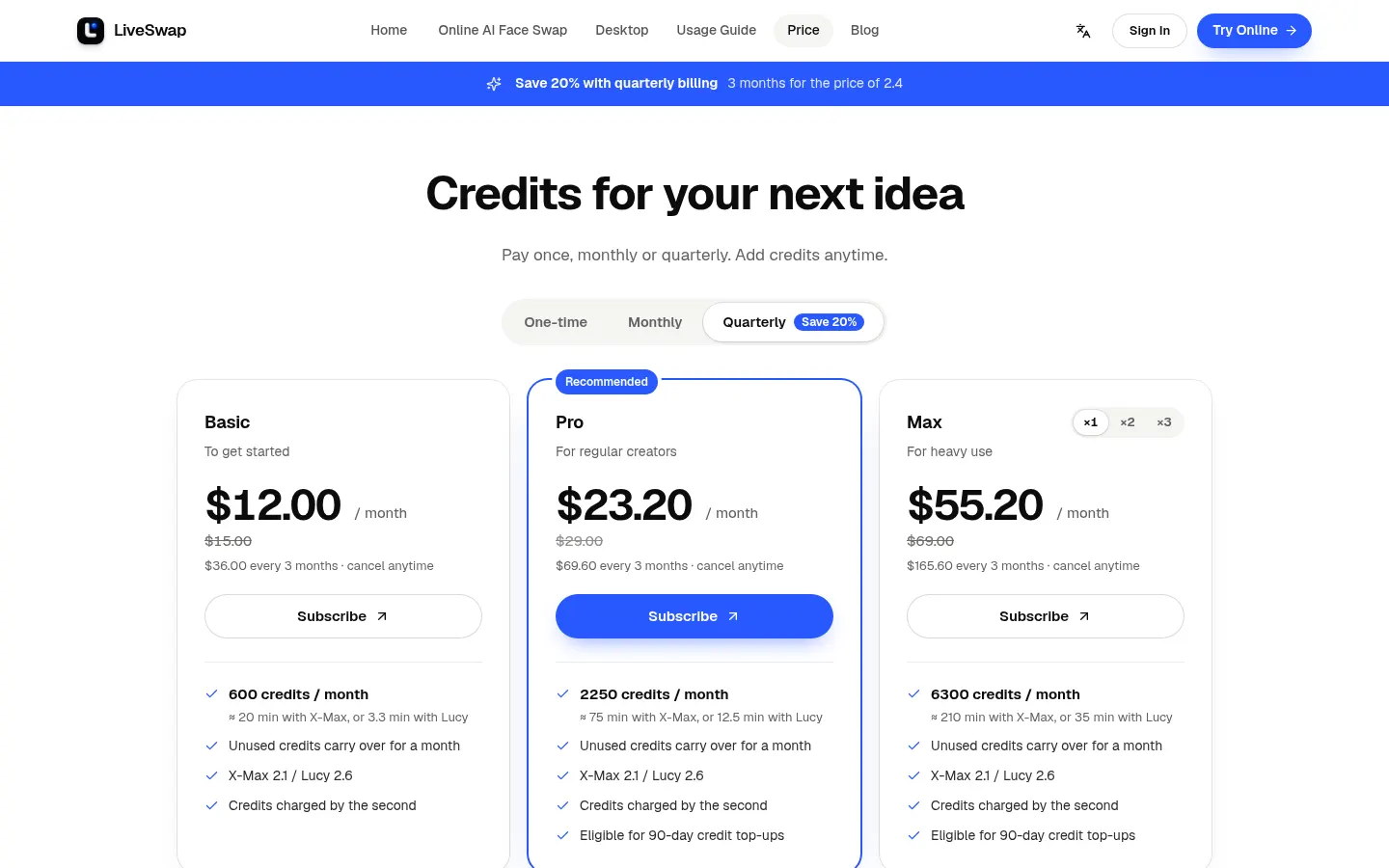
Basic: $15/month ($12/month on quarterly billing of $36). 600 credits a month, about 20 min with X-Max or 3.3 min with Lucy.
Pro: $29/month ($23.20/month quarterly). 2,250 credits a month, about 75 min with X-Max or 12.5 min with Lucy.
Max: $69/month ($55.20/month quarterly). 6,300 credits a month, about 210 min with X-Max or 35 min with Lucy.
- All plans: face swap, restyle and try-on, web and Windows apps, no branding on output; unused credits carry over for a month.
- Top-ups for Pro and Max (valid 90 days): 900 credits for $15, 1,800 for $30, 3,600 for $60.
- Permanent packs, no subscription: 1,800 credits for $59 and 4,000 for $119.
- New accounts get 30 credits (one per IP). X-Max costs 0.5 credits/s and Lucy 3 credits/s.
LiveSwap.ai Screenshots
LiveSwap.ai user reviews
Write a review
Checking your session...
LiveSwap.ai Reviews
Loading reviews...
LiveSwap.ai alternatives

Tiptoeing in My Jordans
Generate Rumpelstiltskin barn meme videos by inserting faces from photos. Create custom social media clips with music and perfectly synced dance moves.



Burning Bridges AI
Create custom videos by inserting your photos into preset scenes. Swap the lead and audience while keeping the original choreography and audio.