

Share
Transform static logos into cinematic AI animations. Create unique, high-resolution videos for your brand without using templates.
What is LogoTeddy?
LogoTeddy is an advanced AI logo animation platform designed to transform static images into high-quality cinematic reveals in a matter of minutes. Unlike traditional template-based tools that repeat the same patterns for every user, this system utilizes generative artificial intelligence to analyze the structure, colors, and personality of each brand, creating a unique and personalized movement for every execution. Its primary purpose is to enable businesses and content creators to produce professional video intros without requiring technical expertise in post-production or motion design.
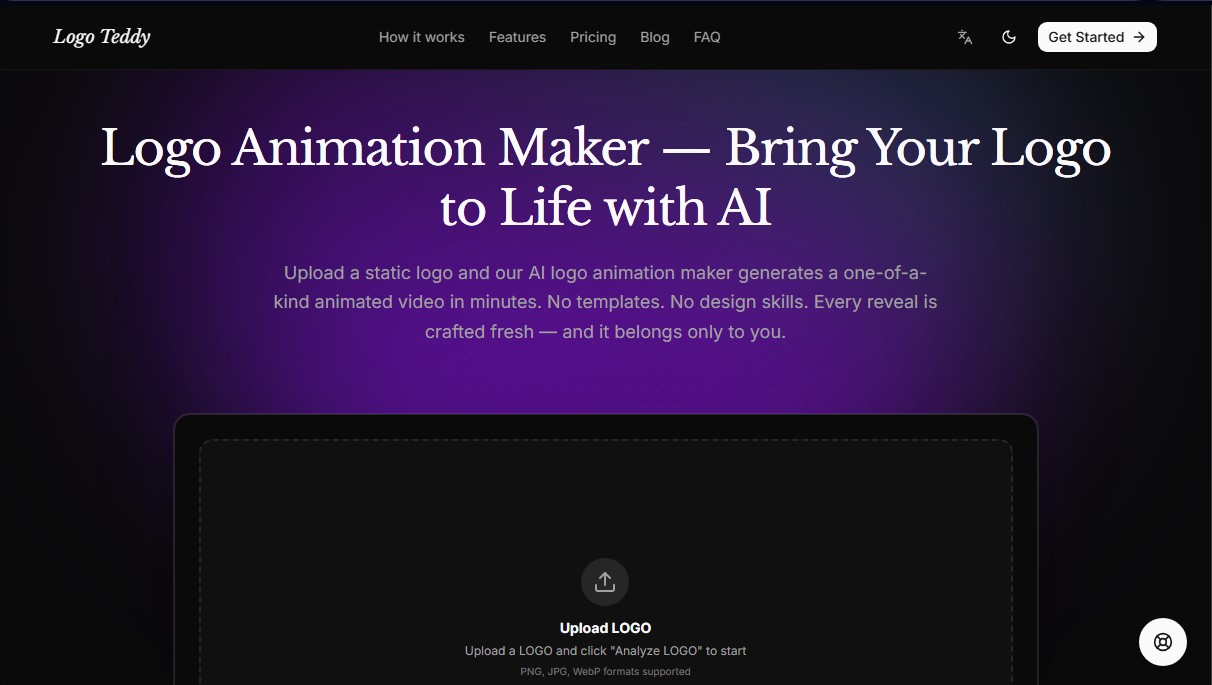
The LogoTeddy workflow is built on a structured process that begins by uploading a PNG, JPG, or WebP file. Once the image is uploaded, the AI model studies the logo's "visual DNA" to propose various creative directions. Users can adjust specific parameters such as duration, aspect ratio, and reveal pacing, allowing the AI to generate a motion graphics sequence that aligns with the project’s visual identity. The final rendering is typically completed within 3 to 5 minutes, providing a downloadable file ready for use on any computer or mobile device.
Key technical capabilities and functional benefits of this tool include:
- Unique Reveal Generation: The AI analyzes the logo's shape and character to create exclusive animations, ensuring the result is never a carbon copy of other projects.
- Dynamic Style Adjustments: Users can steer the output toward specific aesthetics—whether luxury, dynamic, or industrial—using intuitive configuration controls.
- High-Resolution Export: Supports MP4 downloads in qualities ranging from 480p to 4K, optimized for large-format screens and presentations.
- Format Versatility: Offers multiple aspect ratios, including 16:9 for YouTube, 9:16 for vertical social media, and 1:1 for square posts.
- Brand Integrity Preservation: The technology ensures the logo resolves with perfect sharpness and zero distortion at the end of the animation.
This tool is particularly valuable for content creators, social media managers, and marketing agencies seeking to efficiently elevate their digital branding. Since it includes commercial usage rights, the generated animations can be seamlessly integrated into advertisements, corporate presentations, video channels, and websites. LogoTeddy delivers studio-quality results through automation, eliminating the cost and time barriers typically associated with traditional video editing. It is the ideal solution for anyone needing an impactful logo reveal that provides an immediate premium look to their digital presence.
LogoTeddy features and use cases
How to use LogoTeddy
LogoTeddy FAQ
How is LogoTeddy different from other template-based animation tools?
Unlike platforms that simply recycle the same movements, LogoTeddy’s AI analyzes your logo's shape and colors to create a unique, custom animation every time.
What image formats can I upload to start animating?
You can upload PNG, JPG, or WebP files, though we recommend using high-resolution images for the best possible results.
Can I try LogoTeddy for free?
Yes! When you sign up, you’ll receive 50 free credits—enough to generate your first five-second, 480p animation with no watermarks.
How long does it take to create a video?
Most animations render in three to five minutes, and you can watch the progress in real time while the AI does its work.
Can I use LogoTeddy animations for commercial projects?
Absolutely. You own every animation you generate, and you’re free to use them for YouTube, ads, presentations, or client work with no extra licensing fees.
What resolutions are available for the final video downloads?
You can export your animations as MP4s in 480p, 720p, 1080p, and even 4K, making them perfect for any screen.
Do purchased credits expire?
No, credits purchased through our various packages never expire, so you can use them whenever you need them.
What settings can I adjust before generating the final animation?
You can choose the creative direction, adjust the duration, select the aspect ratio, and define the style or movement intensity before spending your credits.
LogoTeddy pricing and plans
Free (0 $)
50 starter credits upon registration.
Allows you to create your first 5-second animation in 480p resolution.
No watermarks.
Restriction: Mandatory public display of the logo and the generated animated video is required.
Starter (19,99 $)
2,050 total credits (2,000 + 50 bonus).
Access to all export resolutions.
Includes commercial use license.
Estimated capacity: approximately 5 animations in 720p or 2 10-second animations in 1080p.
Creator (99,99 $)
10,500 total credits (10,000 + 500 bonus).
Access to all export resolutions.
Includes commercial use license.
Estimated capacity: approximately 25 animations in 720p or 10 10-second animations in 1080p.
Studio (499,99 $)
55,000 total credits (50,000 + 5,000 bonus).
Access to all export resolutions.
Includes commercial use license.
Estimated capacity: approximately 134 animations in 720p or 53 10-second animations in 1080p.
Additional usage information: Credits do not expire. The cost per 10-second animation is 190 credits for 480p, 410 credits for 720p, and 1,020 credits for 1080p. A 5-second animation in 480p has an initial cost of 47.5 credits.
LogoTeddy Screenshots
LogoTeddy user reviews
Write a review
Checking your session...
LogoTeddy Reviews
Loading reviews...
LogoTeddy alternatives



Osmo Studio
AI animation studio for professional motion graphics and videos. Control every detail, collaborate with teams, and export with transparent backgrounds.

Comik AI-Anime Character Creator
Design anime characters using text or images. Generate multi-view design sheets to ensure visual consistency across comics, manga, and animated videos.