
Share
Generate downloadable 3D models from text or images. Create assets for video games, 3D printing, and AR in OBJ, FBX, and STL formats—no modeling experience required.
What is Make3DAI.com?
Make3DAI.com is an advanced AI-powered 3D modeling platform designed to transform text descriptions or reference images into downloadable 3D assets. This tool eliminates the need to master complex design software or CAD programs, allowing both beginners and professionals to generate detailed geometry automatically. Its primary focus is the creation of video game assets, product prototypes, 3D printing models, augmented reality (AR) objects, and visual content for e-commerce.
The application’s workflow is based on three main input modes that facilitate content creation:
- Text to 3D: Allows users to generate models from natural language prompts, interpreting descriptions of characters, accessories, or environments.
- Image to 3D: Processes photos, sketches, or concept art to build a 3D mesh based on the image's main subject.
- Multiview to 3D: Supports uploading multiple angles of the same object to achieve a more precise and consistent volumetric reconstruction.
Make3DAI.com technology is deployed through different versions of its AI engine to adapt to various technical needs. Version V1.0 is geared toward creating quick drafts and basic untextured meshes, ideal for volume testing. Version V3.0 introduces vibrant colors and PBR materials, while V4.0 offers high-quality geometry and detailed textures suitable for professional workflows.
Beyond generation, the system includes a creator toolkit that allows for the optimization of final files:
- AI Texture Generator: Enhances flat models through text descriptions.
- 3D Repair Tool: Corrects mesh errors and non-manifold edges before exporting.
- Remeshing and Segmentation: Optimizes topology for better performance in graphics engines and allows complex models to be split into editable parts.
- Volume Calculator: Useful for estimating the material needed for manufacturing and prototyping projects.
Regarding interoperability, Make3DAI.com stands out for its broad format compatibility. Users can export their creations as GLB, OBJ, FBX, STL, PLY, USDZ, and 3MF files, ensuring that models are usable in Unity, Unreal Engine, web viewers, and print slicers. It is a comprehensive solution for those looking to create 3D models with AI efficiently, prioritizing the technical utility of the final file and speed in digital asset production.
Make3DAI.com features and use cases
How to use Make3DAI.com
Make3DAI.com FAQ
What is Make3DAI.com and what is this tool used for?
It is an AI platform designed to quickly and easily transform text descriptions or reference images into downloadable 3D models.
Can I create a 3D model from a single photo on Make3DAI.com?
Yes, the "Picture to 3D" feature allows you to upload an image, and the AI automatically handles generating the object's geometry and details.
Which file formats can I export from Make3D AI?
The tool supports the most widely used industry formats, including GLB, OBJ, FBX, STL, PLY, USDZ, and 3MF.
Can I use Make3DAI.com for free?
Yes, there is a free plan that provides 50 monthly credits to generate basic models using version V1.0 and allows for up to two downloads per day.
Are Make3D AI models suitable for 3D printing?
Absolutely. You can export your creations in STL or 3MF format and use the built-in repair tool to ensure the mesh is print-ready.
Do I need technical modeling skills to use Make3DAI.com?
No prior experience or knowledge of complex software like Blender or CAD is required, as the entire process is handled through simple prompts.
Can I use assets generated in Make3D AI for commercial projects?
Users subscribed to any paid plan receive commercial usage rights for the 3D models they create on the platform.
What is the difference between V1.0 and V4.0 models on Make3DAI.com?
While version V1.0 generates quick drafts without textures, version V4.0 offers high quality with detailed geometry, PBR materials, and professional-grade finishes.
Make3DAI.com pricing and plans
Free Plan
Precio: 0 $ (Free forever)
- 50 free credits per month.
- 1 concurrent task.
- 2 daily downloads of V1.0 models (fast drafts without textures).
- 30-day cloud storage.
- Single-view AI 3D rendering (1024 px JPG).
- Restrictions: Does not include advanced V3.0 or V4.0 models, or commercial use rights.
Creator Plan
Precio: 11,90 $ al mes (8,33 $ al mes con facturación anual)
- 800 credits per month.
- 2 concurrent tasks.
- Access to advanced V3.0 models (vibrant colors, PBR materials, and detailed geometry).
- Commercial use rights.
- Creation tools: Text-to-3D, Image-to-3D, and Multi-view-to-3D.
- 3D model video generation.
- Single-view rendering (1024 px) and 4-view studio render pack (2048 px PNG).
- File downloads in GLB, OBJ, FBX, STL, PLY, USDZ, and 3MF formats.
- 24/7 priority customer support.
Pro Plan
Precio: 25,90 $ al mes (18,00 $ al mes con facturación anual)
- 2,500 credits per month.
- 4 concurrent tasks.
- Access to advanced V3.0 models.
- Commercial use rights.
- All creation features (text, image, multi-view) and video generation.
- High-resolution renders and 4-view studio packs.
- Full export in GLB, OBJ, FBX, STL, PLY, USDZ, and 3MF formats.
- 24/7 priority customer support.
Studio Plan
Precio: 79,90 $ al mes (39,90 $ al mes con facturación anual)
- 8,000 credits per month.
- 12 concurrent tasks.
- Access to advanced V3.0 models.
- Commercial use rights.
- Includes all creation, video, and professional rendering tools.
- Export in all supported formats (GLB, OBJ, FBX, STL, PLY, USDZ, and 3MF).
- 24/7 priority customer support.
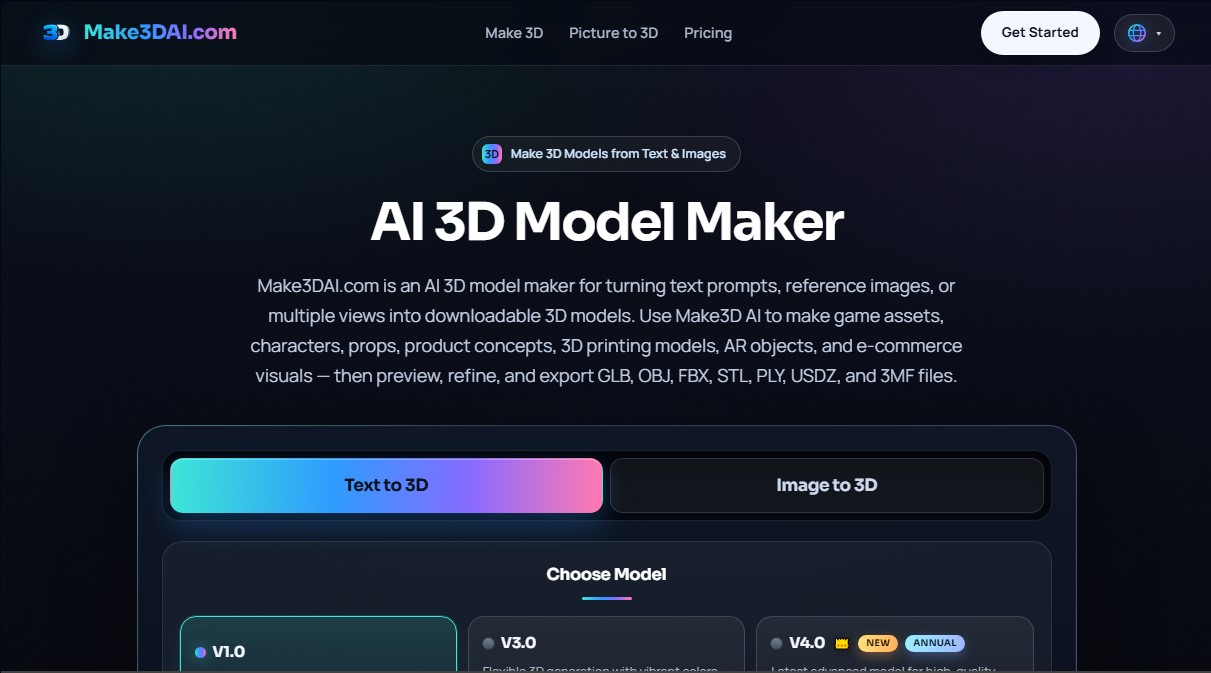
Make3DAI.com Screenshots
Make3DAI.com user reviews
Write a review
Checking your session...
Make3DAI.com Reviews
Loading reviews...
Make3DAI.com alternatives


Triverse AI
Triverse AI generates 3D models from an image or a text prompt, adds AI PBR textures and produces assets ready for games, 3D printing and XR.

ImageToSTL.org
Convert JPG and PNG images into STL files for 3D printing using AI. Generate detailed 3D models ready for instant download.

Image to 3D
Convert 2D images and sketches into textured 3D models using AI. Export in GLB, STL, or USDZ for video games, 3D printing, and augmented reality.