

Share
Convert PDFs, images, and emails to Excel or CSV. Extract data from messy files to generate structured tables and automate recurring extractions.
What is Messy2Sheet?
Messy2Sheet is an advanced AI solution designed for data extraction and converting unstructured files into clean, organized spreadsheets. Its primary function is to transform complex documents—such as PDFs, screenshots, emails, messy CSV files, or copied text—into editable Excel or CSV formats. This tool is particularly useful for accounting professionals, sales departments, logistics, and data managers who need to automate data entry without relying on manual processing on their computers.
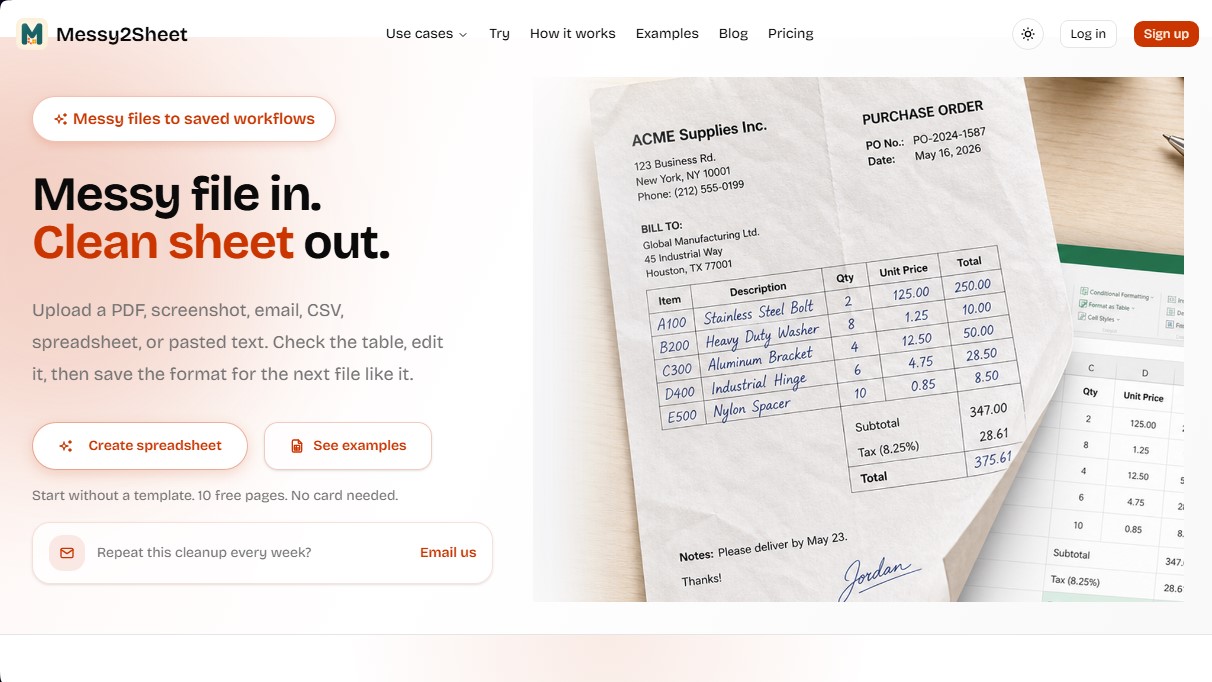
The platform operates on a direct processing approach: the user uploads the source file, and Messy2Sheet’s technology generates an automatic draft with the necessary rows, columns, and tabs. Unlike traditional OCR software that only recognizes characters, this tool uses artificial intelligence to interpret the logical structure of the information and build a coherent table. The system allows users to add natural language instructions to define specific columns, apply cleaning rules, or request alternative versions of the table before the final export.
Key features include its flexible use, allowing users to start from scratch without pre-configuring templates. However, for corporate processes requiring a rigid format, the application allows users to link extracted data to predefined Excel templates. One of its most powerful features is the creation of automated workflows. Once a user adjusts the layout for a recurring document, they can save those rules and columns so that future similar files are processed automatically with the same structure, ensuring data consistency.
The tool’s versatility covers various practical use cases:
- Converting bank statements into accounting ledgers with transaction and balance breakdowns.
- Automating invoices and purchase orders by extracting vendor data, line items, and taxes.
- Transforming screenshots and photos of receipts into detailed expense reports.
- Processing POS sales reports, lab reports, and complex legal documents.
Before downloading the file, users can preview the workbook to verify the accuracy of the rows and columns. Messy2Sheet facilitates exporting to standard formats like XLSX and CSV, allowing for immediate integration into analysis tools or business management systems. By eliminating manual transcription, this application optimizes operational productivity and significantly reduces the margin of error in business data handling.
Messy2Sheet features and use cases
How to use Messy2Sheet
Messy2Sheet FAQ
What is Messy2Sheet and what is it used for?
It is a tool designed to convert messy files—such as PDFs, screenshots, or emails—into clean Excel or CSV spreadsheets.
What types of source files can I upload to Messy2Sheet?
You can upload PDF files, images, screenshots, CSV documents, standard spreadsheets, or even paste text directly from your clipboard.
Is it mandatory to use a template to process my documents?
No, it isn’t necessary. You can upload a file directly, and the tool will automatically detect the row and column structure you need.
Can I save my cleaning rules in Messy2Sheet to use them later?
Yes. Once you get a result you're happy with, you can save the format as a workflow to automatically process similar files in the future.
Is it possible to review the data before the final download?
Yes, the platform allows you to preview the workbook and check all extracted rows before exporting the file to Excel or CSV format.
Does Messy2Sheet work with photos taken on a cell phone or scans?
Yes, the tool can process photos and scans as long as the text is legible, though we recommend reviewing the result if the image has glare or is blurry.
What is the difference between Messy2Sheet and conventional OCR software?
Unlike basic OCR that only reads text, this tool organizes information into logical tables, separates fields, and allows you to apply custom instructions to format the data.
Is there a free option to try the service?
The tool offers a free plan that includes ten verified pages for life, so you can test all features without needing to enter a credit card.
What formats can I use to download the final results?
You can export your clean data in XLSX format for Excel and Google Sheets, or in CSV format for accounting imports and other systems.
Are my files secure, and are they used as public examples?
No, your uploaded files are private and are only used to generate your own spreadsheets. The examples on our website are separate, independent sample documents.
Messy2Sheet pricing and plans
Free
- 10 lifetime verified pages.
- Generate new spreadsheets.
- Limit of up to 10 billable pages per run.
- Restrictions: Does not include follow-up chat or workflows.
Starter
19,9 $ per month (or 191 $ per year)
- 100 verified pages per month.
- Limit of up to 50 billable pages per run.
- Follow-up chat to create new document versions.
- Ability to save and run workflows.
Pro
29,9 $ per month (or 287 $ per year)
- 400 verified pages per month.
- Limit of up to 50 billable pages per run.
- Follow-up chat to create new document versions.
- Ability to save and run workflows.
Ultra
59,9 $ per month (or 575 $ per year)
- 1,200 verified pages per month.
- Limit of up to 50 billable pages per run.
- Follow-up chat to create new document versions.
- Ability to save and run workflows.
Messy2Sheet Screenshots
Messy2Sheet user reviews
Write a review
Checking your session...
Messy2Sheet Reviews
Loading reviews...
Messy2Sheet alternatives


Bank Statement Converter
Convert PDF bank statements and images to Excel or CSV. Securely edit transactions and validate balances against the original without sharing login credentials.

Sharper AI
An office assistant that transforms documents into a knowledge base to automate tasks, create presentations, analyze data, and manage recurring workflows.


Tracelight Excel Add-in
Optimize financial modeling with AI. Build, audit, and format spreadsheets using natural language, and extract data from PDF files.

Tracelight PPT Add-in
Sync presentations and documents with Excel models to auto-update charts. Detect slide inconsistencies and ensure corporate formatting.