Share
AI-powered mockup generator for product prototypes. Includes thousands of apparel and tech templates with free, watermark-free downloads.
What is Mockey.ai?
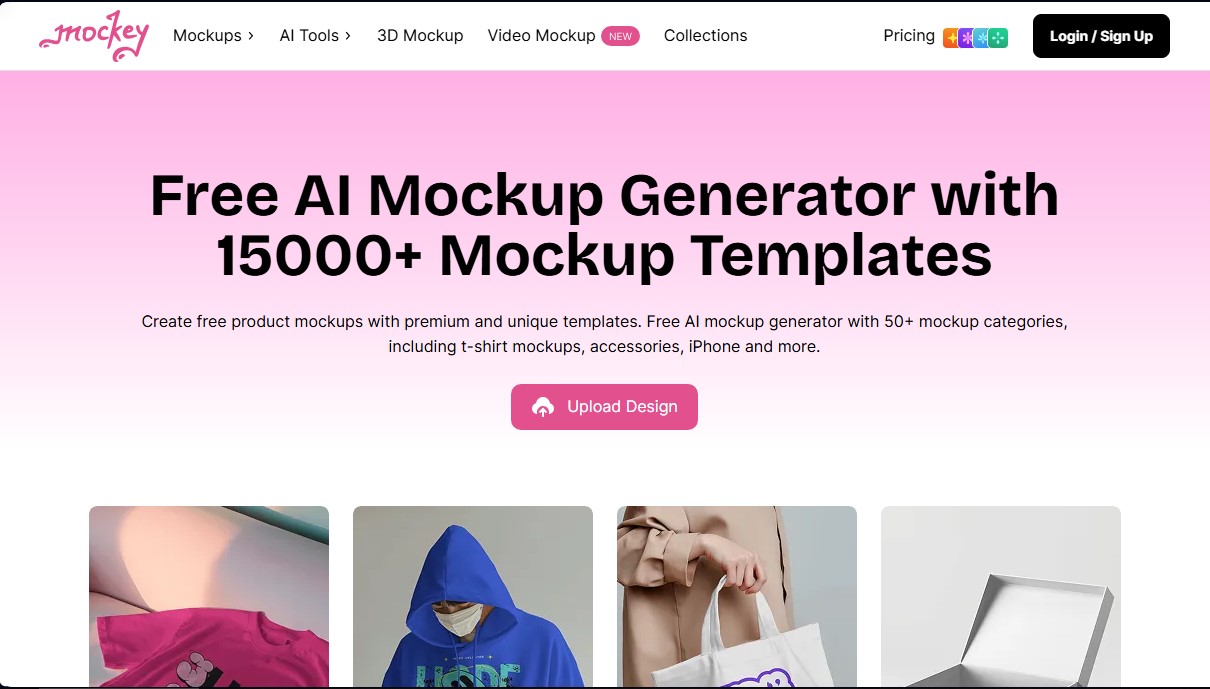
Mockey.ai is an advanced AI mockup generator designed to facilitate the creation of professional and efficient visual product prototypes. This online tool allows designers, e-commerce entrepreneurs, and marketing specialists to transform their flat designs into photorealistic images without needing to master complex graphic design software. With a library exceeding 15,000 mockup templates, the platform covers more than 50 categories, including fashion, tech devices, home goods, and stationery.
The operation of Mockey.ai stands out for its practical and straightforward approach. The process is structured into three key steps: selecting a template from its numerous categories, uploading the design in PNG or JPG format, and customizing it using integrated editing tools. Thanks to its artificial intelligence technology, the system automatically adjusts the design to the object's surface, respecting textures, shadows, and natural perspectives to achieve a professional finish. Additionally, it allows for quick color and background adjustments to align the image with any brand's visual identity.
Among its primary capabilities, several innovative features that go beyond static images stand out:
- 3D Mockup Generator: Allows for the creation of three-dimensional designs in various categories, offering the option to download the result as an image or via MP4 animations.
- Video Mockups: Generates high-quality video clips of approximately 5 seconds for products such as t-shirts, jewelry, or hats, integrating the custom design into real-world environments with moving models and objects.
- Integrated AI Tools: Includes functions to remove backgrounds with AI, apply background blur, and generate virtual photo shoots, optimizing content for ads and social media.
- Print on Demand Specialization: Offers a vast collection of specific templates for print-on-demand businesses, covering everything from hoodies and t-shirts to phone cases and posters.
Mockey.ai positions itself as a versatile solution for both desktop and mobile use, even featuring a dedicated Android app. Its ability to generate high-resolution downloads without watermarks makes it an essential tool for those needing to validate product ideas or create advertising material quickly. By eliminating the need for expensive photo shoots, users can iterate on their designs and test different color variants in seconds, significantly improving productivity within the creative workflow.
Mockey.ai features and use cases
How to use Mockey.ai
Mockey.ai FAQ
What is Mockey.ai and what exactly is it used for?
It is an AI-powered online mockup generator that allows you to easily create free product prototypes for items like t-shirts, accessories, and tech devices.
Do I need to pay to download images from Mockey.ai?
No, the platform offers a free plan that lets you download mockups without watermarks, though paid plans are available for unlimited downloads and higher quality.
What types of products can I find in the Mockey.ai catalog?
You have access to over 15,000 templates across 45 different categories, including apparel, phone cases, posters, business cards, packaging, and home goods.
Can I create animated or video mockups with this tool?
Yes, Mockey.ai includes a 3D mockup generator and video templates where you can apply your design to create realistic, high-quality clips.
Do I need Photoshop skills to use Mockey.ai?
There is no need to know how to use complex design software, as the editor is very intuitive and allows you to adjust your images directly from your browser in just a few clicks.
Is there a Mockey.ai mobile app for Android devices?
Yes, you can download the official app from the Play Store to conveniently create and customize your mockups right from your smartphone.
What image formats are supported for uploading my designs?
The tool supports PNG and JPG files; we recommend using high-resolution images with transparent backgrounds to achieve the best visual results.
How many new mockups are added to the Mockey.ai collection?
The catalog is updated weekly with new designs and modern templates to ensure you always have up-to-date options for your e-commerce or social media projects.
Mockey.ai pricing and plans
Free Plan
Price: Free
- Access to over 5,000 free mockups.
- New templates added weekly.
- Download files in JPG format.
- 3 downloads per day limit (no watermark).
Pro Plan
Price: $9.99 per month (or $68 per year)
- Unlimited high-quality downloads.
- Export files in PNG format.
- Access to PRO mockups and mockup bundles.
- Ability to upload multiple designs simultaneously.
- Access to exclusive backgrounds and ad-free browsing.
Max Plan
Price: $19 per month (or $182 per year)
- Includes all Pro plan features.
- 200 monthly AI credits.
- AI animation tools.
- AI photo generation.
- AI features for background removal and blurring.
Enterprise Plan
Price: See official website
- Custom template creation on demand.
- Tailored solutions for corporate needs.
Mockey.ai Screenshots
Mockey.ai alternatives


AlreadyRan
AlreadyRan brings dozens of AI image, video and audio models into one web studio with a single credit balance and the cost shown before every generation.