
Share
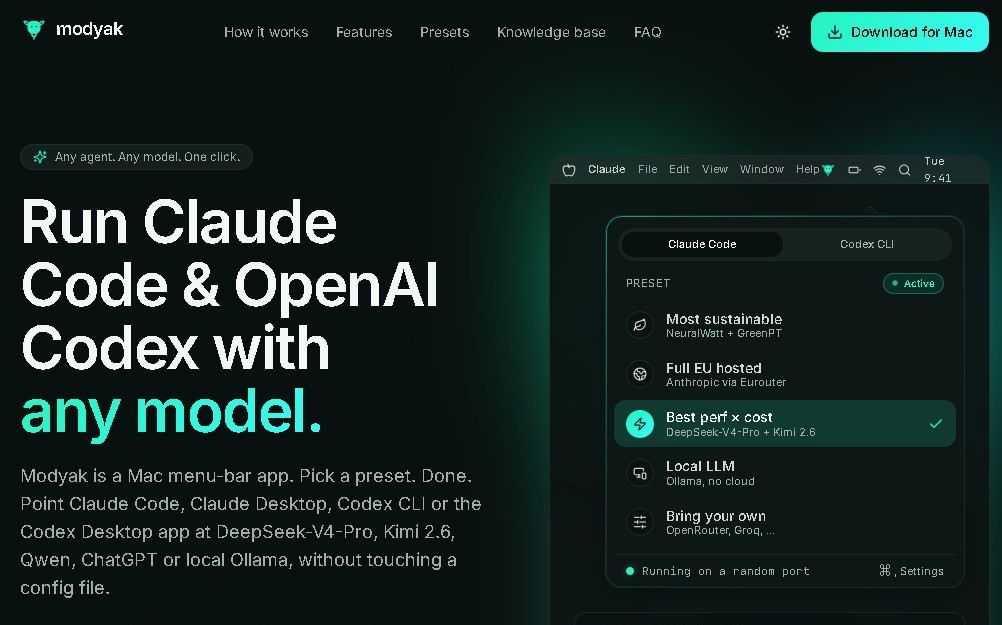
Connect Claude Code and Claude Desktop to any AI model on macOS. Quick and easy setup via presets directly from the system menu bar.
What is Modyak?
Modyak is a lightweight utility designed specifically for macOS users looking to expand the capabilities of Claude Code and Claude Desktop. This application acts as a technical bridge that allows these artificial intelligence tools to run on a variety of different language models, removing the original compatibility restrictions of Anthropic's platforms. Its primary goal is to simplify the workflow for developers and power users who require flexibility without dealing with complex or manual system configurations.
Modyak’s operation stands out for its focus on optimized usability and operational simplicity. The tool resides permanently in the computer's menu bar, ensuring quick and discreet access during any work session. Instead of requiring deep manual adjustments or extensive knowledge of underlying systems, the application offers a selection of presets. Thanks to this structure, users can diversify the range of models on which their Claude tools run without having to manage the technical infrastructure individually.
Key capabilities and functional benefits of this AI tool include the following:
- Automatic system compatibility, ensuring seamless and error-free integration within the Apple ecosystem.
- Greater platform flexibility, allowing Claude Code and Claude Desktop to operate in environments for which they were not initially configured.
- Improved operational functionality, optimizing the execution of programming tasks and natural language processing directly from the desktop.
- Simplified interface that eliminates the need for complex installations or tedious network configurations, focusing the experience on choosing ready-to-use presets.
This application is especially useful for technical profiles who use Claude Code for software development and want to quickly test code behavior across different AI models. By automating the link between the desktop application and target models, Modyak removes technical barriers to entry, providing a smooth and professional user experience on the computer. Although its use is limited exclusively to Claude platforms and requires a separate installation, its ability to act as an efficient connector makes it a valuable add-on for maximizing AI performance in the local macOS environment.
Modyak features and use cases
How to use Modyak
Modyak FAQ
What is Modyak and what exactly does it do?
Modyak is a lightweight macOS application that acts as a bridge, allowing Claude Code and Claude Desktop to run on any AI model.
Is there a fee to use Modyak?
No, the tool is completely free for all users.
Which operating systems can I install the application on?
Modyak is designed exclusively for macOS and is not currently compatible with other operating systems.
Do I need advanced technical skills to set up Modyak?
No extensive technical knowledge is required, as the app provides presets to avoid complex configurations.
Where is the tool located once it's installed on my Mac?
The app lives in the macOS menu bar, giving you quick and easy access to its features.
What are the main benefits Modyak offers Claude Code users?
It allows you to effortlessly expand the range of compatible models and improves overall usability through a streamlined experience.
Does Modyak allow for deep customization of its features?
No, the tool lacks advanced customization options to prioritize simplicity and ease of use through its predefined settings.
Do I need to install Modyak separately?
Yes, this tool requires a separate installation to function as a link for Claude platforms.
Can I use this app with platforms other than Claude?
No, the tool's functionality is specifically limited to the Claude Code and Claude Desktop platforms.
How does Modyak help improve platform flexibility?
Modyak enables automatic system compatibility with different models without requiring the user to manage the underlying processes.
Modyak pricing and plans
Free Plan: 0 €
- Bridge between Claude Code and Claude Desktop with any AI model.
- Access to curated presets to eliminate complex technical configurations.
- Direct macOS menu bar integration for quick and easy access.
- Automatic system compatibility to diversify model usage.
- Optimized and streamlined user experience for Claude tools.
Modyak Screenshots
Modyak user reviews
Write a review
Checking your session...
Modyak Reviews
Loading reviews...
Modyak alternatives


TriggerFlow
Automate Windows apps without APIs using computer vision and AI. Manage PC fleets, monitor processes, and provide centralized remote control.